XPPen Deco 01 V3 Graphics Tablet
Official Store Deal
Expert Analysis Overview
Precision Unleashed: The XPPen Deco 01 V3 Graphics Tablet
The XPPen Deco 01 V3 Graphics Tablet is a highly responsive digital canvas designed for artists, designers, and educators seeking a seamless transition from traditional to digital creative workflows. This device excels in offering a robust feature set tailored for intricate drawing, painting, sketching, and photo editing, positioning it as a formidable tool in the entry-to-mid-range digital art market.The Art of Responsiveness: Stylus Performance
The core of any graphics tablet lies in its stylus performance. The Deco 01 V3 elevates this with an upgraded, battery-free stylus that boasts an astonishing 16,384 levels of pressure sensitivity. This is not merely a number; it represents a profound leap in digital precision. Older tablets often provide 2048 or 8192 levels, which can feel restrictive. This exponential increase means artists can achieve incredibly nuanced line weights and opacity variations. A light touch will produce a faint, delicate line. Pressing harder will yield a bold, opaque stroke.This granular control translates directly to a more natural and intuitive drawing experience. The subtle shifts in pressure, akin to using a real pencil or brush, are accurately captured, allowing for a broader expressive range. Imagine rendering intricate hair strands or delicate fabric textures. The stylus supports up to 60 degrees of tilt brush effect. This feature is critical for simulating traditional art techniques where the angle of the tool against the surface dictates the stroke's appearance, such as broad shading with a charcoal stick or varied strokes with a calligraphy pen. This tilt recognition allows for dynamic brushwork, enhancing realism and fluidity in digital paintings. The absence of a battery means constant power, eliminating creative interruptions from dead batteries. This focus on an uninterrupted workflow is a significant advantage.
Ergonomics and Workflow: Design and Shortcut Keys
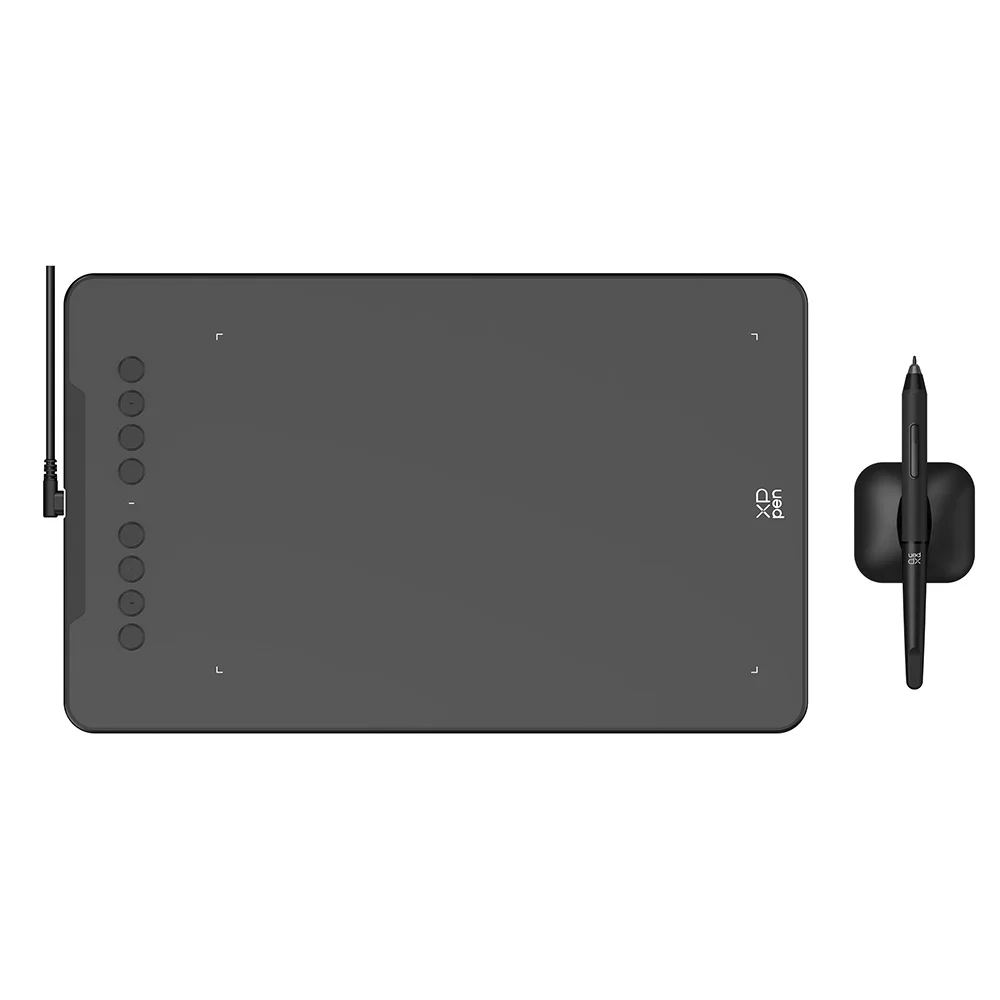
The tablet itself presents a sleek, minimalist design. With dimensions that provide a 10 x 6.25-inch active drawing area, it offers ample space for broad strokes without feeling cumbersome. The device is impressively thin, measuring just 8mm in thickness, which contributes to a comfortable user experience during long creative sessions. Its weight, approximately 570g, suggests a balance between portability and desk stability. This lightweight profile makes it easy to transport between workspaces or to carry for on-the-go creativity.Integrated into the left side of the tablet are 8 efficient shortcut keys. These customizable physical buttons are a boon for productivity. Unlike relying solely on keyboard shortcuts, these dedicated keys allow users to program frequently used functions—such as undo, zoom in/out, brush size adjustment, or specific tool selections—directly onto the tablet. This significantly streamlines the workflow. Muscle memory develops quickly, allowing artists to execute commands without breaking their focus from the screen. This immediate access to tools reduces mouse travel and keyboard interaction, keeping the creative flow uninterrupted. For professionals, this efficiency translates to saved time and reduced mental fatigue over demanding projects.
Versatile Connectivity and Application
The XPPen Deco 01 V3 is engineered for broad compatibility. It supports Windows and Mac operating systems, ensuring seamless integration into most desktop environments. A notable feature is its Android phone compatibility, including support for vertical screen mode. This expands its utility dramatically, allowing artists to sketch or edit on their mobile devices. To leverage this, the Android device must support the OTG (On-The-Go) function. This means artists are not confined to a desktop setup; they can create anywhere, anytime, using their smartphone or tablet as a display.This versatility makes the Deco 01 V3 suitable for a variety of applications beyond traditional digital art. It is an effective tool for design, education, painting, sketching, and photo editing. In an educational setting, it enables teachers to annotate documents, solve math problems, or illustrate concepts dynamically during online classes. For designers, it offers precision for intricate vector work or mock-up creation. Photographers can use it for precise retouching and masking. The ability to connect to various devices and adapt to different orientations provides a new level of flexibility. This is a significant upgrade from tablets that are strictly tethered to desktop operating systems, offering a truly mobile creative solution.
Build Quality and Included Accessories
The tablet's construction appears durable, with a matte finish that provides a good tactile surface for the stylus. The overall build suggests a device designed to withstand regular use. The package includes a comprehensive set of accessories, ensuring users have everything needed to get started and maintain their device.Included are the drawing tablet itself, a protective film for the active area, a stylus stand for convenient storage, the battery-free stylus, 8 replacement nibs to ensure longevity of use, an anti-fouling drawing glove for smoother hand movement across the tablet surface, a USB cable for connectivity, and a USB to USB-C adapter for broader device compatibility. A quick guide is also included to assist with initial setup. The inclusion of multiple replacement nibs is particularly valuable, as nibs are consumable parts that wear down with use. This thoughtful inclusion extends the usable life of the stylus and prevents immediate additional purchases. The anti-fouling glove is a subtle but impactful addition, preventing smudges and reducing friction, leading to a smoother drawing experience. This comprehensive accessory bundle enhances the overall value proposition, reducing the need for separate purchases.
Value Proposition and Long-Term Investment
The XPPen Deco 01 V3, priced at approximately $38.57 USD, represents exceptional value in the graphics tablet market. While some might focus on the initial cost, the long-term return on investment is evident. Its durability, coupled with the battery-free stylus and included replacement nibs, minimizes ongoing maintenance costs. The enhanced pressure sensitivity and tilt function mean artists can achieve professional-grade results without investing in significantly more expensive professional tablets. This tablet is an investment in creative efficiency and expanded capabilities. It allows for a more fluid workflow, reducing the time spent on repetitive actions and increasing the focus on artistic expression.Imagine the seamless flow as your digital strokes perfectly mirror your hand movements, the frustration of a lagging pen a distant memory. Picture yourself effortlessly transitioning between detailed illustrations on your desktop and quick sketches on your Android phone during a commute, all with the same reliable tool. This tablet empowers artists to refine their craft and explore new digital horizons without technical limitations impeding their vision.