URAO 10-Inch Android Tablet with Creative Suite
Official Store Deal
Expert Analysis Overview
The URAO 10-Inch Android Tablet is an accessible entry point into digital productivity and media consumption, specifically designed for users seeking a feature-rich device without a premium price tag. This tablet positions itself as a versatile tool, bundling essential accessories that often require separate purchases, making it a compelling option for students, casual artists, and entertainment enthusiasts. Its core strength lies in its comprehensive package, offering immediate utility right out of the box.
The URAO tablet features a 10.1-inch HD touchscreen with an 800x1280 resolution and a 16:10 aspect ratio. This display size provides ample screen real estate for drawing, note-taking, and media viewing. The resolution, while termed 'HD', is modest for a 10.1-inch panel, meaning individual pixels may be discernible upon close inspection. This is a common trade-off in budget-friendly Tablets, prioritizing screen size and touch responsiveness over pixel density.
For digital artists, the interaction with the screen is paramount. The included stylus facilitates direct input, transforming the tablet into a drawing pad. While the exact pressure sensitivity levels are not specified, typical budget styluses offer basic tap and drag functionality rather than fine pressure detection. This makes the tablet suitable for sketching, diagramming, or simple coloring tasks, but less ideal for professional-grade digital painting that demands nuanced line weight control. Palm rejection, a critical feature for comfortable drawing, is often software-dependent on such devices; users may need to adjust their drawing posture or rely on app-specific settings to minimize accidental touches. Parallax, the perceived gap between the stylus tip and the on-screen line, is also a factor. Without full screen lamination, a slight parallax effect is expected, which can feel less intuitive than premium laminated displays. It's a small hurdle.
Compared to tablets with higher resolution displays and active stylus support, the URAO offers a more fundamental drawing experience. However, for those transitioning from paper to digital art or needing a device for quick visual notes, its large screen and included stylus provide a functional starting point. The multi-touch capability ensures fluid navigation and gesture control across the Android interface.
Underpinning the URAO tablet's operations is an octa-core CPU clocked at 2.0GHz. This processor configuration delivers reliable performance for everyday tasks, including web browsing, email, streaming video, and running light to moderately demanding applications. The inclusion of an octa-core architecture ensures that multiple processes can run concurrently without significant slowdowns, contributing to a smoother user experience. Apps open quickly.
The tablet is equipped with 24GB of RAM, a figure achieved through a combination of 4GB physical RAM and an additional 20GB of virtual RAM expansion. This dynamic memory allocation allows the system to temporarily use a portion of the 128GB Internal Storage as RAM when needed, effectively boosting multitasking capabilities. For artists, this means being able to switch between a drawing app, a reference image browser, and a communication tool with less interruption. It handles multiple apps.
Storage is generous, with 128GB of internal ROM for apps, photos, and documents. Furthermore, the tablet supports 1TB of external storage expansion via a microSD card. This massive expansion potential is a significant advantage, particularly for digital artists who often work with large project files, high-resolution images, and numerous creative assets. Unlike tablets with fixed storage, the URAO allows users to grow their digital library without constant worry about running out of space, ensuring creative projects are never constrained by storage limitations.
Connectivity is a strong suit, featuring WiFi 6 (2.4G/5G) and Bluetooth 5.4. WiFi 6 offers faster and more stable wireless internet connections, crucial for downloading large app updates, streaming high-definition content, or uploading finished artwork to cloud storage. This next-generation Wi-Fi standard also improves network efficiency in crowded environments, making it ideal for use in cafes or shared workspaces. Faster downloads are a reality.
Bluetooth 5.4 provides a robust and energy-efficient wireless connection for peripherals. The included keyboard, mouse, and headphones connect seamlessly, transforming the tablet into a more traditional workstation or an immersive entertainment hub. This allows for precise cursor control for detailed editing, comfortable typing for longer documents, and private audio enjoyment without tangled wires. The 3.5mm headset jack is a welcome addition, offering universal compatibility with wired headphones for latency-free audio monitoring, a preference for many who prioritize audio fidelity or require reliable sound without battery concerns.
Compared to older tablets still relying on WiFi 5 or older Bluetooth standards, the URAO's modern connectivity ensures a future-proof experience. It facilitates rapid data transfer and maintains stable connections, which is vital for uninterrupted creative work and smooth online collaboration. This setup ensures you stay connected.
The URAO tablet maintains a sleek profile, measuring 8.9mm thin and weighing 520g. This relatively lightweight and slim design makes it comfortable to hold for extended periods, whether sketching on a couch or reading in bed. The chassis likely employs a durable plastic construction, common in this price segment, offering a balance of resilience and cost-effectiveness. The matte finish, often seen on budget tablets, provides a secure grip and resists fingerprints better than glossy surfaces.
The overall aesthetic is minimalist and functional. The screen-to-body ratio appears decent, with bezels that provide enough space for comfortable handling without accidental screen touches. The physical buttons for power and volume are typically placed on the side, offering tactile feedback for easy operation. This tablet feels good.
Beyond creative endeavors, the URAO tablet excels as a multimedia device. Its Widevine L1 support is a critical feature, enabling high-definition streaming from popular platforms such as YouTube, Hulu, Prime Video, and Netflix. This means users can enjoy their favorite movies and shows in their intended quality, free from the resolution limitations often imposed on devices without L1 certification. Crisp visuals enhance viewing.
Camera capabilities include a 5MP front camera and an 8MP rear camera. The front camera is suitable for video calls, online meetings, or quick selfies, providing clear enough visuals for communication. The rear camera, while not a flagship-level sensor, is adequate for scanning documents, capturing reference photos for art projects, or snapping casual everyday pictures. It's a functional setup for general use, not meant for professional photography but perfectly capable for daily needs.
The tablet runs on Android 15, providing access to the latest features, security updates, and a vast ecosystem of applications from the Google Play Store. Android 15 brings improvements in privacy, performance, and user interface refinements, ensuring a modern and responsive operating environment. The intuitive interface is easy to navigate.
Face Unlock offers a convenient and quick way to access the device, enhancing security without the need for manual password entry. The Eye Care Mode is a thoughtful addition, reducing blue light emissions to alleviate eye strain during prolonged use, particularly beneficial for artists spending hours staring at the screen or for late-night readers. Multi-touch gestures further streamline interaction, making navigation fluid and intuitive.
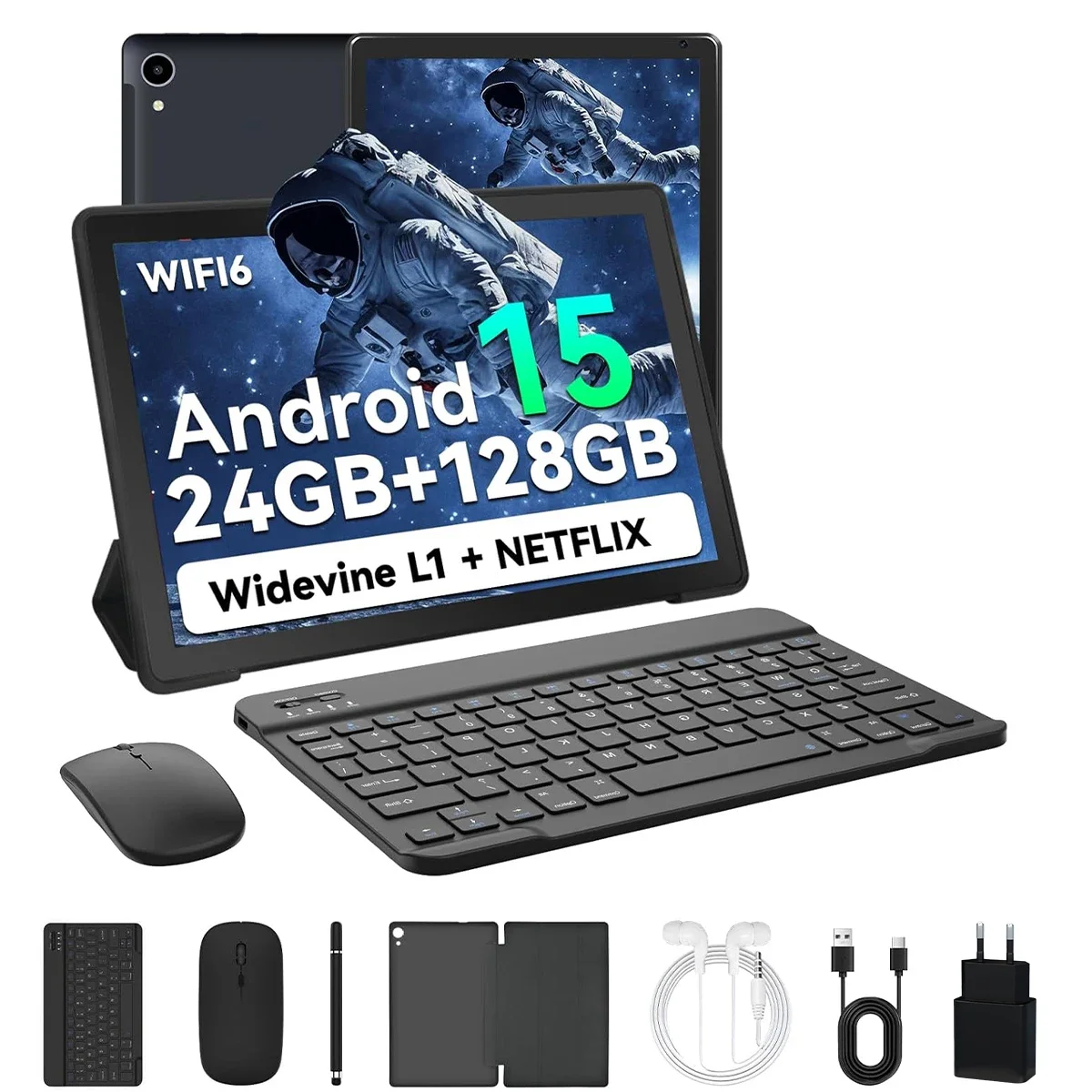
The URAO tablet distinguishes itself by including a stylus, keyboard, mouse, and headphones as part of the package. This 'PC PAD Set' immediately transforms the tablet into a versatile workstation. The keyboard allows for efficient typing, turning the tablet into a lightweight laptop alternative for document creation or email. The mouse provides precise cursor control, invaluable for detailed editing in art applications or navigating complex spreadsheets. The headphones offer private audio, perfect for focused work or immersive entertainment.
This comprehensive accessory bundle eliminates the need for additional purchases, providing significant value. It empowers users to seamlessly switch between touch-based interaction for casual browsing and stylus input for creative tasks, to keyboard and mouse for serious productivity. This integrated approach ensures users have all the tools necessary to maximize the tablet's potential across various use cases.
Imagine effortlessly transitioning from sketching a new design with the stylus, to typing out project notes on the keyboard, then unwinding with a high-definition movie, all on a single, portable device. This tablet is built to empower your daily digital life, providing the flexibility and tools needed to create, learn, and entertain without interruption. It simplifies your tech.
The Digital Canvas: Display and Stylus Interaction
The URAO tablet features a 10.1-inch HD touchscreen with an 800x1280 resolution and a 16:10 aspect ratio. This display size provides ample screen real estate for drawing, note-taking, and media viewing. The resolution, while termed 'HD', is modest for a 10.1-inch panel, meaning individual pixels may be discernible upon close inspection. This is a common trade-off in budget-friendly Tablets, prioritizing screen size and touch responsiveness over pixel density.
For digital artists, the interaction with the screen is paramount. The included stylus facilitates direct input, transforming the tablet into a drawing pad. While the exact pressure sensitivity levels are not specified, typical budget styluses offer basic tap and drag functionality rather than fine pressure detection. This makes the tablet suitable for sketching, diagramming, or simple coloring tasks, but less ideal for professional-grade digital painting that demands nuanced line weight control. Palm rejection, a critical feature for comfortable drawing, is often software-dependent on such devices; users may need to adjust their drawing posture or rely on app-specific settings to minimize accidental touches. Parallax, the perceived gap between the stylus tip and the on-screen line, is also a factor. Without full screen lamination, a slight parallax effect is expected, which can feel less intuitive than premium laminated displays. It's a small hurdle.
Compared to tablets with higher resolution displays and active stylus support, the URAO offers a more fundamental drawing experience. However, for those transitioning from paper to digital art or needing a device for quick visual notes, its large screen and included stylus provide a functional starting point. The multi-touch capability ensures fluid navigation and gesture control across the Android interface.
Core Processing and Storage Capabilities
Underpinning the URAO tablet's operations is an octa-core CPU clocked at 2.0GHz. This processor configuration delivers reliable performance for everyday tasks, including web browsing, email, streaming video, and running light to moderately demanding applications. The inclusion of an octa-core architecture ensures that multiple processes can run concurrently without significant slowdowns, contributing to a smoother user experience. Apps open quickly.
The tablet is equipped with 24GB of RAM, a figure achieved through a combination of 4GB physical RAM and an additional 20GB of virtual RAM expansion. This dynamic memory allocation allows the system to temporarily use a portion of the 128GB Internal Storage as RAM when needed, effectively boosting multitasking capabilities. For artists, this means being able to switch between a drawing app, a reference image browser, and a communication tool with less interruption. It handles multiple apps.
Storage is generous, with 128GB of internal ROM for apps, photos, and documents. Furthermore, the tablet supports 1TB of external storage expansion via a microSD card. This massive expansion potential is a significant advantage, particularly for digital artists who often work with large project files, high-resolution images, and numerous creative assets. Unlike tablets with fixed storage, the URAO allows users to grow their digital library without constant worry about running out of space, ensuring creative projects are never constrained by storage limitations.
Seamless Connectivity for Creative Workflows
Connectivity is a strong suit, featuring WiFi 6 (2.4G/5G) and Bluetooth 5.4. WiFi 6 offers faster and more stable wireless internet connections, crucial for downloading large app updates, streaming high-definition content, or uploading finished artwork to cloud storage. This next-generation Wi-Fi standard also improves network efficiency in crowded environments, making it ideal for use in cafes or shared workspaces. Faster downloads are a reality.
Bluetooth 5.4 provides a robust and energy-efficient wireless connection for peripherals. The included keyboard, mouse, and headphones connect seamlessly, transforming the tablet into a more traditional workstation or an immersive entertainment hub. This allows for precise cursor control for detailed editing, comfortable typing for longer documents, and private audio enjoyment without tangled wires. The 3.5mm headset jack is a welcome addition, offering universal compatibility with wired headphones for latency-free audio monitoring, a preference for many who prioritize audio fidelity or require reliable sound without battery concerns.
Compared to older tablets still relying on WiFi 5 or older Bluetooth standards, the URAO's modern connectivity ensures a future-proof experience. It facilitates rapid data transfer and maintains stable connections, which is vital for uninterrupted creative work and smooth online collaboration. This setup ensures you stay connected.
Ergonomics and Visual Aesthetics
The URAO tablet maintains a sleek profile, measuring 8.9mm thin and weighing 520g. This relatively lightweight and slim design makes it comfortable to hold for extended periods, whether sketching on a couch or reading in bed. The chassis likely employs a durable plastic construction, common in this price segment, offering a balance of resilience and cost-effectiveness. The matte finish, often seen on budget tablets, provides a secure grip and resists fingerprints better than glossy surfaces.
The overall aesthetic is minimalist and functional. The screen-to-body ratio appears decent, with bezels that provide enough space for comfortable handling without accidental screen touches. The physical buttons for power and volume are typically placed on the side, offering tactile feedback for easy operation. This tablet feels good.
Multimedia and Entertainment Prowess
Beyond creative endeavors, the URAO tablet excels as a multimedia device. Its Widevine L1 support is a critical feature, enabling high-definition streaming from popular platforms such as YouTube, Hulu, Prime Video, and Netflix. This means users can enjoy their favorite movies and shows in their intended quality, free from the resolution limitations often imposed on devices without L1 certification. Crisp visuals enhance viewing.
Camera capabilities include a 5MP front camera and an 8MP rear camera. The front camera is suitable for video calls, online meetings, or quick selfies, providing clear enough visuals for communication. The rear camera, while not a flagship-level sensor, is adequate for scanning documents, capturing reference photos for art projects, or snapping casual everyday pictures. It's a functional setup for general use, not meant for professional photography but perfectly capable for daily needs.
The Android 15 Ecosystem and User Enhancements
The tablet runs on Android 15, providing access to the latest features, security updates, and a vast ecosystem of applications from the Google Play Store. Android 15 brings improvements in privacy, performance, and user interface refinements, ensuring a modern and responsive operating environment. The intuitive interface is easy to navigate.
Face Unlock offers a convenient and quick way to access the device, enhancing security without the need for manual password entry. The Eye Care Mode is a thoughtful addition, reducing blue light emissions to alleviate eye strain during prolonged use, particularly beneficial for artists spending hours staring at the screen or for late-night readers. Multi-touch gestures further streamline interaction, making navigation fluid and intuitive.
A Complete Productivity and Creativity Suite
The URAO tablet distinguishes itself by including a stylus, keyboard, mouse, and headphones as part of the package. This 'PC PAD Set' immediately transforms the tablet into a versatile workstation. The keyboard allows for efficient typing, turning the tablet into a lightweight laptop alternative for document creation or email. The mouse provides precise cursor control, invaluable for detailed editing in art applications or navigating complex spreadsheets. The headphones offer private audio, perfect for focused work or immersive entertainment.
This comprehensive accessory bundle eliminates the need for additional purchases, providing significant value. It empowers users to seamlessly switch between touch-based interaction for casual browsing and stylus input for creative tasks, to keyboard and mouse for serious productivity. This integrated approach ensures users have all the tools necessary to maximize the tablet's potential across various use cases.
Imagine effortlessly transitioning from sketching a new design with the stylus, to typing out project notes on the keyboard, then unwinding with a high-definition movie, all on a single, portable device. This tablet is built to empower your daily digital life, providing the flexibility and tools needed to create, learn, and entertain without interruption. It simplifies your tech.