RTL8822CE Dual-Band M.2 Wi-Fi & Bluetooth Card
Official Store Deal
Expert Analysis Overview
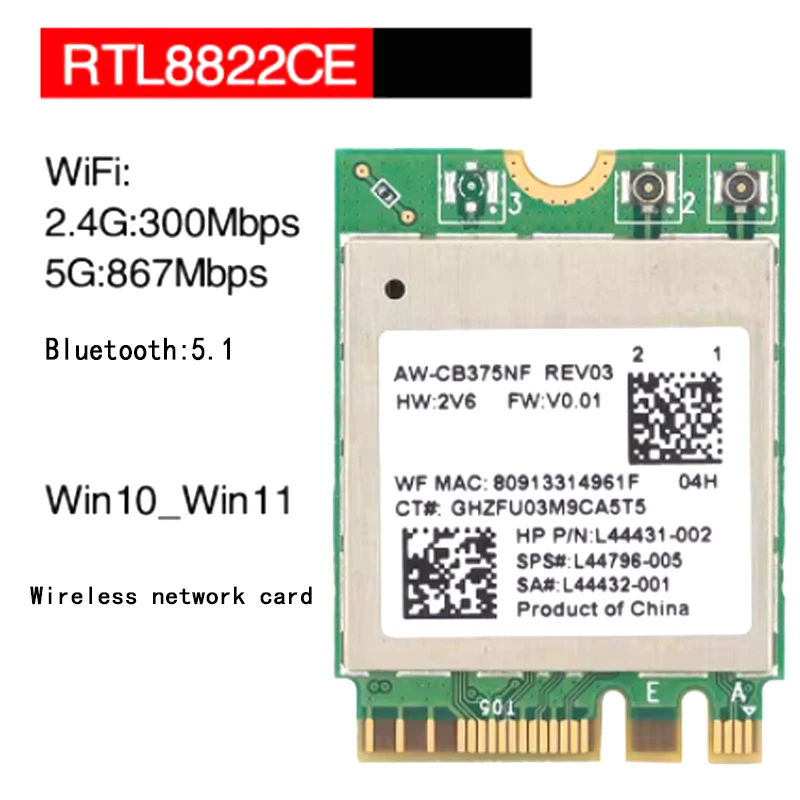
The RTL8822CE Dual-Band M.2 Wi-Fi & Bluetooth Card is a pragmatic internal Networking solution designed for users seeking a significant upgrade to their desktop or laptop's wireless capabilities without external clutter. This compact module integrates both high-speed Wi-Fi and modern Bluetooth connectivity, addressing common frustrations associated with outdated or underperforming built-in wireless adapters. Its design targets a seamless internal integration, offering a cleaner setup compared to USB dongles.
This network card features 802.11ac wireless technology, operating across both the 2.4GHz and 5GHz bands. The 2.4GHz band provides speeds up to 300Mbps, while the 5GHz band delivers a significantly faster 867Mbps. This dual-band capability is crucial for modern network environments, allowing devices to connect to the less congested 5GHz spectrum for demanding tasks like streaming high-definition video or online gaming. The combined theoretical speed of 1200Mbps indicates a substantial bandwidth improvement over older wireless standards.
In practical terms, the dual-band operation means a more stable and efficient wireless experience. The 2.4GHz band, while slower, offers greater range and better wall penetration, making it suitable for general browsing and devices further from the router. The 5GHz band, with its higher speed and lower latency, is ideal for close-range, bandwidth-intensive applications. This flexibility ensures that regardless of the device's location within a home or office, a suitable and performant connection can be established. This card helps eliminate dead zones by intelligently leveraging the appropriate frequency band.
Unlike older, single-band wireless cards that often struggle with congestion and slower speeds, this RTL8822CE unit leverages dual-band 802.11ac technology to ensure a more robust and adaptable connection. Many generic Wi-Fi adapters only support 2.4GHz, leading to slower speeds and more interference in crowded urban environments. The presence of the 5GHz band significantly enhances the user's ability to maintain high-speed data transfers, even when multiple devices are active on the network. It's a noticeable upgrade.
Integrated Bluetooth 5.1 connectivity is another key feature of this card. Bluetooth 5.1 offers several advantages over previous versions, including improved speed, greater range, and enhanced energy efficiency. This is particularly beneficial for connecting a wide array of wireless peripherals, such as headphones, keyboards, mice, and game controllers, with minimal latency and more reliable connections.
For users, this translates to a more fluid and responsive experience with their wireless accessories. Audio streaming to Bluetooth headphones benefits from reduced dropouts and better sound quality, while input devices like keyboards and mice exhibit less lag. The improved range of Bluetooth 5.1 also means peripherals can be used further away from the computer without losing connection, which is convenient for presentations or casual use in larger rooms. It simplifies peripheral management.
Many older Laptops and desktops still rely on Bluetooth 4.0 or even earlier versions, which suffer from shorter ranges, slower data rates, and higher power consumption. Upgrading to Bluetooth 5.1 with this card provides a significant leap in performance and reliability, making it easier to connect multiple devices simultaneously without performance degradation. This capability ensures coverage for all your wireless accessories.
The card utilizes an NGFF M.2 interface, a common standard for internal expansion cards in modern laptops and desktop motherboards. This form factor is compact and designed for easy installation into compatible M.2 slots, typically found on motherboards or dedicated wireless card slots in laptops. Compatibility is broad, supporting Windows 10 and Windows 11 natively.
Installation into an M.2 slot is generally straightforward for those familiar with internal Computer Components. The compact size of the card means it occupies minimal space, making it suitable for slim laptops and small form factor desktop PCs. For users running Linux, the card is also supported, though the product information notes that technical support for Linux may not be readily available, implying a reliance on community drivers or kernel support. This is a common scenario.
Compared to older PCI-E or mini PCI-E wireless cards, the M.2 standard offers a more streamlined and space-efficient solution. The widespread adoption of M.2 in newer systems makes this card a relevant upgrade option for a broad range of devices. While some older systems might require a different interface, the M.2 form factor is the standard for contemporary internal wireless upgrades. It is a modern solution.
Installing an internal network card requires opening the computer chassis, which can be a deterrent for some users. However, for those comfortable with basic hardware installation, the process involves locating an available M.2 slot, inserting the card, and securing it with a small screw. External antennas, if required by the system, would then connect to the card's ports. Driver installation for Windows systems is often automatic or easily managed through device manager.
The physical installation is a one-time process that, once completed, provides a permanent and integrated wireless solution. This avoids the inconvenience of external USB dongles that can be easily lost, damaged, or occupy valuable USB ports. The internal nature also contributes to a cleaner aesthetic and potentially better antenna placement if the laptop's internal antennas are utilized. It ensures a tidy setup.
Many users find the prospect of opening their computer daunting, often opting for simpler, albeit less performant, external solutions. However, the internal M.2 card provides a superior, integrated experience that is worth the initial effort for those seeking optimal performance and a clutter-free workspace. It is a worthwhile investment.
The 802.11ac standard is known for its ability to handle multiple simultaneous connections and deliver higher throughput compared to its predecessors. This is particularly important in households with numerous Wi-Fi devices, where bandwidth can quickly become saturated. The card's ability to operate on the 5GHz band helps mitigate interference from other 2.4GHz devices like microwaves or cordless phones, leading to more consistent performance.
Users will experience faster download and upload speeds, smoother video conferencing, and reduced buffering when streaming content. The higher bandwidth also benefits large file transfers over the local network, making tasks like backing up data to a network-attached storage (NAS) device significantly quicker. This enhances overall productivity and entertainment quality. It handles heavy loads.
In contrast to older 802.11n cards, which often struggle to maintain stable connections and high speeds in congested environments, the RTL8822CE's 802.11ac capabilities offer a substantial performance boost. This means less frustration with slow internet and more reliable connections for all online activities. The improvement is tangible.
This RTL8822CE dual-band M.2 Wi-Fi and Bluetooth card represents a compelling upgrade for users whose existing wireless capabilities are holding them back. Its combination of modern Wi-Fi speeds and Bluetooth 5.1 ensures that both network connectivity and peripheral integration are robust and efficient. The M.2 form factor makes it a suitable internal solution for many contemporary systems, providing a clean and high-performance alternative to external adapters. The card's broad operating system support for Windows 10 and 11 further solidifies its position as a practical choice for a wide user base. This card is a solid choice.
Imagine effortlessly streaming 4K content in one room while simultaneously engaging in a lag-free online gaming session in another, all while your wireless headphones maintain a crystal-clear connection. This card facilitates a truly connected and responsive digital environment, ensuring your home network keeps pace with your demands and eliminates the frustration of dropped signals or sluggish performance.
Unlocking Digital Throughput
This network card features 802.11ac wireless technology, operating across both the 2.4GHz and 5GHz bands. The 2.4GHz band provides speeds up to 300Mbps, while the 5GHz band delivers a significantly faster 867Mbps. This dual-band capability is crucial for modern network environments, allowing devices to connect to the less congested 5GHz spectrum for demanding tasks like streaming high-definition video or online gaming. The combined theoretical speed of 1200Mbps indicates a substantial bandwidth improvement over older wireless standards.
In practical terms, the dual-band operation means a more stable and efficient wireless experience. The 2.4GHz band, while slower, offers greater range and better wall penetration, making it suitable for general browsing and devices further from the router. The 5GHz band, with its higher speed and lower latency, is ideal for close-range, bandwidth-intensive applications. This flexibility ensures that regardless of the device's location within a home or office, a suitable and performant connection can be established. This card helps eliminate dead zones by intelligently leveraging the appropriate frequency band.
Unlike older, single-band wireless cards that often struggle with congestion and slower speeds, this RTL8822CE unit leverages dual-band 802.11ac technology to ensure a more robust and adaptable connection. Many generic Wi-Fi adapters only support 2.4GHz, leading to slower speeds and more interference in crowded urban environments. The presence of the 5GHz band significantly enhances the user's ability to maintain high-speed data transfers, even when multiple devices are active on the network. It's a noticeable upgrade.
The Bluetooth Advantage
Integrated Bluetooth 5.1 connectivity is another key feature of this card. Bluetooth 5.1 offers several advantages over previous versions, including improved speed, greater range, and enhanced energy efficiency. This is particularly beneficial for connecting a wide array of wireless peripherals, such as headphones, keyboards, mice, and game controllers, with minimal latency and more reliable connections.
For users, this translates to a more fluid and responsive experience with their wireless accessories. Audio streaming to Bluetooth headphones benefits from reduced dropouts and better sound quality, while input devices like keyboards and mice exhibit less lag. The improved range of Bluetooth 5.1 also means peripherals can be used further away from the computer without losing connection, which is convenient for presentations or casual use in larger rooms. It simplifies peripheral management.
Many older Laptops and desktops still rely on Bluetooth 4.0 or even earlier versions, which suffer from shorter ranges, slower data rates, and higher power consumption. Upgrading to Bluetooth 5.1 with this card provides a significant leap in performance and reliability, making it easier to connect multiple devices simultaneously without performance degradation. This capability ensures coverage for all your wireless accessories.
Bridging System Divides
The card utilizes an NGFF M.2 interface, a common standard for internal expansion cards in modern laptops and desktop motherboards. This form factor is compact and designed for easy installation into compatible M.2 slots, typically found on motherboards or dedicated wireless card slots in laptops. Compatibility is broad, supporting Windows 10 and Windows 11 natively.
Installation into an M.2 slot is generally straightforward for those familiar with internal Computer Components. The compact size of the card means it occupies minimal space, making it suitable for slim laptops and small form factor desktop PCs. For users running Linux, the card is also supported, though the product information notes that technical support for Linux may not be readily available, implying a reliance on community drivers or kernel support. This is a common scenario.
Compared to older PCI-E or mini PCI-E wireless cards, the M.2 standard offers a more streamlined and space-efficient solution. The widespread adoption of M.2 in newer systems makes this card a relevant upgrade option for a broad range of devices. While some older systems might require a different interface, the M.2 form factor is the standard for contemporary internal wireless upgrades. It is a modern solution.
The Installation Journey
Installing an internal network card requires opening the computer chassis, which can be a deterrent for some users. However, for those comfortable with basic hardware installation, the process involves locating an available M.2 slot, inserting the card, and securing it with a small screw. External antennas, if required by the system, would then connect to the card's ports. Driver installation for Windows systems is often automatic or easily managed through device manager.
The physical installation is a one-time process that, once completed, provides a permanent and integrated wireless solution. This avoids the inconvenience of external USB dongles that can be easily lost, damaged, or occupy valuable USB ports. The internal nature also contributes to a cleaner aesthetic and potentially better antenna placement if the laptop's internal antennas are utilized. It ensures a tidy setup.
Many users find the prospect of opening their computer daunting, often opting for simpler, albeit less performant, external solutions. However, the internal M.2 card provides a superior, integrated experience that is worth the initial effort for those seeking optimal performance and a clutter-free workspace. It is a worthwhile investment.
Performance Under Pressure
The 802.11ac standard is known for its ability to handle multiple simultaneous connections and deliver higher throughput compared to its predecessors. This is particularly important in households with numerous Wi-Fi devices, where bandwidth can quickly become saturated. The card's ability to operate on the 5GHz band helps mitigate interference from other 2.4GHz devices like microwaves or cordless phones, leading to more consistent performance.
Users will experience faster download and upload speeds, smoother video conferencing, and reduced buffering when streaming content. The higher bandwidth also benefits large file transfers over the local network, making tasks like backing up data to a network-attached storage (NAS) device significantly quicker. This enhances overall productivity and entertainment quality. It handles heavy loads.
In contrast to older 802.11n cards, which often struggle to maintain stable connections and high speeds in congested environments, the RTL8822CE's 802.11ac capabilities offer a substantial performance boost. This means less frustration with slow internet and more reliable connections for all online activities. The improvement is tangible.
A Worthwhile Upgrade
This RTL8822CE dual-band M.2 Wi-Fi and Bluetooth card represents a compelling upgrade for users whose existing wireless capabilities are holding them back. Its combination of modern Wi-Fi speeds and Bluetooth 5.1 ensures that both network connectivity and peripheral integration are robust and efficient. The M.2 form factor makes it a suitable internal solution for many contemporary systems, providing a clean and high-performance alternative to external adapters. The card's broad operating system support for Windows 10 and 11 further solidifies its position as a practical choice for a wide user base. This card is a solid choice.
Imagine effortlessly streaming 4K content in one room while simultaneously engaging in a lag-free online gaming session in another, all while your wireless headphones maintain a crystal-clear connection. This card facilitates a truly connected and responsive digital environment, ensuring your home network keeps pace with your demands and eliminates the frustration of dropped signals or sluggish performance.