PIX-LINK UE01 300Mbps USB Wireless Network Adapter
Official Store Deal
Expert Analysis Overview
The PIX-LINK UE01 300Mbps USB Wireless Network Adapter is a compact, multi-functional networking peripheral engineered for extending wireless coverage and providing wired connectivity to devices lacking integrated Wi-Fi capabilities. This device targets users requiring a flexible, USB-powered solution for enhancing network access in various home entertainment and computing environments. Its design prioritizes ease of deployment and adaptability, making it a pragmatic choice for addressing common connectivity bottlenecks without extensive infrastructure modifications.
This network adapter integrates a USB 2.0 interface for power and, in some configurations, data, alongside an RJ45 Ethernet port for physical layer connectivity. The core functionality revolves around its ability to operate in multiple network modes: Wi-Fi Repeater, Access Point (AP) Mode, and a dedicated TV Network Adapter mode. These operational paradigms allow the UE01 to serve diverse roles within a home network architecture, from extending an existing wireless signal to providing a wired connection to an otherwise wireless-only device.
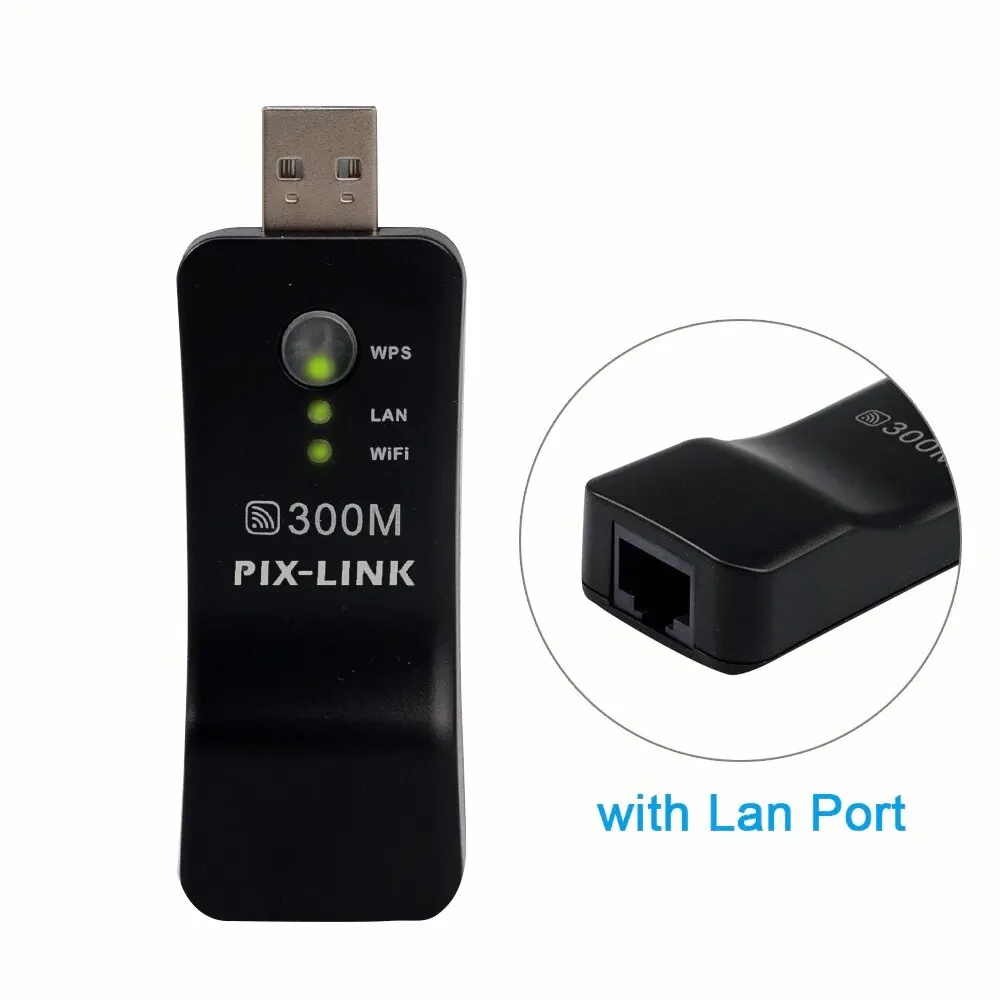
The visible components include a WPS button, which facilitates rapid, secure pairing with compatible routers, and a series of LED indicators for WPS, LAN, and Wi-Fi status. These indicators provide immediate visual feedback on the device's operational state and connectivity status, which is crucial for initial setup and ongoing diagnostics. The compact, dongle-like form factor suggests a design optimized for minimal physical footprint, allowing for discreet integration into various setups.
Unlike traditional standalone repeaters that often require a dedicated power outlet, the UE01's USB power delivery mechanism offers significant flexibility. This design choice enables it to draw power directly from a television's USB port, a computer, a power strip with USB outlets, or even a portable power bank. This eliminates the need for an additional power brick and simplifies cable management, a common pain point in home entertainment centers. The absence of a bulky power adapter streamlines deployment, particularly in scenarios where power outlets are scarce or inconveniently located.
Rated at 300Mbps, the UE01 operates within the IEEE 802.11n standard, which defines wireless local area networks (WLANs) operating in the 2.4 GHz frequency band. This specification, while not leveraging the latest Wi-Fi 6 or Wi-Fi 6E advancements, remains a widely adopted standard for mainstream internet usage and local network traffic. A 300Mbps theoretical maximum throughput is sufficient for standard web browsing, email, and streaming high-definition (HD) video content, though it may present a bottleneck for ultra-high-definition (4K) streaming or large file transfers across the local network.
The device supports a range of security protocols, including WEP, WPA, WPA-PSK, and WPA2-PSK. WPA2-PSK remains the industry standard for robust wireless encryption in consumer-grade networks, offering a strong defense against unauthorized access. The inclusion of WEP, while largely deprecated due to security vulnerabilities, ensures backward compatibility with older network infrastructures. Network administrators should prioritize WPA2-PSK for optimal security posture.
In a repeater configuration, the UE01 captures an existing Wi-Fi signal and re-broadcasts it, effectively extending the coverage area. This mode is particularly useful for eliminating dead zones in larger homes or offices. The inherent limitation of repeater mode is a potential halving of bandwidth, as the device must simultaneously receive and transmit data on the same channel. For optimal performance, strategic placement is critical, ideally midway between the primary router and the desired coverage area.
The integrated LAN port is a critical differentiator for the UE01. This Ethernet port allows devices that typically lack Wi-Fi capabilities, such as older smart TVs, gaming consoles (e.g., PlayStation 4), or desktop PCs, to connect to the wireless network via a physical cable. This provides a more stable and often faster connection than Wi-Fi, particularly in environments with significant wireless interference. The physical connection mitigates latency and packet loss, which are crucial factors for online gaming and real-time media streaming.
When operating in AP Mode, the UE01 can transform a wired internet connection into a private wireless hotspot. This is beneficial in scenarios where only a wired Ethernet drop is available, such as in hotel rooms or conference settings, allowing multiple wireless devices to connect. The device essentially acts as a miniature router, broadcasting its own SSID and providing internet access to connected clients. This mode requires the UE01 to be connected to an active Ethernet source, such as a modem or a router's LAN port.
The TV Network Adapter mode is a specialized application of its wired connectivity. Many smart TVs, while offering a rich feature set, often come with older or less performant Wi-Fi modules. By connecting the UE01 to the TV's USB port for power and its Ethernet port for data, the TV gains a more reliable and potentially faster network connection. This setup bypasses the TV's internal Wi-Fi, offloading the wireless communication to the UE01, which can be positioned for better signal reception.
The reliance on USB power is a significant design advantage. This universal power standard means the UE01 can be powered by virtually any device with a USB port capable of supplying sufficient current. This includes modern televisions, desktop computers, laptops, USB wall chargers, and portable power banks. This flexibility simplifies deployment, as users do not need to locate a dedicated power outlet for the device, making it ideal for travel or temporary setups. Power consumption is minimal.
Consider a scenario where a smart TV is located far from the main router, resulting in intermittent Wi-Fi connectivity. Instead of running a long Ethernet cable or investing in a more complex mesh system, the UE01 can be powered by the TV's USB port, placed strategically for optimal Wi-Fi reception, and then connected to the TV via a short Ethernet cable. This provides a robust wired connection to the TV while leveraging the UE01's wireless capabilities to bridge the distance to the main router.
This contrasts sharply with many traditional network extenders that require a bulky wall wart power adapter, often occupying an entire power socket. The UE01's integrated USB plug minimizes clutter and enhances portability. Its small size allows it to be easily tucked away behind a TV or desk, maintaining a clean aesthetic. This form factor is a key selling point for users prioritizing minimalist setups.
While the UE01 supports standard encryption protocols, network administrators should always configure the device with the strongest available security, which is typically WPA2-PSK. The WPS (Wi-Fi Protected Setup) button offers a convenient method for quick setup, but it is generally recommended to disable WPS after initial configuration or to use a strong, complex passphrase for manual setup, as WPS has known security vulnerabilities. Regular firmware updates, if available, are crucial for maintaining security and performance, though the availability of such updates for a device in this category may vary.
For advanced users, the ability to customize firmware settings, potentially through third-party options like OpenWRT, is a common desire in networking hardware. However, devices in this price and form factor category typically feature proprietary, simplified firmware designed for ease of use rather than extensive customization. Expect a straightforward web-based interface for basic configuration, such as changing the SSID, password, and operating mode. Deep-level traffic management or VLAN support is unlikely.
Effective network management with the UE01 involves understanding its limitations as a 2.4 GHz 802.11n device. In congested wireless environments, performance may degrade due to interference from other 2.4 GHz devices (e.g., microwaves, Bluetooth devices, cordless phones). For optimal performance, consider channel selection and minimizing physical obstructions. The device's primary utility lies in extending basic connectivity rather than serving as a high-throughput backbone for demanding enterprise-grade applications.
The PIX-LINK UE01 positions itself as a cost-effective solution for common home networking challenges. Its multi-mode functionality and flexible power options offer significant utility for its price point. For users struggling with Wi-Fi dead zones, or those with older devices requiring a wired connection to a wireless network, this adapter provides a pragmatic and accessible remedy. The device's simplicity of operation makes it suitable for users with varying levels of technical expertise.
This device is not intended for building a robust, enterprise-grade network at home, nor does it offer advanced traffic management or extensive firmware customization. Its strength lies in its ability to provide basic, reliable connectivity extension and bridging. The 300Mbps throughput is adequate for most consumer applications, but power users or those with gigabit internet connections may find it to be a bottleneck for their primary network needs. It serves as an excellent secondary or supplementary networking tool.
Compared to more expensive mesh Wi-Fi systems or dedicated powerline adapters, the UE01 offers a significantly lower barrier to entry. Its compact size and USB power make it highly portable, allowing users to easily move it between different locations or take it on trips. This flexibility adds considerable value, especially for individuals who frequently encounter varying network conditions in different environments. It is a practical tool for enhancing existing network infrastructure without a major investment.
Imagine seamless streaming on your smart TV, even in rooms previously plagued by weak Wi-Fi signals. Picture your gaming console enjoying a stable, low-latency wired connection without the hassle of running long Ethernet cables across your living space. Envision the freedom of creating a personal Wi-Fi hotspot from any wired connection, empowering all your portable devices. This adapter simplifies connectivity, transforming frustrating network limitations into reliable digital experiences across your home entertainment and computing setup.
Architectural Overview and Operational Modalities
This network adapter integrates a USB 2.0 interface for power and, in some configurations, data, alongside an RJ45 Ethernet port for physical layer connectivity. The core functionality revolves around its ability to operate in multiple network modes: Wi-Fi Repeater, Access Point (AP) Mode, and a dedicated TV Network Adapter mode. These operational paradigms allow the UE01 to serve diverse roles within a home network architecture, from extending an existing wireless signal to providing a wired connection to an otherwise wireless-only device.
The visible components include a WPS button, which facilitates rapid, secure pairing with compatible routers, and a series of LED indicators for WPS, LAN, and Wi-Fi status. These indicators provide immediate visual feedback on the device's operational state and connectivity status, which is crucial for initial setup and ongoing diagnostics. The compact, dongle-like form factor suggests a design optimized for minimal physical footprint, allowing for discreet integration into various setups.
Unlike traditional standalone repeaters that often require a dedicated power outlet, the UE01's USB power delivery mechanism offers significant flexibility. This design choice enables it to draw power directly from a television's USB port, a computer, a power strip with USB outlets, or even a portable power bank. This eliminates the need for an additional power brick and simplifies cable management, a common pain point in home entertainment centers. The absence of a bulky power adapter streamlines deployment, particularly in scenarios where power outlets are scarce or inconveniently located.
Throughput and Wireless Protocol Adherence
Rated at 300Mbps, the UE01 operates within the IEEE 802.11n standard, which defines wireless local area networks (WLANs) operating in the 2.4 GHz frequency band. This specification, while not leveraging the latest Wi-Fi 6 or Wi-Fi 6E advancements, remains a widely adopted standard for mainstream internet usage and local network traffic. A 300Mbps theoretical maximum throughput is sufficient for standard web browsing, email, and streaming high-definition (HD) video content, though it may present a bottleneck for ultra-high-definition (4K) streaming or large file transfers across the local network.
The device supports a range of security protocols, including WEP, WPA, WPA-PSK, and WPA2-PSK. WPA2-PSK remains the industry standard for robust wireless encryption in consumer-grade networks, offering a strong defense against unauthorized access. The inclusion of WEP, while largely deprecated due to security vulnerabilities, ensures backward compatibility with older network infrastructures. Network administrators should prioritize WPA2-PSK for optimal security posture.
In a repeater configuration, the UE01 captures an existing Wi-Fi signal and re-broadcasts it, effectively extending the coverage area. This mode is particularly useful for eliminating dead zones in larger homes or offices. The inherent limitation of repeater mode is a potential halving of bandwidth, as the device must simultaneously receive and transmit data on the same channel. For optimal performance, strategic placement is critical, ideally midway between the primary router and the desired coverage area.
Connectivity and Integration Capabilities
The integrated LAN port is a critical differentiator for the UE01. This Ethernet port allows devices that typically lack Wi-Fi capabilities, such as older smart TVs, gaming consoles (e.g., PlayStation 4), or desktop PCs, to connect to the wireless network via a physical cable. This provides a more stable and often faster connection than Wi-Fi, particularly in environments with significant wireless interference. The physical connection mitigates latency and packet loss, which are crucial factors for online gaming and real-time media streaming.
When operating in AP Mode, the UE01 can transform a wired internet connection into a private wireless hotspot. This is beneficial in scenarios where only a wired Ethernet drop is available, such as in hotel rooms or conference settings, allowing multiple wireless devices to connect. The device essentially acts as a miniature router, broadcasting its own SSID and providing internet access to connected clients. This mode requires the UE01 to be connected to an active Ethernet source, such as a modem or a router's LAN port.
The TV Network Adapter mode is a specialized application of its wired connectivity. Many smart TVs, while offering a rich feature set, often come with older or less performant Wi-Fi modules. By connecting the UE01 to the TV's USB port for power and its Ethernet port for data, the TV gains a more reliable and potentially faster network connection. This setup bypasses the TV's internal Wi-Fi, offloading the wireless communication to the UE01, which can be positioned for better signal reception.
Power Management and Deployment Flexibility
The reliance on USB power is a significant design advantage. This universal power standard means the UE01 can be powered by virtually any device with a USB port capable of supplying sufficient current. This includes modern televisions, desktop computers, laptops, USB wall chargers, and portable power banks. This flexibility simplifies deployment, as users do not need to locate a dedicated power outlet for the device, making it ideal for travel or temporary setups. Power consumption is minimal.
Consider a scenario where a smart TV is located far from the main router, resulting in intermittent Wi-Fi connectivity. Instead of running a long Ethernet cable or investing in a more complex mesh system, the UE01 can be powered by the TV's USB port, placed strategically for optimal Wi-Fi reception, and then connected to the TV via a short Ethernet cable. This provides a robust wired connection to the TV while leveraging the UE01's wireless capabilities to bridge the distance to the main router.
This contrasts sharply with many traditional network extenders that require a bulky wall wart power adapter, often occupying an entire power socket. The UE01's integrated USB plug minimizes clutter and enhances portability. Its small size allows it to be easily tucked away behind a TV or desk, maintaining a clean aesthetic. This form factor is a key selling point for users prioritizing minimalist setups.
Security and Configuration Considerations
While the UE01 supports standard encryption protocols, network administrators should always configure the device with the strongest available security, which is typically WPA2-PSK. The WPS (Wi-Fi Protected Setup) button offers a convenient method for quick setup, but it is generally recommended to disable WPS after initial configuration or to use a strong, complex passphrase for manual setup, as WPS has known security vulnerabilities. Regular firmware updates, if available, are crucial for maintaining security and performance, though the availability of such updates for a device in this category may vary.
For advanced users, the ability to customize firmware settings, potentially through third-party options like OpenWRT, is a common desire in networking hardware. However, devices in this price and form factor category typically feature proprietary, simplified firmware designed for ease of use rather than extensive customization. Expect a straightforward web-based interface for basic configuration, such as changing the SSID, password, and operating mode. Deep-level traffic management or VLAN support is unlikely.
Effective network management with the UE01 involves understanding its limitations as a 2.4 GHz 802.11n device. In congested wireless environments, performance may degrade due to interference from other 2.4 GHz devices (e.g., microwaves, Bluetooth devices, cordless phones). For optimal performance, consider channel selection and minimizing physical obstructions. The device's primary utility lies in extending basic connectivity rather than serving as a high-throughput backbone for demanding enterprise-grade applications.
Value Proposition and Target Audience
The PIX-LINK UE01 positions itself as a cost-effective solution for common home networking challenges. Its multi-mode functionality and flexible power options offer significant utility for its price point. For users struggling with Wi-Fi dead zones, or those with older devices requiring a wired connection to a wireless network, this adapter provides a pragmatic and accessible remedy. The device's simplicity of operation makes it suitable for users with varying levels of technical expertise.
This device is not intended for building a robust, enterprise-grade network at home, nor does it offer advanced traffic management or extensive firmware customization. Its strength lies in its ability to provide basic, reliable connectivity extension and bridging. The 300Mbps throughput is adequate for most consumer applications, but power users or those with gigabit internet connections may find it to be a bottleneck for their primary network needs. It serves as an excellent secondary or supplementary networking tool.
Compared to more expensive mesh Wi-Fi systems or dedicated powerline adapters, the UE01 offers a significantly lower barrier to entry. Its compact size and USB power make it highly portable, allowing users to easily move it between different locations or take it on trips. This flexibility adds considerable value, especially for individuals who frequently encounter varying network conditions in different environments. It is a practical tool for enhancing existing network infrastructure without a major investment.
Imagine seamless streaming on your smart TV, even in rooms previously plagued by weak Wi-Fi signals. Picture your gaming console enjoying a stable, low-latency wired connection without the hassle of running long Ethernet cables across your living space. Envision the freedom of creating a personal Wi-Fi hotspot from any wired connection, empowering all your portable devices. This adapter simplifies connectivity, transforming frustrating network limitations into reliable digital experiences across your home entertainment and computing setup.