Makerbase MKS eMMC Adapter V2 with USB 3.0 Reader
Official Store Deal
Expert Analysis Overview
The Makerbase MKS eMMC Adapter V2 is a critical utility tool for 3D printing enthusiasts and system builders, specifically engineered for seamless interaction with eMMC storage modules. This device provides a direct bridge between high-speed eMMC storage often found in embedded systems like the MKS Pi or MKS SKIPR 3D printer control boards, and a standard computer's USB 3.0 port. Its design prioritizes efficient data transfer, a fundamental requirement for flashing operating systems or backing up critical configurations.
Many modern 3D printer mainboards, particularly those designed for advanced control and processing power, are moving away from traditional microSD cards towards embedded MultiMediaCard (eMMC) storage. eMMC offers superior read/write speeds, enhanced reliability, and a more compact footprint compared to its microSD counterpart. However, accessing and managing data on these eMMC modules typically requires specialized hardware. This is where the MKS eMMC Adapter V2 becomes indispensable. It converts the eMMC module's interface into a universally recognized USB 3.0 connection, simplifying tasks that would otherwise be complex or impossible without dedicated hardware.
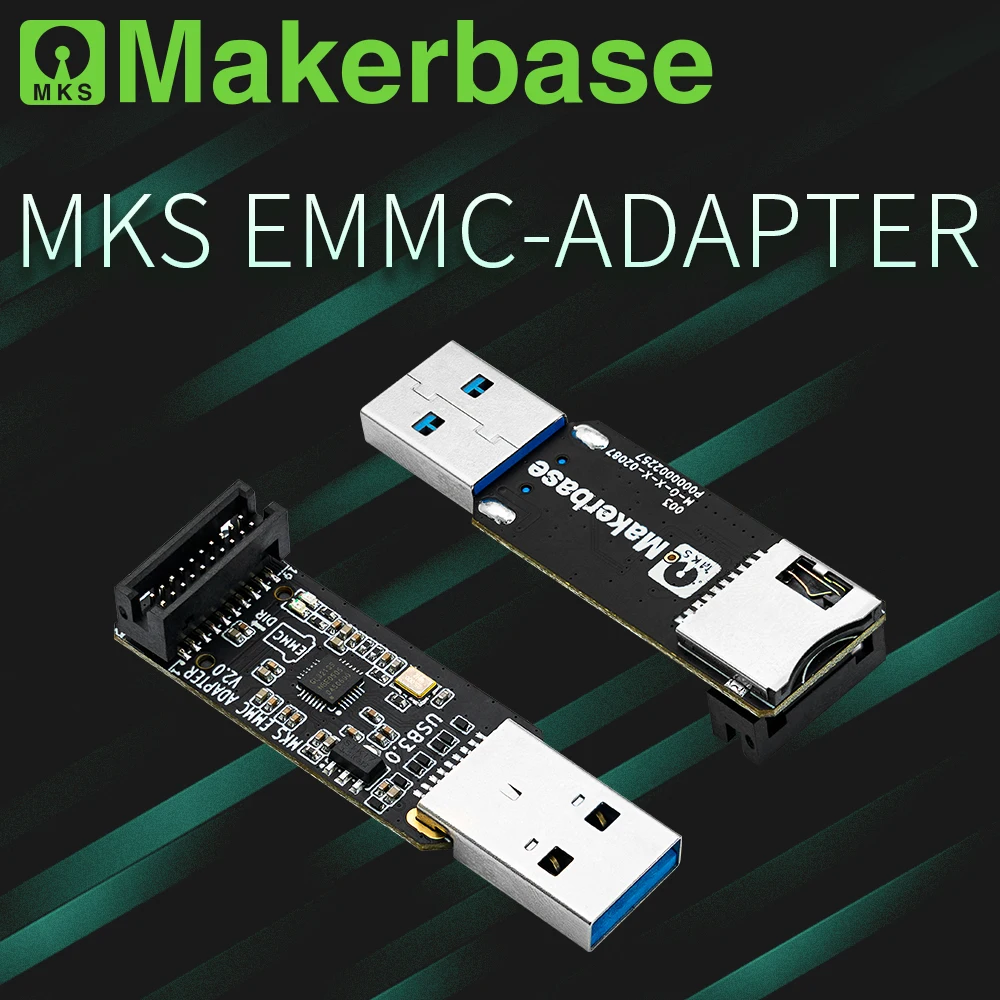
The visible circuitry on the adapter suggests a robust design. A USB 3.0 Type-A connector is prominently featured, indicating compatibility with a wide range of computing devices. The PCB itself is compact. This small form factor makes it easy to handle and transport, fitting conveniently into a toolkit for on-the-go maintenance or system upgrades. The black PCB contrasts with the metallic USB connector, a common aesthetic in maker-focused electronics.
Unlike cumbersome external eMMC programmers that might require additional cables or power sources, this adapter integrates the functionality into a single, flash drive-like form factor. This streamlined approach minimizes clutter on the workbench. It allows a direct plug-and-play experience for users familiar with USB storage devices, making the transition to eMMC management less daunting.
For anyone involved in the 3D printing community, the ability to flash, update, or recover firmware is paramount. Corrupted operating systems or experimental firmware installations can render a 3D printer board inoperable. The MKS eMMC Adapter V2 offers a reliable method for these critical operations. It provides a direct pathway to the eMMC, allowing for low-level access that is often necessary for deep system modifications or recovery procedures.
When a 3D printer's operating system, such as Klipper or Marlin compiled for specific hardware, needs updating, the eMMC adapter facilitates this process. The module can be removed from the mainboard. It is then inserted into the adapter. This allows the user to connect it directly to a computer and write the new image file. This direct approach often bypasses potential complexities or speed limitations associated with over-the-air updates or network-based flashing methods, providing a more reliable and often faster solution for significant system changes.
Consider the common scenario where a 3D printer board's eMMC has become corrupted due to a power outage or an unsuccessful firmware flash. Without a tool like this adapter, recovering the board could be a significant challenge, potentially requiring a replacement. This adapter transforms that frustration into a manageable task, allowing users to re-flash a clean operating system image and bring their board back to life. It empowers users. This capability significantly reduces downtime and the need for costly component replacements, embodying the maker ethos of repair and reuse.
The adapter features a USB 3.0 interface, which is a significant upgrade over older USB 2.0 standards. USB 3.0, also known as SuperSpeed USB, boasts a theoretical maximum transfer rate of 5 Gbit/s (625 MB/s). This speed is crucial when dealing with eMMC modules, which themselves are designed for high-speed data access. Transferring large operating system images or backing up substantial amounts of data from an eMMC module can be accomplished in a fraction of the time compared to slower interfaces.
The visible chip on the PCB, likely a USB-to-eMMC bridge controller, is responsible for managing the communication protocols between the USB host and the eMMC module. The quality of this controller dictates the actual performance and stability of the adapter. Makerbase, a known entity in the 3D printing electronics space, generally provides reliable components. The component layout appears clean. Surface-mount components are visible. This indicates modern manufacturing practices. The traces are well-defined.
Compared to generic SD card readers, this specialized eMMC adapter is designed to handle the specific pinout and electrical characteristics of eMMC modules. This dedicated design ensures optimal signal integrity and power delivery, which are vital for stable and error-free data transfers to and from sensitive eMMC storage. It avoids the compromises inherent in multi-card readers attempting to support many formats with a single, less optimized controller.
The combination of a high-speed eMMC module and a USB 3.0 adapter translates directly into tangible benefits for the user. Flashing a new OS image, which could be several gigabytes in size, can be completed in minutes rather than tens of minutes or even hours. This efficiency is invaluable for developers, testers, and anyone who frequently experiments with different operating systems or firmware versions on their embedded 3D printer boards.
The stability provided by a dedicated eMMC adapter also minimizes the risk of data corruption during critical operations. An unstable connection or insufficient power can lead to incomplete flashes or damaged file systems. By adhering to USB 3.0 specifications and providing a direct, purpose-built connection, the adapter significantly reduces these potential failure points. This ensures that the eMMC module is properly initialized and written to, reducing frustrating errors and repeated attempts.
Imagine a scenario where a large Klipper firmware image needs to be deployed across multiple MKS Pi boards for a printer farm. The speed and reliability offered by this adapter streamline the entire process, allowing for rapid deployment and configuration. This capability vastly improves workflow efficiency compared to methods reliant on slower interfaces or less direct programming approaches. It saves considerable time.
Tools like the MKS eMMC Adapter V2 are fundamental to the open-source spirit of the 3D printing community. They enable users to take full control of their hardware, moving beyond manufacturer-provided firmwares to explore custom builds, optimize performance, and integrate new features. This adapter is an enabler for deeper customization and problem-solving within the ecosystem of MKS Pi and MKS SKIPR users.
Community forums and online guides frequently discuss methods for flashing and recovering eMMC-based systems. Having a reliable adapter simplifies following these guides. It removes a common bottleneck, allowing users to focus on the software aspects rather than struggling with hardware connectivity. This direct access promotes experimentation. Users can confidently test new configurations.
Unlike closed-source or proprietary embedded systems, the MKS Pi and SKIPR boards, along with compatible tools like this eMMC adapter, encourage a vibrant community of tinkerers. This adapter becomes a shared resource for troubleshooting and development. It fosters a collective knowledge base around eMMC management. This collective effort accelerates innovation and problem-solving for everyone involved.
The ability to easily modify the eMMC content extends beyond just flashing a new OS. It enables users to create custom partition layouts, pre-load specific configurations, or even run multiple operating systems on their 3D printer boards. This level of control is appealing to advanced users who require more flexibility than standard installations offer.
For those who like to experiment with different Linux distributions or specialized software packages on their MKS Pi, the adapter simplifies the process of swapping out eMMC modules or re-imaging existing ones. It becomes a test bench companion. This allows for rapid iteration and testing of various software environments without complex on-board flashing procedures. The module is easily accessible. This is a key advantage.
This adapter transforms the eMMC module from a fixed, internal component into a flexible, swappable storage medium. This flexibility is reminiscent of how early computer enthusiasts would swap out hard drives to test different operating systems. For the modern 3D printer tinkerer, it provides a similar level of freedom and experimentation, fostering a deeper understanding and control over their machine's core intelligence.
The Makerbase MKS eMMC Adapter V2 is more than just a simple data transfer tool; it is an investment in the longevity and hackability of your 3D printing ecosystem. As embedded systems continue to evolve and eMMC becomes a more prevalent storage solution, having a reliable adapter ensures future compatibility and continued access to critical board components. This tool secures a user's ability to adapt to new technologies.
The adapter's design supports both the MKS Pi and MKS SKIPR, indicating a commitment to the Makerbase ecosystem. This cross-compatibility means that users invested in Makerbase hardware can rely on a single tool for multiple boards. It simplifies the accessory collection. This reduces the need for multiple specialized adapters, making it a more cost-effective solution in the long run. The adapter is a versatile asset.
Imagine confidently tackling any eMMC-related challenge that arises with your MKS Pi or SKIPR board. Picture the seamless process of flashing a new Klipper image, backing up your perfectly tuned printer configuration, or recovering from a software hiccup, all with the speed and reliability of a dedicated USB 3.0 connection. This adapter equips you with the essential capability to maintain, upgrade, and experiment with your advanced 3D printer electronics, ensuring your projects always move forward with minimal friction and maximum potential. It is a vital tool for deep system control.
The utility of this eMMC adapter extends to development work. Engineers and hobbyists creating custom firmwares or operating system images for ARM-based single-board computers often need a fast and reliable way to write their creations to eMMC modules. The adapter provides this essential link, speeding up the development cycle significantly. It's a key tool for rapid prototyping.
Data forensics or recovery on eMMC modules also benefits from such a device. In situations where data needs to be extracted from a damaged or non-booting eMMC, the direct USB connection allows specialized software to attempt data retrieval. While not its primary design, this capability adds an extra layer of utility for advanced users. It expands its functional scope.
Finally, for educational purposes, the adapter can be used to demonstrate how embedded storage works and how operating systems are loaded onto such devices. It provides a tangible way to interact with a core component of many modern electronic systems, making abstract concepts more concrete for students and learners. This hands-on experience is invaluable for understanding embedded computing principles.
This adapter is a cornerstone for anyone looking to truly master their eMMC-based 3D printer control boards. It offers a blend of speed, reliability, and ease of use that is hard to match with less specialized solutions. The robust build and clear functionality make it an indispensable item for the serious maker. It is a tool that pays for itself in saved time and avoided frustrations, enabling deeper exploration into the world of custom 3D printer electronics. This device simplifies complex tasks.
Bridging the eMMC Divide
Many modern 3D printer mainboards, particularly those designed for advanced control and processing power, are moving away from traditional microSD cards towards embedded MultiMediaCard (eMMC) storage. eMMC offers superior read/write speeds, enhanced reliability, and a more compact footprint compared to its microSD counterpart. However, accessing and managing data on these eMMC modules typically requires specialized hardware. This is where the MKS eMMC Adapter V2 becomes indispensable. It converts the eMMC module's interface into a universally recognized USB 3.0 connection, simplifying tasks that would otherwise be complex or impossible without dedicated hardware.
The visible circuitry on the adapter suggests a robust design. A USB 3.0 Type-A connector is prominently featured, indicating compatibility with a wide range of computing devices. The PCB itself is compact. This small form factor makes it easy to handle and transport, fitting conveniently into a toolkit for on-the-go maintenance or system upgrades. The black PCB contrasts with the metallic USB connector, a common aesthetic in maker-focused electronics.
Unlike cumbersome external eMMC programmers that might require additional cables or power sources, this adapter integrates the functionality into a single, flash drive-like form factor. This streamlined approach minimizes clutter on the workbench. It allows a direct plug-and-play experience for users familiar with USB storage devices, making the transition to eMMC management less daunting.
The Tinker's Gateway to Firmware
For anyone involved in the 3D printing community, the ability to flash, update, or recover firmware is paramount. Corrupted operating systems or experimental firmware installations can render a 3D printer board inoperable. The MKS eMMC Adapter V2 offers a reliable method for these critical operations. It provides a direct pathway to the eMMC, allowing for low-level access that is often necessary for deep system modifications or recovery procedures.
When a 3D printer's operating system, such as Klipper or Marlin compiled for specific hardware, needs updating, the eMMC adapter facilitates this process. The module can be removed from the mainboard. It is then inserted into the adapter. This allows the user to connect it directly to a computer and write the new image file. This direct approach often bypasses potential complexities or speed limitations associated with over-the-air updates or network-based flashing methods, providing a more reliable and often faster solution for significant system changes.
Consider the common scenario where a 3D printer board's eMMC has become corrupted due to a power outage or an unsuccessful firmware flash. Without a tool like this adapter, recovering the board could be a significant challenge, potentially requiring a replacement. This adapter transforms that frustration into a manageable task, allowing users to re-flash a clean operating system image and bring their board back to life. It empowers users. This capability significantly reduces downtime and the need for costly component replacements, embodying the maker ethos of repair and reuse.
Under the Hood: Engineering Insights
The adapter features a USB 3.0 interface, which is a significant upgrade over older USB 2.0 standards. USB 3.0, also known as SuperSpeed USB, boasts a theoretical maximum transfer rate of 5 Gbit/s (625 MB/s). This speed is crucial when dealing with eMMC modules, which themselves are designed for high-speed data access. Transferring large operating system images or backing up substantial amounts of data from an eMMC module can be accomplished in a fraction of the time compared to slower interfaces.
The visible chip on the PCB, likely a USB-to-eMMC bridge controller, is responsible for managing the communication protocols between the USB host and the eMMC module. The quality of this controller dictates the actual performance and stability of the adapter. Makerbase, a known entity in the 3D printing electronics space, generally provides reliable components. The component layout appears clean. Surface-mount components are visible. This indicates modern manufacturing practices. The traces are well-defined.
Compared to generic SD card readers, this specialized eMMC adapter is designed to handle the specific pinout and electrical characteristics of eMMC modules. This dedicated design ensures optimal signal integrity and power delivery, which are vital for stable and error-free data transfers to and from sensitive eMMC storage. It avoids the compromises inherent in multi-card readers attempting to support many formats with a single, less optimized controller.
Speed and Stability for System Builders
The combination of a high-speed eMMC module and a USB 3.0 adapter translates directly into tangible benefits for the user. Flashing a new OS image, which could be several gigabytes in size, can be completed in minutes rather than tens of minutes or even hours. This efficiency is invaluable for developers, testers, and anyone who frequently experiments with different operating systems or firmware versions on their embedded 3D printer boards.
The stability provided by a dedicated eMMC adapter also minimizes the risk of data corruption during critical operations. An unstable connection or insufficient power can lead to incomplete flashes or damaged file systems. By adhering to USB 3.0 specifications and providing a direct, purpose-built connection, the adapter significantly reduces these potential failure points. This ensures that the eMMC module is properly initialized and written to, reducing frustrating errors and repeated attempts.
Imagine a scenario where a large Klipper firmware image needs to be deployed across multiple MKS Pi boards for a printer farm. The speed and reliability offered by this adapter streamline the entire process, allowing for rapid deployment and configuration. This capability vastly improves workflow efficiency compared to methods reliant on slower interfaces or less direct programming approaches. It saves considerable time.
Community's Digital Toolkit
Tools like the MKS eMMC Adapter V2 are fundamental to the open-source spirit of the 3D printing community. They enable users to take full control of their hardware, moving beyond manufacturer-provided firmwares to explore custom builds, optimize performance, and integrate new features. This adapter is an enabler for deeper customization and problem-solving within the ecosystem of MKS Pi and MKS SKIPR users.
Community forums and online guides frequently discuss methods for flashing and recovering eMMC-based systems. Having a reliable adapter simplifies following these guides. It removes a common bottleneck, allowing users to focus on the software aspects rather than struggling with hardware connectivity. This direct access promotes experimentation. Users can confidently test new configurations.
Unlike closed-source or proprietary embedded systems, the MKS Pi and SKIPR boards, along with compatible tools like this eMMC adapter, encourage a vibrant community of tinkerers. This adapter becomes a shared resource for troubleshooting and development. It fosters a collective knowledge base around eMMC management. This collective effort accelerates innovation and problem-solving for everyone involved.
Empowering Custom Configurations
The ability to easily modify the eMMC content extends beyond just flashing a new OS. It enables users to create custom partition layouts, pre-load specific configurations, or even run multiple operating systems on their 3D printer boards. This level of control is appealing to advanced users who require more flexibility than standard installations offer.
For those who like to experiment with different Linux distributions or specialized software packages on their MKS Pi, the adapter simplifies the process of swapping out eMMC modules or re-imaging existing ones. It becomes a test bench companion. This allows for rapid iteration and testing of various software environments without complex on-board flashing procedures. The module is easily accessible. This is a key advantage.
This adapter transforms the eMMC module from a fixed, internal component into a flexible, swappable storage medium. This flexibility is reminiscent of how early computer enthusiasts would swap out hard drives to test different operating systems. For the modern 3D printer tinkerer, it provides a similar level of freedom and experimentation, fostering a deeper understanding and control over their machine's core intelligence.
A Foundation for Future Projects
The Makerbase MKS eMMC Adapter V2 is more than just a simple data transfer tool; it is an investment in the longevity and hackability of your 3D printing ecosystem. As embedded systems continue to evolve and eMMC becomes a more prevalent storage solution, having a reliable adapter ensures future compatibility and continued access to critical board components. This tool secures a user's ability to adapt to new technologies.
The adapter's design supports both the MKS Pi and MKS SKIPR, indicating a commitment to the Makerbase ecosystem. This cross-compatibility means that users invested in Makerbase hardware can rely on a single tool for multiple boards. It simplifies the accessory collection. This reduces the need for multiple specialized adapters, making it a more cost-effective solution in the long run. The adapter is a versatile asset.
Imagine confidently tackling any eMMC-related challenge that arises with your MKS Pi or SKIPR board. Picture the seamless process of flashing a new Klipper image, backing up your perfectly tuned printer configuration, or recovering from a software hiccup, all with the speed and reliability of a dedicated USB 3.0 connection. This adapter equips you with the essential capability to maintain, upgrade, and experiment with your advanced 3D printer electronics, ensuring your projects always move forward with minimal friction and maximum potential. It is a vital tool for deep system control.
Beyond the Basics: Advanced Use Cases
The utility of this eMMC adapter extends to development work. Engineers and hobbyists creating custom firmwares or operating system images for ARM-based single-board computers often need a fast and reliable way to write their creations to eMMC modules. The adapter provides this essential link, speeding up the development cycle significantly. It's a key tool for rapid prototyping.
Data forensics or recovery on eMMC modules also benefits from such a device. In situations where data needs to be extracted from a damaged or non-booting eMMC, the direct USB connection allows specialized software to attempt data retrieval. While not its primary design, this capability adds an extra layer of utility for advanced users. It expands its functional scope.
Finally, for educational purposes, the adapter can be used to demonstrate how embedded storage works and how operating systems are loaded onto such devices. It provides a tangible way to interact with a core component of many modern electronic systems, making abstract concepts more concrete for students and learners. This hands-on experience is invaluable for understanding embedded computing principles.
This adapter is a cornerstone for anyone looking to truly master their eMMC-based 3D printer control boards. It offers a blend of speed, reliability, and ease of use that is hard to match with less specialized solutions. The robust build and clear functionality make it an indispensable item for the serious maker. It is a tool that pays for itself in saved time and avoided frustrations, enabling deeper exploration into the world of custom 3D printer electronics. This device simplifies complex tasks.