M.2 Key A+E to NVMe SSD Adapter Card
Official Store Deal
Expert Analysis Overview
The M.2 Key A+E to NVME SSD Adapter is a critical interface bridge engineered for system builders seeking to repurpose existing M.2 Wi-Fi slots for high-speed NVMe storage. This compact adapter provides a cost-effective solution for expanding storage capabilities in compatible systems, transforming an often underutilized A+E Key slot into a robust M-Key interface. It is a smart way to maximize motherboard resources.
Many modern motherboards, particularly in smaller form factor PCs or laptops, feature M.2 A+E Key slots primarily intended for Wi-Fi and Bluetooth modules. These slots often sit idle if a user prefers wired networking or has an integrated solution. This adapter capitalizes on that unused bandwidth, allowing an NVMe SSD to be installed where a Wi-Fi card once resided. The visible design indicates a straightforward conversion, with the A+E Key connector on one side and an M-Key slot for the SSD on the other.
This conversion directly addresses the common pain point of limited M.2 M-Key slots on motherboards, especially for users who want to add more high-speed storage without upgrading their entire system. It provides a direct pathway for NVMe drives, bypassing the slower SATA interface entirely. This means quicker boot times and faster application loading.
Unlike systems limited to a single M.2 M-Key slot or older platforms relying solely on SATA connections, this adapter expands the potential for high-performance storage. It leverages an existing, often overlooked, interface to inject new life into a system. This is a significant capability upgrade.
Compatibility is paramount for any adapter, and this unit is designed to work with M.2 A+E Key slots that support a PCIe channel. The product explicitly states support for PCIe 4.0, which is a crucial detail for modern performance expectations. This means that if the host A+E Key slot itself supports PCIe 4.0, the connected NVMe SSD can potentially operate at these higher speeds. It is a fast connection.
Understanding the distinction between PCIe and CNVi channels is vital. The adapter supports the PCIe channel, which is standard for most M.2 Wi-Fi cards. However, it does not support the CNVi channel, a proprietary Intel interface. Users must verify their M.2 A+E slot utilizes a standard PCIe interface for this adapter to function correctly. This ensures broad compatibility with a range of chipsets.
Compared to generic M.2 adapters that might only support older PCIe generations, the explicit mention of PCIe 4.0 support positions this adapter as a forward-looking solution. This ensures that even the latest NVMe SSDs can achieve their advertised speeds, provided the motherboard and CPU also support PCIe 4.0. This is a performance-oriented feature.
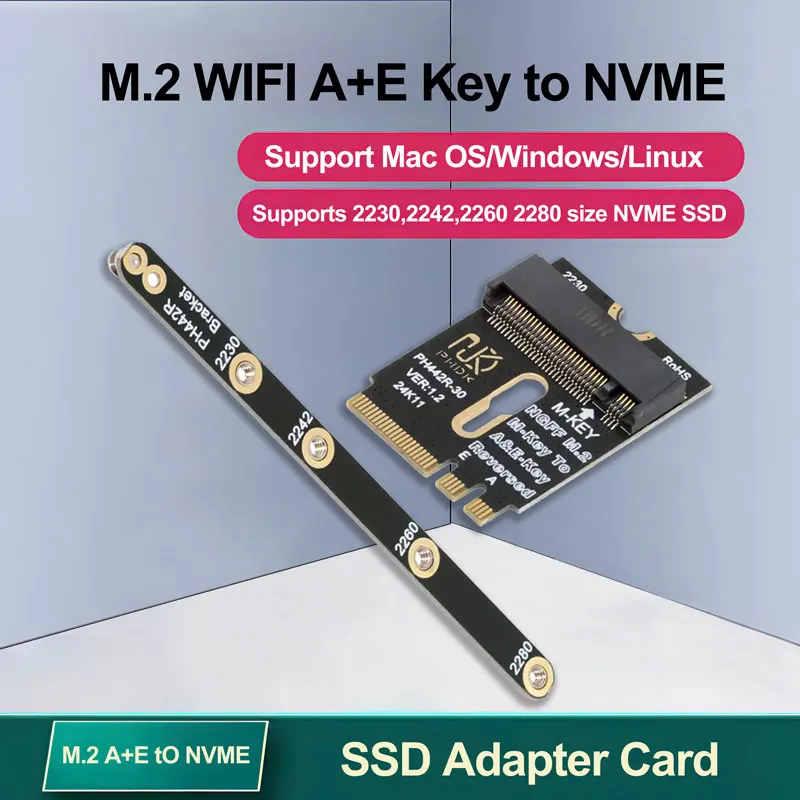
Physical installation appears straightforward, involving the adapter card and a separate bracket. The images clearly show a black PCB adapter with gold-plated contacts for the A+E Key interface and a slot for the NVMe SSD. A small screw secures the SSD to the adapter. The separate bracket, also black, features multiple screw points for various SSD lengths: 2230, 2242, 2260, and 2280. This is highly versatile.
This modular bracket system is a thoughtful inclusion, addressing the diverse form factors of M.2 NVMe SSDs available on the market. Users can select the appropriate mounting point on the bracket to securely hold their specific SSD length. This prevents unsupported drives from rattling or becoming dislodged within the system. Proper fit is essential.
Typical M.2 slots on motherboards often have fixed standoffs or a single adjustable standoff. This adapter's bracket provides a universal solution for various SSD sizes, a distinct advantage over adapters that might only support one or two lengths. This flexibility minimizes compatibility headaches during installation. It simplifies the process.
Once the adapter with the SSD is installed into the M.2 A+E Key slot, the system's BIOS/UEFI must recognize the new storage device. Modern operating systems like Windows, Mac OS, and Linux are explicitly supported, suggesting broad driver compatibility. The adapter itself is passive, drawing power directly from the M.2 slot. This simplifies power management.
For optimal performance and stability, ensuring the motherboard's M.2 A+E slot provides sufficient power is crucial. While M.2 slots are standardized for power delivery, some older or entry-level boards might have limitations. A quick check of the motherboard manual can confirm the power specifications for the M.2 A+E slot. This prevents unexpected issues.
Unlike active PCIe expansion cards that might require auxiliary power connections, this passive adapter relies entirely on the host slot. This design simplifies installation and reduces cable clutter within the case. It is a clean solution. The system's power supply unit (PSU) should always be sufficient for the entire system, including any new components. A robust PSU ensures reliable operation.
The support for PCIe 4.0 is a significant performance indicator. PCIe 4.0 offers double the bandwidth per lane compared to PCIe 3.0, meaning an NVMe SSD connected via this adapter can achieve much higher sequential read and write speeds. This translates directly to faster data transfers and reduced loading times for demanding applications or games. Speed is a key benefit.
While the adapter supports PCIe 4.0, the actual performance will be limited by the slowest component in the chain: the NVMe SSD itself, the M.2 A+E slot's PCIe generation, and the motherboard's chipset. If the A+E slot only supports PCIe 3.0, the SSD will operate at PCIe 3.0 speeds. However, having PCIe 4.0 capability in the adapter ensures future-proofing. This is a smart design choice.
Compared to older M.2 to SATA adapters, which are bottlenecked by the SATA III interface's ~600 MB/s limit, this NVMe adapter offers orders of magnitude higher performance. Even a PCIe 3.0 NVMe SSD will vastly outperform a SATA SSD. This adapter provides a genuine upgrade path for speed-conscious users. It delivers superior throughput.
Operating system compatibility across Mac OS, Windows, and Linux is a strong selling point. This broad support means users are not locked into a specific ecosystem. The adapter functions as a transparent bridge, allowing the operating system to interact directly with the NVMe SSD as it would with any native M.2 drive. This ensures seamless integration.
This universal OS support simplifies deployment in diverse computing environments, from custom-built Linux workstations to Mac mini systems with available M.2 A+E slots. Users can expect plug-and-play functionality for most modern operating systems, relying on their built-in NVMe drivers. It is broadly compatible.
Many generic adapters might have limited or unverified OS support, leading to driver headaches or compatibility issues. The explicit mention of Mac OS, Windows, and Linux support provides confidence in the adapter's functionality across popular platforms. This minimizes setup friction. It works with common systems.
The visible construction of the adapter, with its black PCB and gold-plated contacts, suggests a standard level of durability for internal computer components. The included small screwdriver and two screws are a thoughtful addition, providing all necessary tools for installation. The low weight of 8.3g indicates a minimalist design. It is lightweight.
Gold-plated contacts are a standard feature in quality computer components, offering improved conductivity and corrosion resistance over time. This ensures a stable and reliable connection between the adapter and the motherboard's M.2 slot, as well as between the adapter and the NVMe SSD. This contributes to long-term stability. A stable connection is vital.
Considering the adapter's function and the materials used, its value proposition is strong. It provides a pathway to high-speed NVMe storage for systems that might otherwise be limited, all at a very accessible price point. This is a cost-effective upgrade. It extends system lifespan.
Imagine your system, once constrained by limited M.2 slots or slower storage, now booting in seconds, loading games almost instantly, and handling large file transfers with unprecedented speed. This adapter transforms an underutilized port into a high-performance asset, making your daily computing tasks feel effortless and responsive. Experience the difference in speed and efficiency, enhancing your productivity and enjoyment. This simple upgrade unlocks a new level of system capability, allowing you to get more out of your existing hardware and push its performance boundaries further than you thought possible.
Unlocking Hidden Storage Potential
Many modern motherboards, particularly in smaller form factor PCs or laptops, feature M.2 A+E Key slots primarily intended for Wi-Fi and Bluetooth modules. These slots often sit idle if a user prefers wired networking or has an integrated solution. This adapter capitalizes on that unused bandwidth, allowing an NVMe SSD to be installed where a Wi-Fi card once resided. The visible design indicates a straightforward conversion, with the A+E Key connector on one side and an M-Key slot for the SSD on the other.
This conversion directly addresses the common pain point of limited M.2 M-Key slots on motherboards, especially for users who want to add more high-speed storage without upgrading their entire system. It provides a direct pathway for NVMe drives, bypassing the slower SATA interface entirely. This means quicker boot times and faster application loading.
Unlike systems limited to a single M.2 M-Key slot or older platforms relying solely on SATA connections, this adapter expands the potential for high-performance storage. It leverages an existing, often overlooked, interface to inject new life into a system. This is a significant capability upgrade.
Bridging the Interface Divide
Compatibility is paramount for any adapter, and this unit is designed to work with M.2 A+E Key slots that support a PCIe channel. The product explicitly states support for PCIe 4.0, which is a crucial detail for modern performance expectations. This means that if the host A+E Key slot itself supports PCIe 4.0, the connected NVMe SSD can potentially operate at these higher speeds. It is a fast connection.
Understanding the distinction between PCIe and CNVi channels is vital. The adapter supports the PCIe channel, which is standard for most M.2 Wi-Fi cards. However, it does not support the CNVi channel, a proprietary Intel interface. Users must verify their M.2 A+E slot utilizes a standard PCIe interface for this adapter to function correctly. This ensures broad compatibility with a range of chipsets.
Compared to generic M.2 adapters that might only support older PCIe generations, the explicit mention of PCIe 4.0 support positions this adapter as a forward-looking solution. This ensures that even the latest NVMe SSDs can achieve their advertised speeds, provided the motherboard and CPU also support PCIe 4.0. This is a performance-oriented feature.
Integrating the New Drive
Physical installation appears straightforward, involving the adapter card and a separate bracket. The images clearly show a black PCB adapter with gold-plated contacts for the A+E Key interface and a slot for the NVMe SSD. A small screw secures the SSD to the adapter. The separate bracket, also black, features multiple screw points for various SSD lengths: 2230, 2242, 2260, and 2280. This is highly versatile.
This modular bracket system is a thoughtful inclusion, addressing the diverse form factors of M.2 NVMe SSDs available on the market. Users can select the appropriate mounting point on the bracket to securely hold their specific SSD length. This prevents unsupported drives from rattling or becoming dislodged within the system. Proper fit is essential.
Typical M.2 slots on motherboards often have fixed standoffs or a single adjustable standoff. This adapter's bracket provides a universal solution for various SSD sizes, a distinct advantage over adapters that might only support one or two lengths. This flexibility minimizes compatibility headaches during installation. It simplifies the process.
System Integration and Power Considerations
Once the adapter with the SSD is installed into the M.2 A+E Key slot, the system's BIOS/UEFI must recognize the new storage device. Modern operating systems like Windows, Mac OS, and Linux are explicitly supported, suggesting broad driver compatibility. The adapter itself is passive, drawing power directly from the M.2 slot. This simplifies power management.
For optimal performance and stability, ensuring the motherboard's M.2 A+E slot provides sufficient power is crucial. While M.2 slots are standardized for power delivery, some older or entry-level boards might have limitations. A quick check of the motherboard manual can confirm the power specifications for the M.2 A+E slot. This prevents unexpected issues.
Unlike active PCIe expansion cards that might require auxiliary power connections, this passive adapter relies entirely on the host slot. This design simplifies installation and reduces cable clutter within the case. It is a clean solution. The system's power supply unit (PSU) should always be sufficient for the entire system, including any new components. A robust PSU ensures reliable operation.
Performance Throughput and Operating System Harmony
The support for PCIe 4.0 is a significant performance indicator. PCIe 4.0 offers double the bandwidth per lane compared to PCIe 3.0, meaning an NVMe SSD connected via this adapter can achieve much higher sequential read and write speeds. This translates directly to faster data transfers and reduced loading times for demanding applications or games. Speed is a key benefit.
While the adapter supports PCIe 4.0, the actual performance will be limited by the slowest component in the chain: the NVMe SSD itself, the M.2 A+E slot's PCIe generation, and the motherboard's chipset. If the A+E slot only supports PCIe 3.0, the SSD will operate at PCIe 3.0 speeds. However, having PCIe 4.0 capability in the adapter ensures future-proofing. This is a smart design choice.
Compared to older M.2 to SATA adapters, which are bottlenecked by the SATA III interface's ~600 MB/s limit, this NVMe adapter offers orders of magnitude higher performance. Even a PCIe 3.0 NVMe SSD will vastly outperform a SATA SSD. This adapter provides a genuine upgrade path for speed-conscious users. It delivers superior throughput.
Operating system compatibility across Mac OS, Windows, and Linux is a strong selling point. This broad support means users are not locked into a specific ecosystem. The adapter functions as a transparent bridge, allowing the operating system to interact directly with the NVMe SSD as it would with any native M.2 drive. This ensures seamless integration.
This universal OS support simplifies deployment in diverse computing environments, from custom-built Linux workstations to Mac mini systems with available M.2 A+E slots. Users can expect plug-and-play functionality for most modern operating systems, relying on their built-in NVMe drivers. It is broadly compatible.
Many generic adapters might have limited or unverified OS support, leading to driver headaches or compatibility issues. The explicit mention of Mac OS, Windows, and Linux support provides confidence in the adapter's functionality across popular platforms. This minimizes setup friction. It works with common systems.
Durability and Value Proposition
The visible construction of the adapter, with its black PCB and gold-plated contacts, suggests a standard level of durability for internal computer components. The included small screwdriver and two screws are a thoughtful addition, providing all necessary tools for installation. The low weight of 8.3g indicates a minimalist design. It is lightweight.
Gold-plated contacts are a standard feature in quality computer components, offering improved conductivity and corrosion resistance over time. This ensures a stable and reliable connection between the adapter and the motherboard's M.2 slot, as well as between the adapter and the NVMe SSD. This contributes to long-term stability. A stable connection is vital.
Considering the adapter's function and the materials used, its value proposition is strong. It provides a pathway to high-speed NVMe storage for systems that might otherwise be limited, all at a very accessible price point. This is a cost-effective upgrade. It extends system lifespan.
Imagine your system, once constrained by limited M.2 slots or slower storage, now booting in seconds, loading games almost instantly, and handling large file transfers with unprecedented speed. This adapter transforms an underutilized port into a high-performance asset, making your daily computing tasks feel effortless and responsive. Experience the difference in speed and efficiency, enhancing your productivity and enjoyment. This simple upgrade unlocks a new level of system capability, allowing you to get more out of your existing hardware and push its performance boundaries further than you thought possible.