M.2 A+E Key to NVMe SSD Adapter
Official Store Deal
Expert Analysis Overview
The M.2 A+E Key to NVMe SSD Adapter is a specialized bridging solution designed for enthusiasts and system builders aiming to circumvent inherent platform limitations. This is not a performance enhancer in itself, but a critical enabler, allowing the integration of high-speed NVMe solid-state drives into systems equipped only with an M.2 A+E Key slot—typically reserved for wireless network cards. For an overclocker, this adapter represents an opportunity to eliminate storage bottlenecks, pushing overall system responsiveness beyond stock configurations. It is a fundamental component for optimizing compact or legacy systems where direct NVMe M-Key slots are absent.
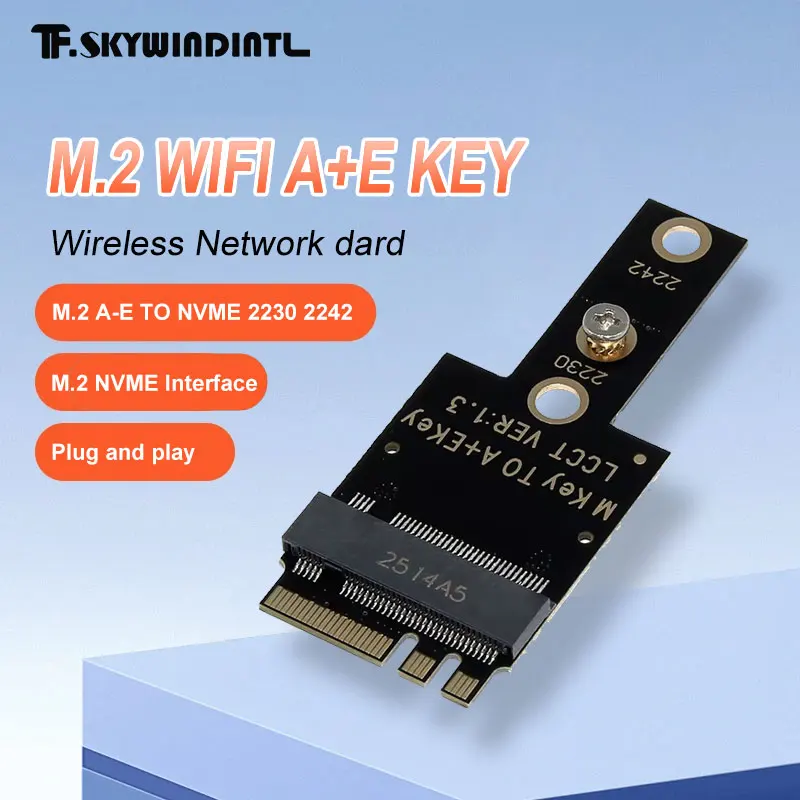
This adapter's primary function is to convert an M.2 A+E Key interface to an M.2 M-Key interface. The physical layout clearly shows the A+E key edge connector on one end and the M-Key slot on the other. This mechanical and electrical translation is crucial. Without it, many mini PCs, laptops, or embedded systems would be confined to slower SATA-based storage or entirely lack the option for NVMe.
For systems where every millisecond counts, the ability to introduce NVMe storage is transformative. Boot times shrink. Application loading accelerates. Data transfer rates soar. This adapter unlocks that potential.
Standard A+E Key slots are typically wired for PCIe x1 or x2, alongside USB and other low-bandwidth signals. While a full M-Key NVMe SSD often utilizes PCIe x4, this adapter routes the available PCIe lanes from the A+E slot to the NVMe drive. This means the NVMe drive will operate at the maximum PCIe bandwidth supported by the A+E slot, which is usually PCIe 3.0 x1 or x2. Unlike a direct M-Key slot that offers full PCIe x4 speeds, this adapter provides a substantial upgrade over SATA, even if not full NVMe bandwidth. It is still a significant leap.
While the adapter itself is a passive PCB, the NVMe SSD it hosts generates considerable heat, especially under sustained loads. Overclockers know thermal management is paramount. A high-performance NVMe drive, even when operating at reduced PCIe lanes via this adapter, can still produce enough heat to throttle if airflow is inadequate. The adapter's compact design means it doesn't add significant thermal mass or obstruction. However, the system's overall cooling solution for the SSD becomes critical. Proper airflow around the installed SSD is non-negotiable.
Many compact systems lack dedicated SSD cooling. Adding a thin heatsink to the NVMe drive installed on this adapter is often a wise move. This prevents thermal throttling. It ensures consistent performance, a core tenet of any optimized system.
Compared to typical M.2 SATA SSDs, NVMe drives inherently run hotter due to their higher performance. This adapter facilitates the use of these hotter components, demanding proactive thermal planning from the builder. Ignoring heat can lead to frustrating performance degradation.
The adapter features a clean, black PCB with clearly labeled mounting points for 2230 and 2242 form factor NVMe SSDs. The traces appear direct, minimizing signal path length. Good signal integrity is vital for stable high-speed data transfer. Any impedance mismatch or interference could lead to data corruption or performance drops, particularly under heavy I/O.
Power delivery to the NVMe SSD comes directly from the M.2 A+E Key slot. This adapter is passive, meaning it does not regulate or boost power. The stability of the host system's M.2 slot power lines is therefore critical. Most A+E Key slots are designed to provide sufficient power for Wi-Fi modules, which typically draw less power than a high-performance NVMe SSD. While most modern M.2 slots are robust, monitoring SSD temperatures and stability after installation is recommended, especially under extreme workloads. A stable power rail is fundamental.
Unlike lower-quality adapters that might use flimsy connectors or unshielded traces, this board appears to prioritize direct signal routing. The mounting screw mechanism securely holds the NVMe drive. This prevents physical movement that could disrupt electrical contact. Secure mounting is a small detail with big implications for reliability.
Installation is straightforward: insert the adapter into the M.2 A+E Key slot, then mount the NVMe SSD onto the adapter, securing it with the provided screw. The adapter supports 2230 and 2242 length NVMe drives. This flexibility is beneficial. It allows users to select an SSD that best fits their budget and performance needs within the supported form factors.
Compatibility with the host system's BIOS/UEFI is crucial. The system must support booting from NVMe drives connected via PCIe. Some older or more restrictive BIOS versions might not recognize an NVMe drive on an A+E Key slot. Verification of system compatibility before purchase is highly advised. This prevents frustration.
Integrating this adapter into a mini PC or laptop demands careful consideration of space. The combined height of the adapter and SSD must fit within the chassis. In many compact builds, every millimeter counts. The slim profile of the adapter itself helps, but the overall stack height with the SSD needs to be accounted for. It is a tight fit in some cases.
For its modest price, this adapter offers immense value by unlocking a significant performance upgrade path. It transforms a typically underutilized A+E Key slot into a high-speed storage interface. This cost-effective solution avoids the need for a complete system overhaul just to gain NVMe capabilities. It extends the life and utility of existing hardware. This is smart engineering.
Compared to the cost of a new motherboard or mini PC with native NVMe M-Key support, this adapter presents a compelling return on investment. It's an essential tool for those who push their hardware's limits and demand the fastest possible storage without breaking the bank. The upgrade is palpable.
Imagine a compact system, once limited by slow SATA storage, now booting in seconds and loading complex applications almost instantly. This adapter makes that a reality. It empowers users to revitalize older hardware, providing a noticeable boost in everyday responsiveness and workload efficiency. This is the essence of smart optimization. The system feels new again.
Bridging Performance Gaps
This adapter's primary function is to convert an M.2 A+E Key interface to an M.2 M-Key interface. The physical layout clearly shows the A+E key edge connector on one end and the M-Key slot on the other. This mechanical and electrical translation is crucial. Without it, many mini PCs, laptops, or embedded systems would be confined to slower SATA-based storage or entirely lack the option for NVMe.
For systems where every millisecond counts, the ability to introduce NVMe storage is transformative. Boot times shrink. Application loading accelerates. Data transfer rates soar. This adapter unlocks that potential.
Standard A+E Key slots are typically wired for PCIe x1 or x2, alongside USB and other low-bandwidth signals. While a full M-Key NVMe SSD often utilizes PCIe x4, this adapter routes the available PCIe lanes from the A+E slot to the NVMe drive. This means the NVMe drive will operate at the maximum PCIe bandwidth supported by the A+E slot, which is usually PCIe 3.0 x1 or x2. Unlike a direct M-Key slot that offers full PCIe x4 speeds, this adapter provides a substantial upgrade over SATA, even if not full NVMe bandwidth. It is still a significant leap.
Thermal Considerations for High-Performance Builds
While the adapter itself is a passive PCB, the NVMe SSD it hosts generates considerable heat, especially under sustained loads. Overclockers know thermal management is paramount. A high-performance NVMe drive, even when operating at reduced PCIe lanes via this adapter, can still produce enough heat to throttle if airflow is inadequate. The adapter's compact design means it doesn't add significant thermal mass or obstruction. However, the system's overall cooling solution for the SSD becomes critical. Proper airflow around the installed SSD is non-negotiable.
Many compact systems lack dedicated SSD cooling. Adding a thin heatsink to the NVMe drive installed on this adapter is often a wise move. This prevents thermal throttling. It ensures consistent performance, a core tenet of any optimized system.
Compared to typical M.2 SATA SSDs, NVMe drives inherently run hotter due to their higher performance. This adapter facilitates the use of these hotter components, demanding proactive thermal planning from the builder. Ignoring heat can lead to frustrating performance degradation.
Signal Integrity and Power Stability
The adapter features a clean, black PCB with clearly labeled mounting points for 2230 and 2242 form factor NVMe SSDs. The traces appear direct, minimizing signal path length. Good signal integrity is vital for stable high-speed data transfer. Any impedance mismatch or interference could lead to data corruption or performance drops, particularly under heavy I/O.
Power delivery to the NVMe SSD comes directly from the M.2 A+E Key slot. This adapter is passive, meaning it does not regulate or boost power. The stability of the host system's M.2 slot power lines is therefore critical. Most A+E Key slots are designed to provide sufficient power for Wi-Fi modules, which typically draw less power than a high-performance NVMe SSD. While most modern M.2 slots are robust, monitoring SSD temperatures and stability after installation is recommended, especially under extreme workloads. A stable power rail is fundamental.
Unlike lower-quality adapters that might use flimsy connectors or unshielded traces, this board appears to prioritize direct signal routing. The mounting screw mechanism securely holds the NVMe drive. This prevents physical movement that could disrupt electrical contact. Secure mounting is a small detail with big implications for reliability.
Installation and System Integration
Installation is straightforward: insert the adapter into the M.2 A+E Key slot, then mount the NVMe SSD onto the adapter, securing it with the provided screw. The adapter supports 2230 and 2242 length NVMe drives. This flexibility is beneficial. It allows users to select an SSD that best fits their budget and performance needs within the supported form factors.
Compatibility with the host system's BIOS/UEFI is crucial. The system must support booting from NVMe drives connected via PCIe. Some older or more restrictive BIOS versions might not recognize an NVMe drive on an A+E Key slot. Verification of system compatibility before purchase is highly advised. This prevents frustration.
Integrating this adapter into a mini PC or laptop demands careful consideration of space. The combined height of the adapter and SSD must fit within the chassis. In many compact builds, every millimeter counts. The slim profile of the adapter itself helps, but the overall stack height with the SSD needs to be accounted for. It is a tight fit in some cases.
Value Proposition for the Overclocker
For its modest price, this adapter offers immense value by unlocking a significant performance upgrade path. It transforms a typically underutilized A+E Key slot into a high-speed storage interface. This cost-effective solution avoids the need for a complete system overhaul just to gain NVMe capabilities. It extends the life and utility of existing hardware. This is smart engineering.
Compared to the cost of a new motherboard or mini PC with native NVMe M-Key support, this adapter presents a compelling return on investment. It's an essential tool for those who push their hardware's limits and demand the fastest possible storage without breaking the bank. The upgrade is palpable.
Imagine a compact system, once limited by slow SATA storage, now booting in seconds and loading complex applications almost instantly. This adapter makes that a reality. It empowers users to revitalize older hardware, providing a noticeable boost in everyday responsiveness and workload efficiency. This is the essence of smart optimization. The system feels new again.