Lightning Dual Card Reader
Official Store Deal
Expert Analysis Overview
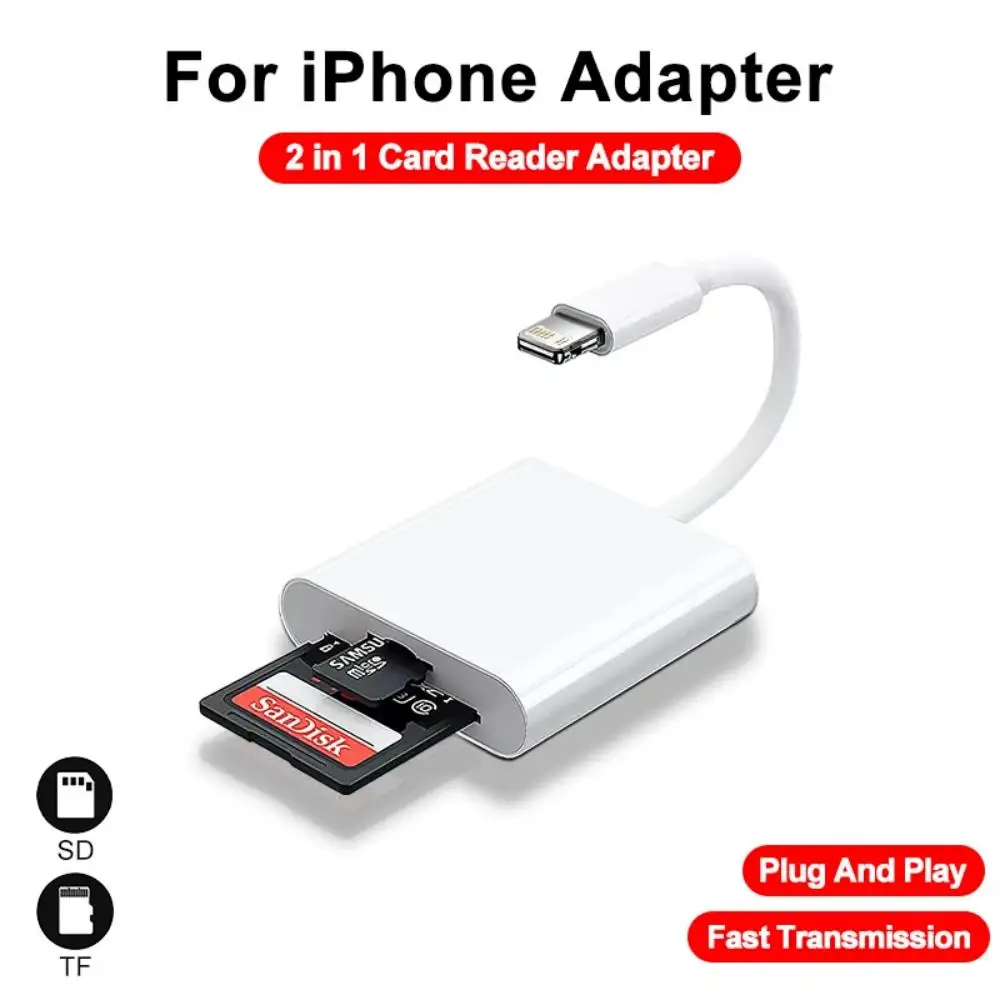
The Lightning Dual Card Reader is a purpose-built peripheral designed for iPhone and iPad users demanding direct, efficient media offload without PC intervention. This compact adapter targets photographers, videographers, and drone enthusiasts who frequently capture content on SD or microSD cards and require immediate transfer to their iOS devices. It streamlines workflows, bypassing the often cumbersome process of moving files through a computer or cloud service.
This card reader integrates a Lightning connector, ensuring direct compatibility with a wide array of Apple devices. It supports iPhones from the 5SE up to the 14 (including Mini, Pro, and Pro Max models), and iPads including the Mini, Air, and various Pro generations. The device requires iOS 8.0 and above for optimal functionality, with iOS 9.2 or above recommended for full photo and video management capabilities. Older iOS versions might limit certain features. The direct Lightning connection is crucial.
Unlike generic USB-C readers, this unit specifically caters to Apple's proprietary Lightning port. This design choice simplifies the hardware ecosystem for iOS users. It means no additional adapters are needed for connection.
Compared to relying solely on Wi-Fi camera transfers, which often suffer from instability and slower speeds, the physical connection offers a more reliable pathway. This is a significant advantage for critical field operations.
The product advertises data transfer speeds of 20MB/s to 30MB/s, operating on a USB 2.0 speed protocol. For a 'File Transfer Heavy' user, this specification immediately flags a critical point: it is not a USB 3.0 or higher device. Modern external SSDs and even some high-end USB flash drives can achieve hundreds of megabytes per second. However, the context is vital here. The Lightning port itself, while convenient, operates on a USB 2.0 bus architecture for data transfer on most iPhones and iPads (excluding some iPad Pro models with USB-C).
This means the stated 20-30MB/s is often the practical maximum achievable through the Lightning interface. While not blistering fast by desktop standards, it represents a substantial improvement over Wi-Fi transfers for large media files. Imagine offloading gigabytes of 4K drone footage. This speed, while not top-tier, prevents agonizingly long waits.
For users accustomed to the glacial pace of some camera-to-phone Wi-Fi apps, this direct connection offers a tangible speed boost. It bypasses network overheads entirely. The raw throughput is consistent.
The reader features two distinct card slots: one for standard SD cards and another for TF cards, more commonly known as microSD cards. This dual functionality eliminates the need for multiple adapters or an additional microSD-to-SD adapter. It's a simple, integrated solution.
Supporting memory cards up to 512GB (with a note that Sony brand cards are limited to 256GB, a specific compatibility quirk), this reader handles substantial storage capacities. This capacity is ample for extended shooting sessions, especially for high-resolution photos and 4K video. Users can consolidate their gear.
Having both slots active means seamless switching between different camera types. A drone might use microSD, while a DSLR uses full-size SD. This device accommodates both without fuss.
One of the most compelling aspects is its plug-and-play nature. No drivers, no dedicated apps, and no PC required. Simply insert the card, connect the adapter to your iPhone or iPad, and the Photos app or Files app will automatically prompt you to import. This is crucial for on-the-go professionals.
This direct integration into iOS's native file management system simplifies the user experience dramatically. It removes layers of complexity often associated with external storage devices. The process is intuitive. Users can quickly review, select, and import desired media.
Compared to solutions that demand proprietary software or a specific app, this native iOS integration reduces friction. It ensures a consistent experience across compatible Apple devices.
The reader supports essential media formats: JPEG and RAW for photos, and H.264 and MPEG-4 for videos. This broad compatibility covers the vast majority of digital cameras, drones, and dash cams. It means no format conversion headaches.
For photographers, the ability to import RAW files directly is a significant advantage. It preserves maximum image data for post-processing on an iPad Pro, for example. JPEGs transfer instantly.
Videographers will appreciate the H.264 and MPEG-4 support, which are standard codecs for most consumer and prosumer cameras. This ensures video files can be quickly offloaded and even edited on the go using iOS apps.
The adapter presents a compact, minimalist white plastic design. Its small footprint makes it highly portable, easily slipping into a camera bag or even a pocket. The integrated Lightning cable is short and flexible, reducing cable clutter. This form factor prioritizes mobility.
The plastic construction feels solid enough for its intended use, though it doesn't boast a premium metal finish. It is lightweight. The design is functional, emphasizing utility over aesthetics. The white color matches Apple's accessory aesthetic.
This compact design is a clear upgrade over bulkier multi-port hubs that might offer more features but sacrifice portability. It's built for field use.
Consider a travel photographer capturing hundreds of images daily. Instead of waiting until returning to a hotel with a laptop, images can be offloaded to an iPad during a lunch break. This frees up camera card space. It prevents missed shots.
Imagine a drone pilot needing to quickly review and share aerial footage. The reader allows direct transfer to an iPhone for immediate social media sharing or client previews. No more delays. The workflow accelerates.
For trail cam users, checking footage in the field becomes effortless. Dash cam recordings can be retrieved instantly after an incident. This device provides immediate access.
While the USB 2.0 speeds are a limitation when compared to high-end desktop card readers, the value proposition of this device lies squarely in its unparalleled convenience for iOS users. It solves the specific pain point of transferring large media files directly from a camera card to an iPhone or iPad without needing a computer. This saves time and simplifies the gear setup.
The cost-per-use becomes incredibly low for frequent travelers or content creators. It's a small investment that drastically improves mobile workflow efficiency. The device pays for itself in saved time.
This adapter is an essential tool for anyone deeply embedded in the Apple ecosystem who regularly works with external memory cards. It's not about being the fastest card reader on the planet; it's about being the most efficient for its specific niche. It enables direct, on-the-spot media management.
Imagine capturing breathtaking landscapes on your DSLR, then moments later, viewing them on your iPad's vibrant display, ready for a quick edit or share. Picture freeing up your camera's memory card mid-shoot, ensuring you never miss a critical moment because of full storage. This card reader integrates seamlessly into your mobile creative life, making file transfers a background task rather than a frustrating obstacle. It empowers immediate action, transforming your iPhone or iPad into a powerful, portable media hub, ready to handle your content the instant it's captured.
Bridging the iOS Gap: Connectivity and Compatibility
This card reader integrates a Lightning connector, ensuring direct compatibility with a wide array of Apple devices. It supports iPhones from the 5SE up to the 14 (including Mini, Pro, and Pro Max models), and iPads including the Mini, Air, and various Pro generations. The device requires iOS 8.0 and above for optimal functionality, with iOS 9.2 or above recommended for full photo and video management capabilities. Older iOS versions might limit certain features. The direct Lightning connection is crucial.
Unlike generic USB-C readers, this unit specifically caters to Apple's proprietary Lightning port. This design choice simplifies the hardware ecosystem for iOS users. It means no additional adapters are needed for connection.
Compared to relying solely on Wi-Fi camera transfers, which often suffer from instability and slower speeds, the physical connection offers a more reliable pathway. This is a significant advantage for critical field operations.
The Throughput Equation: Understanding Transfer Speeds
The product advertises data transfer speeds of 20MB/s to 30MB/s, operating on a USB 2.0 speed protocol. For a 'File Transfer Heavy' user, this specification immediately flags a critical point: it is not a USB 3.0 or higher device. Modern external SSDs and even some high-end USB flash drives can achieve hundreds of megabytes per second. However, the context is vital here. The Lightning port itself, while convenient, operates on a USB 2.0 bus architecture for data transfer on most iPhones and iPads (excluding some iPad Pro models with USB-C).
This means the stated 20-30MB/s is often the practical maximum achievable through the Lightning interface. While not blistering fast by desktop standards, it represents a substantial improvement over Wi-Fi transfers for large media files. Imagine offloading gigabytes of 4K drone footage. This speed, while not top-tier, prevents agonizingly long waits.
For users accustomed to the glacial pace of some camera-to-phone Wi-Fi apps, this direct connection offers a tangible speed boost. It bypasses network overheads entirely. The raw throughput is consistent.
Dual-Slot Dexterity: SD and TF Card Management
The reader features two distinct card slots: one for standard SD cards and another for TF cards, more commonly known as microSD cards. This dual functionality eliminates the need for multiple adapters or an additional microSD-to-SD adapter. It's a simple, integrated solution.
Supporting memory cards up to 512GB (with a note that Sony brand cards are limited to 256GB, a specific compatibility quirk), this reader handles substantial storage capacities. This capacity is ample for extended shooting sessions, especially for high-resolution photos and 4K video. Users can consolidate their gear.
Having both slots active means seamless switching between different camera types. A drone might use microSD, while a DSLR uses full-size SD. This device accommodates both without fuss.
The Simplicity Mandate: Plug-and-Play Operation
One of the most compelling aspects is its plug-and-play nature. No drivers, no dedicated apps, and no PC required. Simply insert the card, connect the adapter to your iPhone or iPad, and the Photos app or Files app will automatically prompt you to import. This is crucial for on-the-go professionals.
This direct integration into iOS's native file management system simplifies the user experience dramatically. It removes layers of complexity often associated with external storage devices. The process is intuitive. Users can quickly review, select, and import desired media.
Compared to solutions that demand proprietary software or a specific app, this native iOS integration reduces friction. It ensures a consistent experience across compatible Apple devices.
Visualizing the Workflow: Supported File Formats
The reader supports essential media formats: JPEG and RAW for photos, and H.264 and MPEG-4 for videos. This broad compatibility covers the vast majority of digital cameras, drones, and dash cams. It means no format conversion headaches.
For photographers, the ability to import RAW files directly is a significant advantage. It preserves maximum image data for post-processing on an iPad Pro, for example. JPEGs transfer instantly.
Videographers will appreciate the H.264 and MPEG-4 support, which are standard codecs for most consumer and prosumer cameras. This ensures video files can be quickly offloaded and even edited on the go using iOS apps.
Physicality and Portability: Design Considerations
The adapter presents a compact, minimalist white plastic design. Its small footprint makes it highly portable, easily slipping into a camera bag or even a pocket. The integrated Lightning cable is short and flexible, reducing cable clutter. This form factor prioritizes mobility.
The plastic construction feels solid enough for its intended use, though it doesn't boast a premium metal finish. It is lightweight. The design is functional, emphasizing utility over aesthetics. The white color matches Apple's accessory aesthetic.
This compact design is a clear upgrade over bulkier multi-port hubs that might offer more features but sacrifice portability. It's built for field use.
Real-World Scenarios: Who Benefits Most?
Consider a travel photographer capturing hundreds of images daily. Instead of waiting until returning to a hotel with a laptop, images can be offloaded to an iPad during a lunch break. This frees up camera card space. It prevents missed shots.
Imagine a drone pilot needing to quickly review and share aerial footage. The reader allows direct transfer to an iPhone for immediate social media sharing or client previews. No more delays. The workflow accelerates.
For trail cam users, checking footage in the field becomes effortless. Dash cam recordings can be retrieved instantly after an incident. This device provides immediate access.
The Value Proposition: Convenience Over Raw Speed
While the USB 2.0 speeds are a limitation when compared to high-end desktop card readers, the value proposition of this device lies squarely in its unparalleled convenience for iOS users. It solves the specific pain point of transferring large media files directly from a camera card to an iPhone or iPad without needing a computer. This saves time and simplifies the gear setup.
The cost-per-use becomes incredibly low for frequent travelers or content creators. It's a small investment that drastically improves mobile workflow efficiency. The device pays for itself in saved time.
This adapter is an essential tool for anyone deeply embedded in the Apple ecosystem who regularly works with external memory cards. It's not about being the fastest card reader on the planet; it's about being the most efficient for its specific niche. It enables direct, on-the-spot media management.
Imagine capturing breathtaking landscapes on your DSLR, then moments later, viewing them on your iPad's vibrant display, ready for a quick edit or share. Picture freeing up your camera's memory card mid-shoot, ensuring you never miss a critical moment because of full storage. This card reader integrates seamlessly into your mobile creative life, making file transfers a background task rather than a frustrating obstacle. It empowers immediate action, transforming your iPhone or iPad into a powerful, portable media hub, ready to handle your content the instant it's captured.