LIANLI US88v1 8.8-inch IPS System Monitor
Official Store Deal
Expert Analysis Overview
The LIANLI US88v1 Universal Screen is a specialized 8.8-inch IPS LCD panel designed for PC enthusiasts seeking advanced system monitoring and aesthetic customization within their computer cases. This display offers a unique solution for integrating real-time performance metrics and personalized visuals directly into a build, setting it apart from generic system status indicators.
The US88v1 features an 8.8-inch IPS LCD panel. This panel type is crucial for maintaining color accuracy and wide viewing angles, ensuring that system data remains clear and legible regardless of the viewer's position relative to the PC case. Unlike TN panels often found in more basic displays, IPS technology prevents color shifting and degradation when viewed from an angle, a common scenario for a screen mounted inside a PC. The visual integrity is maintained.
The display boasts a 1920x480 resolution. This ultra-wide aspect ratio is specifically tailored for horizontal integration within a PC chassis, providing ample screen real estate to simultaneously display multiple system parameters. Users can monitor CPU temperatures, GPU utilization, RAM frequency, and network activity without crowding the interface. This resolution allows for detailed graphs and numerical readouts.
A 60Hz refresh rate ensures smooth updates for dynamic content. While not a high refresh rate gaming monitor, 60Hz is more than sufficient for displaying real-time system statistics, animations, and even short video clips without noticeable stutter. The fluid motion enhances the premium feel of the system monitoring experience. This provides a responsive visual feedback loop.
With 500 nits of brightness, the US88v1 offers exceptional visibility. This high brightness level ensures the display remains vibrant and readable even in well-lit rooms or when ambient light inside the PC case is strong. Many internal displays struggle with brightness, becoming washed out. This screen cuts through the glare.
The visual appeal of the US88v1 extends beyond its technical specifications; it serves as a focal point for PC aesthetics. The images reveal both black and white frame options, allowing builders to match the display seamlessly with their case's color scheme. A cohesive look is easily achieved. This attention to detail in color choice underscores its role as an integrated component rather than an afterthought.
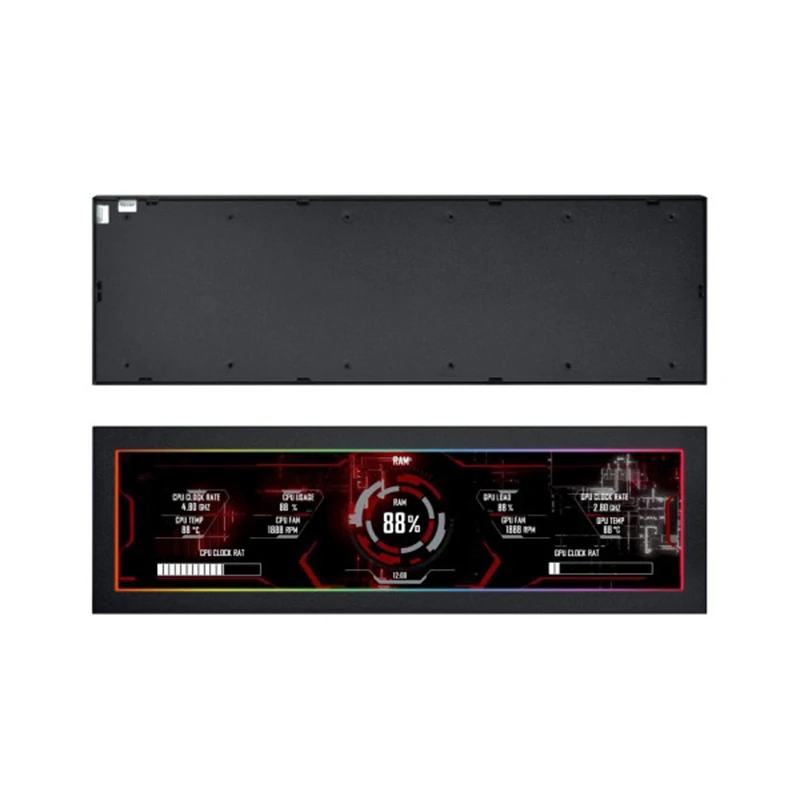
The display's ability to show customizable themes transforms a PC case into a dynamic canvas. Instead of static RGB lighting, builders can display animated backgrounds, personalized logos, or even full-motion video, all while keeping critical system data in view. This level of personalization significantly elevates the overall aesthetic of a high-end build. It offers unparalleled visual flair.
Compared to simple seven-segment displays or basic LED indicators, the US88v1 provides a rich, graphical interface. This allows for complex data visualization, presenting information in an easily digestible and visually appealing manner. The difference is stark. It moves beyond mere data points to a comprehensive visual narrative of the system's health and performance.
The physical dimensions of the US88v1 are critical for its intended application as an internal PC case screen. Its slim profile, visible in the side-angle images, suggests it can fit into various mounting locations without obstructing airflow or other components. Careful measurement is still advised. Builders must verify available clearance within their specific case, particularly near the PSU shroud, front panel, or top radiator mounts.
The universal mounting options are a significant advantage. The rear panel images show multiple screw points, indicating flexibility for custom brackets or integration into cases designed with secondary display mounts. This adaptability is key for a product targeting the diverse PC building market. It avoids proprietary restrictions. Unlike displays with fixed mounting solutions, the US88v1 empowers builders to choose their preferred placement, whether flush with a panel or angled for optimal viewing.
Consideration for cable routing is paramount. The single USB-C connection simplifies this aspect considerably, reducing the number of cables that need to be managed within the case. A clean build benefits greatly. This contrasts sharply with older secondary displays that might require separate power and video cables, leading to clutter and potential airflow impedance. The streamlined connectivity contributes to a tidier internal aesthetic.
The USB-C connectivity handles both power and video signal. This dual-purpose connection is a modern convenience, eliminating the need for a separate power cable from the PSU. It reduces cable clutter. Builders must ensure their motherboard has an available internal USB 2.0 or 3.0 header, which can be converted to a USB-C port via an adapter cable, or that an external USB-C port is accessible for routing. Power draw is minimal.
The power requirements for a 500-nit IPS panel of this size are generally low, typically drawing power directly from the USB port. This means it won't significantly impact the overall power budget of the system. A robust power supply is not strained. For high-end gaming rigs or workstations, where power efficiency is often a concern, this low power consumption is a welcome feature, ensuring that the primary components receive ample power without compromise.
Unlike some displays that require a direct HDMI or DisplayPort connection, the USB-C solution simplifies the setup process. This avoids consuming a valuable GPU output, which is often reserved for primary gaming monitors. The integration is seamless. This approach makes the US88v1 an ideal secondary display, as it doesn't compete for the same resources as the main visual output.
The true potential of the US88v1 is realized through its software integration. While the display itself provides the canvas, third-party monitoring applications like AIDA64, HWMonitor, or Rainmeter are essential for populating it with meaningful data. These tools offer extensive customization. Users can design their own layouts, choosing which metrics to display, their size, color, and position.
The open-ended nature of the software ecosystem allows for a high degree of personalization. Builders can download pre-made themes or create their own from scratch, matching the display's aesthetic to their build's theme. This flexibility is a key differentiator. Compared to proprietary displays with limited customization options, the US88v1 offers a sandbox for creative expression, allowing each builder to craft a truly unique monitoring experience.
Ensuring compatibility with the chosen monitoring software is crucial. Most popular applications support custom display outputs, but some initial configuration may be required to scale content correctly to the 1920x480 resolution. A brief setup period is expected. This initial investment of time pays dividends in a fully personalized and functional system monitor, providing a constant stream of relevant information.
The US88v1 transforms passive system monitoring into an active, engaging experience. Instead of relying on task manager windows or overlay software that can obscure gameplay, critical data is always visible on a dedicated screen. This enhances system oversight. The ability to see CPU temperatures, GPU load, and fan speeds at a glance allows for immediate identification of potential thermal throttling or performance bottlenecks.
For overclockers and performance enthusiasts, this real-time feedback is invaluable. Tweaks to voltages or clock speeds can be instantly observed for their impact on system stability and temperatures. Data-driven decisions are made. This contrasts with traditional methods that involve switching between applications, breaking immersion or delaying critical adjustments during stress tests. The dedicated display provides an uninterrupted flow of information.
The visual representation of data, often through graphs and progress bars, makes complex information easily digestible. A quick glance conveys more than raw numbers alone. This visual efficiency is a significant benefit. It allows users to quickly assess the health of their system without needing to deeply analyze each individual metric, providing a holistic view of performance.
Imagine a scenario where a high-intensity game starts to stutter. With the US88v1, a builder can immediately check if the GPU is hitting its thermal limit or if the CPU is maxing out. This rapid diagnosis saves time. This immediate feedback loop is far more efficient than alt-tabbing to a monitoring application, which can sometimes exacerbate performance issues or cause game crashes.
For content creators, monitoring resource utilization during rendering or video editing is crucial. The display can show if the CPU is fully engaged, if RAM is becoming a bottleneck, or if storage I/O is slowing down the process. Productivity is optimized. This proactive monitoring helps in optimizing workflows and identifying hardware upgrades that would yield the most significant performance improvements.
The screen also serves as a constant reminder of system efficiency. If a system is idling, the display can show minimal resource usage, confirming that background processes are not consuming unnecessary power. Energy consumption is visible. This awareness can lead to better system management, such as closing unnecessary applications or optimizing startup programs, contributing to a more efficient and responsive PC.
At approximately 103.37 USD, the LIANLI US88v1 represents a premium investment for a secondary display. However, its value extends beyond mere functionality, encompassing aesthetic enhancement and a superior user experience. This is an upgrade, not a necessity. Compared to cheaper, smaller, or lower-resolution displays, the US88v1 offers a significantly more refined and integrated solution, justifying its price point for the target audience.
The long-term value lies in its durability and the enhanced functionality it brings to a high-end PC build. A well-built system monitor can last through multiple PC upgrades, providing consistent utility and visual appeal. It is a lasting component. Unlike components that become obsolete quickly, a high-quality display for system monitoring retains its relevance as long as the PC building hobby persists.
For builders who invest hundreds or thousands into their PC, an additional hundred dollars for a display that completes the aesthetic and provides critical data is a sensible allocation. It completes the vision. The overall return on investment is not just in performance, but in the satisfaction of a truly customized and optimized machine that stands out.
Successful integration of the US88v1 requires careful planning. Builders must first assess the available space within their PC case. Dimensions are critical. It is recommended to measure potential mounting locations, considering not only the display's footprint but also the necessary clearance for cables and airflow around it.
Power supply sufficiency is typically not an issue due to the low power draw via USB-C. However, ensuring an available internal USB header on the motherboard is paramount. Many motherboards offer multiple headers, but some older or smaller boards might have limited options. An adapter might be needed. Verifying motherboard compatibility for these headers prevents frustrating installation delays.
The installation process itself, while straightforward for experienced builders, involves careful handling of the display and precise placement. Secure mounting is essential to prevent vibrations or accidental dislodgement. The included mounting hardware or custom brackets should be utilized to ensure a stable and aesthetically pleasing installation. Patience is a virtue.
The LIANLI US88v1 8.8-inch IPS System Monitor stands as a compelling addition for the discerning PC builder. Its vibrant IPS panel, high resolution, and excellent brightness deliver system information with clarity and style. The universal mounting and single USB-C connection simplify integration, making it a practical choice for a wide array of custom builds. This display transforms a PC case from a mere enclosure into an interactive showcase of digital prowess. It provides a constant, visually engaging window into the heart of the system, empowering users with immediate insights and unparalleled aesthetic control. Imagine a meticulously crafted PC, its internal components bathed in RGB, now further enhanced by a sleek, ultra-wide display dynamically charting your CPU's heartbeat and GPU's workload. This is not just a screen; it is the final touch that elevates a build from impressive to truly extraordinary, offering both functional superiority and a captivating visual narrative of your machine's power.
The Visual Command Center
Displaying Digital Vitality
The US88v1 features an 8.8-inch IPS LCD panel. This panel type is crucial for maintaining color accuracy and wide viewing angles, ensuring that system data remains clear and legible regardless of the viewer's position relative to the PC case. Unlike TN panels often found in more basic displays, IPS technology prevents color shifting and degradation when viewed from an angle, a common scenario for a screen mounted inside a PC. The visual integrity is maintained.
The display boasts a 1920x480 resolution. This ultra-wide aspect ratio is specifically tailored for horizontal integration within a PC chassis, providing ample screen real estate to simultaneously display multiple system parameters. Users can monitor CPU temperatures, GPU utilization, RAM frequency, and network activity without crowding the interface. This resolution allows for detailed graphs and numerical readouts.
A 60Hz refresh rate ensures smooth updates for dynamic content. While not a high refresh rate gaming monitor, 60Hz is more than sufficient for displaying real-time system statistics, animations, and even short video clips without noticeable stutter. The fluid motion enhances the premium feel of the system monitoring experience. This provides a responsive visual feedback loop.
With 500 nits of brightness, the US88v1 offers exceptional visibility. This high brightness level ensures the display remains vibrant and readable even in well-lit rooms or when ambient light inside the PC case is strong. Many internal displays struggle with brightness, becoming washed out. This screen cuts through the glare.
Crafting the Case Aesthetic
The visual appeal of the US88v1 extends beyond its technical specifications; it serves as a focal point for PC aesthetics. The images reveal both black and white frame options, allowing builders to match the display seamlessly with their case's color scheme. A cohesive look is easily achieved. This attention to detail in color choice underscores its role as an integrated component rather than an afterthought.
The display's ability to show customizable themes transforms a PC case into a dynamic canvas. Instead of static RGB lighting, builders can display animated backgrounds, personalized logos, or even full-motion video, all while keeping critical system data in view. This level of personalization significantly elevates the overall aesthetic of a high-end build. It offers unparalleled visual flair.
Compared to simple seven-segment displays or basic LED indicators, the US88v1 provides a rich, graphical interface. This allows for complex data visualization, presenting information in an easily digestible and visually appealing manner. The difference is stark. It moves beyond mere data points to a comprehensive visual narrative of the system's health and performance.
Engineering for Integration
Physical Footprint and Adaptability
The physical dimensions of the US88v1 are critical for its intended application as an internal PC case screen. Its slim profile, visible in the side-angle images, suggests it can fit into various mounting locations without obstructing airflow or other components. Careful measurement is still advised. Builders must verify available clearance within their specific case, particularly near the PSU shroud, front panel, or top radiator mounts.
The universal mounting options are a significant advantage. The rear panel images show multiple screw points, indicating flexibility for custom brackets or integration into cases designed with secondary display mounts. This adaptability is key for a product targeting the diverse PC building market. It avoids proprietary restrictions. Unlike displays with fixed mounting solutions, the US88v1 empowers builders to choose their preferred placement, whether flush with a panel or angled for optimal viewing.
Consideration for cable routing is paramount. The single USB-C connection simplifies this aspect considerably, reducing the number of cables that need to be managed within the case. A clean build benefits greatly. This contrasts sharply with older secondary displays that might require separate power and video cables, leading to clutter and potential airflow impedance. The streamlined connectivity contributes to a tidier internal aesthetic.
Powering the Pixel Array
The USB-C connectivity handles both power and video signal. This dual-purpose connection is a modern convenience, eliminating the need for a separate power cable from the PSU. It reduces cable clutter. Builders must ensure their motherboard has an available internal USB 2.0 or 3.0 header, which can be converted to a USB-C port via an adapter cable, or that an external USB-C port is accessible for routing. Power draw is minimal.
The power requirements for a 500-nit IPS panel of this size are generally low, typically drawing power directly from the USB port. This means it won't significantly impact the overall power budget of the system. A robust power supply is not strained. For high-end gaming rigs or workstations, where power efficiency is often a concern, this low power consumption is a welcome feature, ensuring that the primary components receive ample power without compromise.
Unlike some displays that require a direct HDMI or DisplayPort connection, the USB-C solution simplifies the setup process. This avoids consuming a valuable GPU output, which is often reserved for primary gaming monitors. The integration is seamless. This approach makes the US88v1 an ideal secondary display, as it doesn't compete for the same resources as the main visual output.
Software Synergy and Customization
The true potential of the US88v1 is realized through its software integration. While the display itself provides the canvas, third-party monitoring applications like AIDA64, HWMonitor, or Rainmeter are essential for populating it with meaningful data. These tools offer extensive customization. Users can design their own layouts, choosing which metrics to display, their size, color, and position.
The open-ended nature of the software ecosystem allows for a high degree of personalization. Builders can download pre-made themes or create their own from scratch, matching the display's aesthetic to their build's theme. This flexibility is a key differentiator. Compared to proprietary displays with limited customization options, the US88v1 offers a sandbox for creative expression, allowing each builder to craft a truly unique monitoring experience.
Ensuring compatibility with the chosen monitoring software is crucial. Most popular applications support custom display outputs, but some initial configuration may be required to scale content correctly to the 1920x480 resolution. A brief setup period is expected. This initial investment of time pays dividends in a fully personalized and functional system monitor, providing a constant stream of relevant information.
The Performance Metrics Advantage
Beyond Basic Monitoring
The US88v1 transforms passive system monitoring into an active, engaging experience. Instead of relying on task manager windows or overlay software that can obscure gameplay, critical data is always visible on a dedicated screen. This enhances system oversight. The ability to see CPU temperatures, GPU load, and fan speeds at a glance allows for immediate identification of potential thermal throttling or performance bottlenecks.
For overclockers and performance enthusiasts, this real-time feedback is invaluable. Tweaks to voltages or clock speeds can be instantly observed for their impact on system stability and temperatures. Data-driven decisions are made. This contrasts with traditional methods that involve switching between applications, breaking immersion or delaying critical adjustments during stress tests. The dedicated display provides an uninterrupted flow of information.
The visual representation of data, often through graphs and progress bars, makes complex information easily digestible. A quick glance conveys more than raw numbers alone. This visual efficiency is a significant benefit. It allows users to quickly assess the health of their system without needing to deeply analyze each individual metric, providing a holistic view of performance.
Real-World System Insights
Imagine a scenario where a high-intensity game starts to stutter. With the US88v1, a builder can immediately check if the GPU is hitting its thermal limit or if the CPU is maxing out. This rapid diagnosis saves time. This immediate feedback loop is far more efficient than alt-tabbing to a monitoring application, which can sometimes exacerbate performance issues or cause game crashes.
For content creators, monitoring resource utilization during rendering or video editing is crucial. The display can show if the CPU is fully engaged, if RAM is becoming a bottleneck, or if storage I/O is slowing down the process. Productivity is optimized. This proactive monitoring helps in optimizing workflows and identifying hardware upgrades that would yield the most significant performance improvements.
The screen also serves as a constant reminder of system efficiency. If a system is idling, the display can show minimal resource usage, confirming that background processes are not consuming unnecessary power. Energy consumption is visible. This awareness can lead to better system management, such as closing unnecessary applications or optimizing startup programs, contributing to a more efficient and responsive PC.
Value Proposition and Build Considerations
Assessing the Investment
At approximately 103.37 USD, the LIANLI US88v1 represents a premium investment for a secondary display. However, its value extends beyond mere functionality, encompassing aesthetic enhancement and a superior user experience. This is an upgrade, not a necessity. Compared to cheaper, smaller, or lower-resolution displays, the US88v1 offers a significantly more refined and integrated solution, justifying its price point for the target audience.
The long-term value lies in its durability and the enhanced functionality it brings to a high-end PC build. A well-built system monitor can last through multiple PC upgrades, providing consistent utility and visual appeal. It is a lasting component. Unlike components that become obsolete quickly, a high-quality display for system monitoring retains its relevance as long as the PC building hobby persists.
For builders who invest hundreds or thousands into their PC, an additional hundred dollars for a display that completes the aesthetic and provides critical data is a sensible allocation. It completes the vision. The overall return on investment is not just in performance, but in the satisfaction of a truly customized and optimized machine that stands out.
Navigating Installation Nuances
Successful integration of the US88v1 requires careful planning. Builders must first assess the available space within their PC case. Dimensions are critical. It is recommended to measure potential mounting locations, considering not only the display's footprint but also the necessary clearance for cables and airflow around it.
Power supply sufficiency is typically not an issue due to the low power draw via USB-C. However, ensuring an available internal USB header on the motherboard is paramount. Many motherboards offer multiple headers, but some older or smaller boards might have limited options. An adapter might be needed. Verifying motherboard compatibility for these headers prevents frustrating installation delays.
The installation process itself, while straightforward for experienced builders, involves careful handling of the display and precise placement. Secure mounting is essential to prevent vibrations or accidental dislodgement. The included mounting hardware or custom brackets should be utilized to ensure a stable and aesthetically pleasing installation. Patience is a virtue.
Final Assessment: Elevating the PC Experience
The LIANLI US88v1 8.8-inch IPS System Monitor stands as a compelling addition for the discerning PC builder. Its vibrant IPS panel, high resolution, and excellent brightness deliver system information with clarity and style. The universal mounting and single USB-C connection simplify integration, making it a practical choice for a wide array of custom builds. This display transforms a PC case from a mere enclosure into an interactive showcase of digital prowess. It provides a constant, visually engaging window into the heart of the system, empowering users with immediate insights and unparalleled aesthetic control. Imagine a meticulously crafted PC, its internal components bathed in RGB, now further enhanced by a sleek, ultra-wide display dynamically charting your CPU's heartbeat and GPU's workload. This is not just a screen; it is the final touch that elevates a build from impressive to truly extraordinary, offering both functional superiority and a captivating visual narrative of your machine's power.