Lenovo N220 Dual-Mode Wireless Mouse
Official Store Deal
Expert Analysis Overview
The Lenovo N220 Dual-mode Wireless Mouse is a streamlined, office-focused peripheral engineered for users prioritizing quiet operation and flexible connectivity in a compact form factor. This device, identified as the N220, integrates both 2.4G wireless and Bluetooth 5.1, offering a versatile solution for multi-device environments. Its design emphasizes portability and a silent click experience, directly addressing common user pain points in shared workspaces.
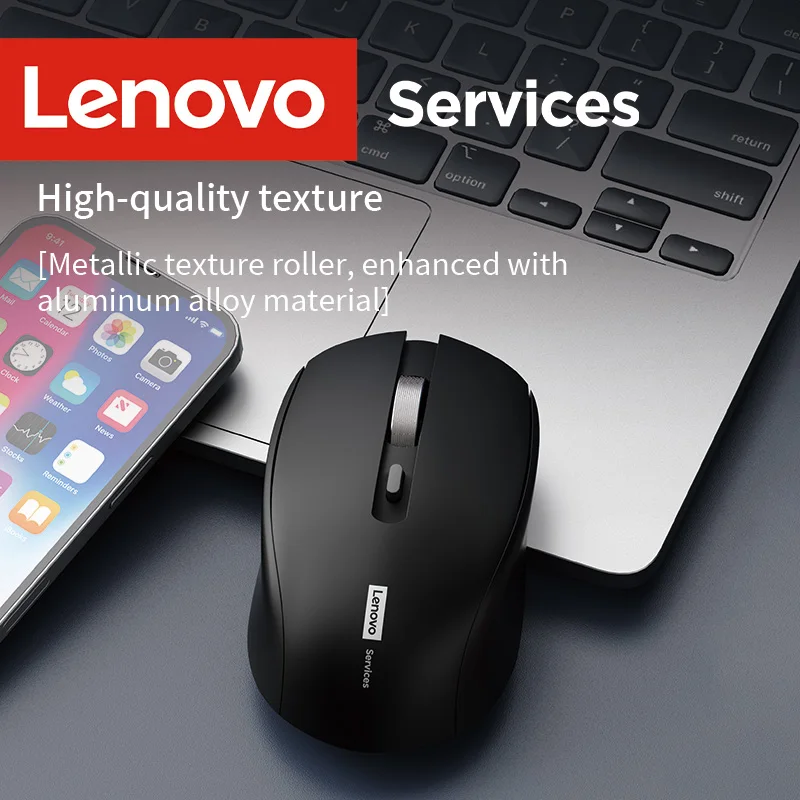
The N220 mouse presents a symmetrical, low-profile contour, visible in both its white and black iterations. It measures 103x61x33mm and weighs a mere 57 grams. The smooth, matte finish across its surface suggests a comfortable tactile experience.
This compact and lightweight construction facilitates easy portability, making it suitable for users who frequently move between workstations or travel. The reduced mass minimizes the effort required for movement, potentially lessening forearm fatigue over extended periods. A light touch is all it needs.
Unlike bulkier, feature-heavy gaming mice that often prioritize aggressive contours and substantial weight for stability, the N220 focuses on unobtrusive presence. Its design caters to general office tasks where a neutral hand posture and effortless gliding are more critical than specialized grip support. This prevents the wrist from being forced into awkward angles.
The mouse's relatively flat profile is conducive to a fingertip or claw grip for many users. For those with smaller to average-sized hands, a relaxed palm grip might also be achievable. The gentle slope prevents excessive wrist extension.
Maintaining a neutral wrist position is crucial for preventing conditions like carpal tunnel syndrome. The N220's dimensions encourage a more natural alignment of the hand and wrist during use. This design choice aims to reduce the cumulative strain associated with repetitive mouse movements over long work sessions.
Standard office mice often feature more pronounced humps, which can force the wrist into an unnatural upward bend. The N220's subdued form factor actively works against this, promoting a flatter, more ergonomic wrist angle. This is a subtle but significant benefit.
A key advertised feature is the mute button, facilitating a silent atmosphere. The product description highlights a low-noise design, aiming for a quiet office environment with no distractions. Click noise is significantly reduced.
This silent operation is a direct ergonomic benefit, extending beyond just auditory comfort. The absence of loud clicks reduces auditory fatigue for the user and those nearby, fostering a more peaceful work setting. It also implies a softer, less jarring tactile feedback, which can contribute to reduced finger strain over thousands of clicks.
Many conventional mice produce audible and sometimes sharp clicking sounds, which can be disruptive and even contribute to a sense of 'impact' on the finger. The N220's silent mechanism mitigates this, offering a smoother, less fatiguing interaction. This can make a real difference during long typing sessions.
The N220 boasts high-performance sensing and precise response, with a 250Hz response rate and a maximum 1600 DPI. It also claims 10G acceleration. These specifications indicate a capable tracking engine.
High DPI (Dots Per Inch) allows the cursor to travel further across the screen with minimal physical mouse movement. This reduces the overall distance the hand needs to travel, minimizing micro-adjustments and repetitive strain on the wrist and arm. A higher response rate ensures immediate feedback from hand movements.
Entry-level mice often feature lower DPI settings, forcing users to make larger, more sweeping hand movements to navigate the screen. The N220's 1600 DPI capability provides ample sensitivity for most business and office applications, enabling more precise and less strenuous control. It responds quickly.
The mouse supports multi-device connection with a one-click switch, utilizing both a 2.4G receiver and Wireless 5.1 dual-mode switching. This offers significant flexibility for users with multiple computing devices. Switching is effortless.
This dual-mode capability means a single mouse can seamlessly transition between, for example, a desktop PC (via 2.4G dongle) and a laptop or tablet (via Bluetooth). This eliminates the need for multiple mice, reducing desk clutter and simplifying workflow. It enhances productivity.
Unlike single-mode wireless mice that are limited to either a dongle or Bluetooth, the N220 provides both options, maximizing compatibility and convenience. This versatility is a strong selling point for modern, multi-device users. It adapts to various setups.
Lenovo emphasizes brand strength and quality assurance, citing a 3 million key presses lifespan test. The mouse is powered by a 1.5V dry battery, though batteries are not included with the product. Longevity is a focus.
A 3 million key press lifespan indicates a robust build quality for the primary click mechanisms, suggesting the mouse will withstand extensive daily use in an office environment. This contributes to the product's long-term value. It promises extended service.
While some premium mice feature rechargeable internal batteries, the use of a standard dry battery (likely AA or AAA) offers the convenience of quick replacement without downtime. Users can simply swap in a new battery when needed, avoiding charging cables. This is a practical approach.
The Lenovo N220 Dual-mode Wireless Mouse presents a compelling option for office professionals and mobile users seeking a balance of functionality, quiet operation, and ergonomic consideration in a compact package. Its dual-mode connectivity and silent clicks address modern workflow demands, while its lightweight, neutral design aims to mitigate common sources of strain during prolonged use. The emphasis on a comfortable grip and reduced noise makes it a thoughtful tool for maintaining well-being during daily computing tasks. This mouse is an upgrade from standard peripherals, offering a more serene and efficient interaction with digital workspaces. Imagine navigating documents and applications with effortless precision, free from distracting clicks and wrist discomfort, allowing full concentration on the task at hand.
Ergonomic Contours and Hand Comfort
The N220 mouse presents a symmetrical, low-profile contour, visible in both its white and black iterations. It measures 103x61x33mm and weighs a mere 57 grams. The smooth, matte finish across its surface suggests a comfortable tactile experience.
This compact and lightweight construction facilitates easy portability, making it suitable for users who frequently move between workstations or travel. The reduced mass minimizes the effort required for movement, potentially lessening forearm fatigue over extended periods. A light touch is all it needs.
Unlike bulkier, feature-heavy gaming mice that often prioritize aggressive contours and substantial weight for stability, the N220 focuses on unobtrusive presence. Its design caters to general office tasks where a neutral hand posture and effortless gliding are more critical than specialized grip support. This prevents the wrist from being forced into awkward angles.
Grip Dynamics and Wrist Health
The mouse's relatively flat profile is conducive to a fingertip or claw grip for many users. For those with smaller to average-sized hands, a relaxed palm grip might also be achievable. The gentle slope prevents excessive wrist extension.
Maintaining a neutral wrist position is crucial for preventing conditions like carpal tunnel syndrome. The N220's dimensions encourage a more natural alignment of the hand and wrist during use. This design choice aims to reduce the cumulative strain associated with repetitive mouse movements over long work sessions.
Standard office mice often feature more pronounced humps, which can force the wrist into an unnatural upward bend. The N220's subdued form factor actively works against this, promoting a flatter, more ergonomic wrist angle. This is a subtle but significant benefit.
Silent Operation for Focused Work
A key advertised feature is the mute button, facilitating a silent atmosphere. The product description highlights a low-noise design, aiming for a quiet office environment with no distractions. Click noise is significantly reduced.
This silent operation is a direct ergonomic benefit, extending beyond just auditory comfort. The absence of loud clicks reduces auditory fatigue for the user and those nearby, fostering a more peaceful work setting. It also implies a softer, less jarring tactile feedback, which can contribute to reduced finger strain over thousands of clicks.
Many conventional mice produce audible and sometimes sharp clicking sounds, which can be disruptive and even contribute to a sense of 'impact' on the finger. The N220's silent mechanism mitigates this, offering a smoother, less fatiguing interaction. This can make a real difference during long typing sessions.
Precision and Responsiveness for Reduced Strain
The N220 boasts high-performance sensing and precise response, with a 250Hz response rate and a maximum 1600 DPI. It also claims 10G acceleration. These specifications indicate a capable tracking engine.
High DPI (Dots Per Inch) allows the cursor to travel further across the screen with minimal physical mouse movement. This reduces the overall distance the hand needs to travel, minimizing micro-adjustments and repetitive strain on the wrist and arm. A higher response rate ensures immediate feedback from hand movements.
Entry-level mice often feature lower DPI settings, forcing users to make larger, more sweeping hand movements to navigate the screen. The N220's 1600 DPI capability provides ample sensitivity for most business and office applications, enabling more precise and less strenuous control. It responds quickly.
Dual-Mode Connectivity and Versatility
The mouse supports multi-device connection with a one-click switch, utilizing both a 2.4G receiver and Wireless 5.1 dual-mode switching. This offers significant flexibility for users with multiple computing devices. Switching is effortless.
This dual-mode capability means a single mouse can seamlessly transition between, for example, a desktop PC (via 2.4G dongle) and a laptop or tablet (via Bluetooth). This eliminates the need for multiple mice, reducing desk clutter and simplifying workflow. It enhances productivity.
Unlike single-mode wireless mice that are limited to either a dongle or Bluetooth, the N220 provides both options, maximizing compatibility and convenience. This versatility is a strong selling point for modern, multi-device users. It adapts to various setups.
Durability and Power Management
Lenovo emphasizes brand strength and quality assurance, citing a 3 million key presses lifespan test. The mouse is powered by a 1.5V dry battery, though batteries are not included with the product. Longevity is a focus.
A 3 million key press lifespan indicates a robust build quality for the primary click mechanisms, suggesting the mouse will withstand extensive daily use in an office environment. This contributes to the product's long-term value. It promises extended service.
While some premium mice feature rechargeable internal batteries, the use of a standard dry battery (likely AA or AAA) offers the convenience of quick replacement without downtime. Users can simply swap in a new battery when needed, avoiding charging cables. This is a practical approach.
The Ergonomic Verdict
The Lenovo N220 Dual-mode Wireless Mouse presents a compelling option for office professionals and mobile users seeking a balance of functionality, quiet operation, and ergonomic consideration in a compact package. Its dual-mode connectivity and silent clicks address modern workflow demands, while its lightweight, neutral design aims to mitigate common sources of strain during prolonged use. The emphasis on a comfortable grip and reduced noise makes it a thoughtful tool for maintaining well-being during daily computing tasks. This mouse is an upgrade from standard peripherals, offering a more serene and efficient interaction with digital workspaces. Imagine navigating documents and applications with effortless precision, free from distracting clicks and wrist discomfort, allowing full concentration on the task at hand.