EasyThreed K10 Portable 3D Printer
Official Store Deal
Expert Analysis Overview
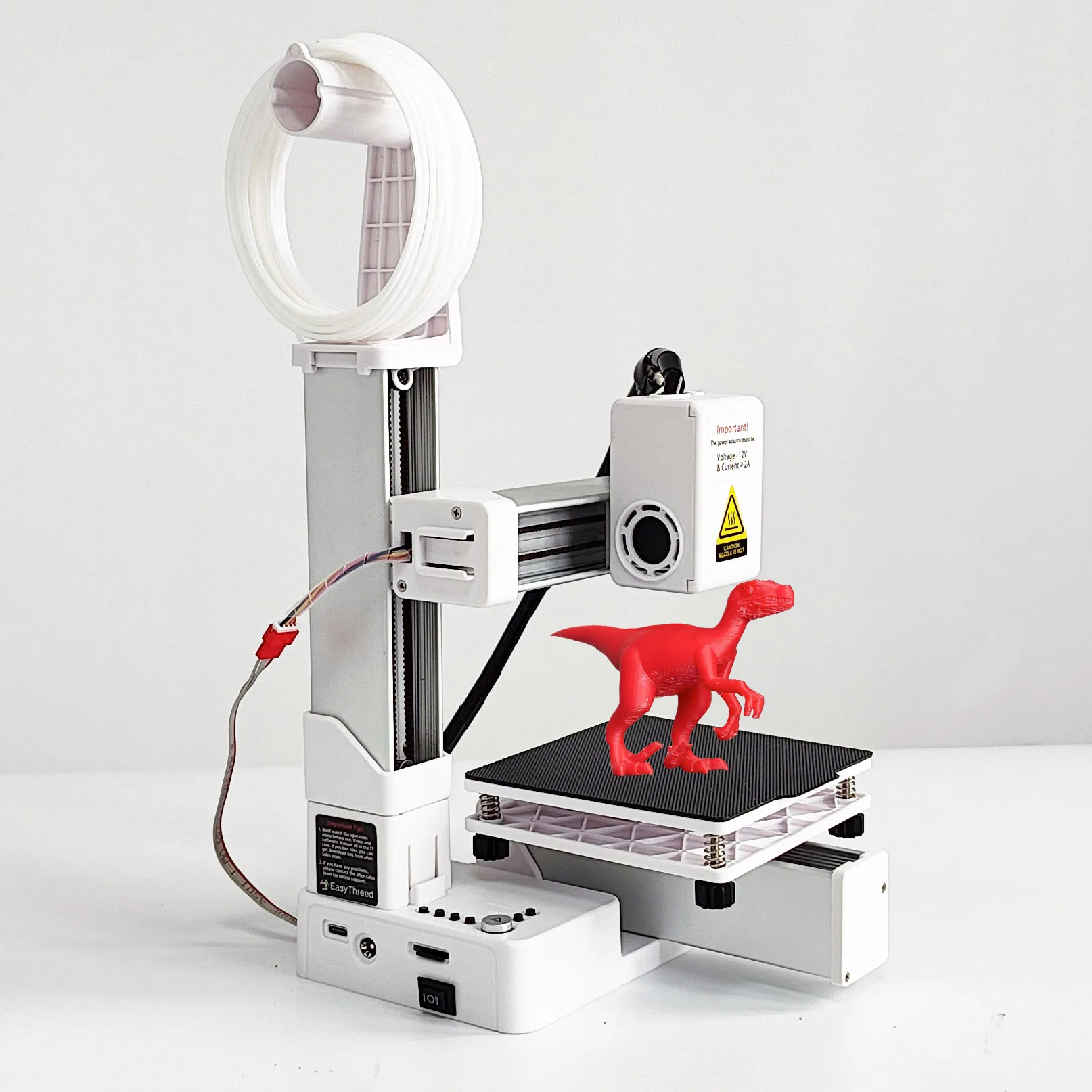
The EasyThreed K10 Portable 3D Printer is a streamlined FDM (Fused Deposition Modeling) device, specifically designed for educational environments and new users venturing into additive manufacturing. This compact machine aims to demystify 3D printing, making it an accessible tool for learning and creative exploration. Its straightforward operation and robust, pre-assembled structure position it as an ideal first printer.
The K10 arrives nearly ready to print. This out-of-the-box readiness significantly reduces the common setup frustrations associated with many entry-level 3D printers. Educators can appreciate this. The minimal assembly means less time spent on construction and more time on actual printing and learning.
Unlike kits that demand hours of intricate assembly, the K10’s pre-built nature ensures a quick start. This design choice directly addresses a major pain point for beginners: the initial hurdle of complex setup. A simple, intuitive experience awaits. The compact form factor, measuring approximately 155mm x 175mm x 210mm, allows it to fit comfortably on a classroom desk or a small workspace without dominating the area. Its lightweight construction, with a net weight of just 0.9kg, makes it easily portable, allowing for flexible deployment across different learning stations or for demonstrations. The frame feels solid. The simple white and black aesthetic is unobtrusive.
Operating the EasyThreed K10 centers around simplicity. A single-button interface guides users through the core functions, eliminating the intimidation often felt with multi-menu displays. This "one-key operation" philosophy is paramount for students and novices. They can focus on design principles rather than complex machine controls.
The printer relies on a TF card for print files. This offline printing method is a significant safety feature, as it removes the need for a constant computer connection during operation. It also prevents accidental interference with ongoing prints. The process is straightforward: prepare the 3D model using slicing software, save it to the TF card, insert the card, and initiate the print. This workflow ensures a controlled learning environment.
The magnetic print bed is another thoughtful inclusion. Once a print is complete, the flexible magnetic surface allows for effortless removal of the printed object. This prevents damage to delicate prints and eliminates the need for scrapers or excessive force, a common issue with fixed beds. It protects both the print and the user. The bed size of 100x100x100mm is perfectly adequate for small educational projects, prototypes, or fun trinkets.
The K10 supports 1.75mm PLA and TPU filaments. PLA (Polylactic Acid) is a biodegradable, easy-to-print material, ideal for beginners due to its low warping and lack of strong odors. TPU (Thermoplastic Polyurethane) introduces the ability to print flexible objects, expanding the creative possibilities for students. This dual material support offers versatility.
The extruder operates within a temperature range of 180°C to 230°C. This range is standard for PLA and TPU, ensuring proper melting and extrusion. The single nozzle, with a diameter of 0.4mm, is a common choice for balancing detail and print speed. This standard nozzle size is versatile. Print speeds range from 10-40mm/s, which is suitable for an entry-level machine, prioritizing print quality over speed. Layer thickness can be adjusted from 0.04mm to 0.4mm, allowing for a balance between fine detail and faster prints. A thinner layer creates smoother surfaces.
Compared to more advanced printers with multiple extruders or higher temperature capabilities, the K10's focus on PLA and TPU simplifies material management. This prevents confusion for new users. The consistent extrusion system, combined with a well-calibrated print bed, yields reliable results for basic prints.
Successful 3D printing relies heavily on the slicing software, which converts 3D models into instructions the printer understands. The EasyThreed K10 is designed to work seamlessly with widely available slicers like Cura. Crucially, the manufacturer provides a specific printer profile on the included TF card. This profile contains optimized settings for the K10, ensuring consistent print quality and preventing common errors.
Users must add this printer profile to Cura. This step is non-negotiable for optimal performance. Neglecting this can lead to poor print quality or even damage to the printer, particularly the nozzle or print bed. The teaching video provided by EasyThreed guides users through this essential setup. This emphasis on correct software configuration is a key aspect of safe and successful printing.
Imagine a student designing their first geometric shape. With the correct profile, the transition from digital model to physical object becomes a smooth, rewarding process. Without it, frustration can quickly set in. The software's role is to translate creativity into reality.
For an educational setting, safety is paramount. The K10's design incorporates several features that contribute to a safer learning environment. The enclosed power adapter ensures a stable and correct power supply (12V, >=2A, Type C port), minimizing electrical risks. The compact, stable base reduces the chance of accidental tipping. The extruder assembly, while exposed, operates at temperatures that are clearly marked with warning labels.
Maintenance is straightforward. Regular cleaning of the print bed and occasional inspection of the nozzle are generally sufficient. The magnetic print bed simplifies removal and cleaning. Users are advised not to touch the hot nozzle directly. Simple tools are provided for clearing excess filament. These practices extend the printer's lifespan.
Troubleshooting common issues, such as poor bed adhesion or clogged nozzles, is made easier with the provided user guide and instructional videos. The focus is on empowering users to solve problems independently, fostering a deeper understanding of the printing process. This hands-on problem-solving is invaluable.
The EasyThreed K10 stands out as an excellent tool for STEM education. Its low cost makes it accessible for schools or individual students on a budget. The ease of use lowers the barrier to entry, allowing younger students or those new to technology to quickly grasp the fundamentals of additive manufacturing. It's a gateway to innovation.
This printer allows students to bring digital designs to life, fostering creativity, problem-solving skills, and an understanding of engineering principles. From designing simple gears to creating custom prototypes, the K10 provides a tangible link between theoretical concepts and practical application. It bridges the digital and physical worlds. The ability to quickly iterate on designs, print them, and then physically evaluate them is a powerful learning experience.
The K10 is an upgrade from simply viewing 3D models on a screen. It transforms passive observation into active creation. Unlike more complex industrial printers that require extensive training, the K10 focuses on the core principles of FDM printing in an approachable package. It empowers students.
Imagine a classroom where every student can design and print their own small inventions. Imagine the excitement of holding a physical object that was once just an idea. The EasyThreed K10 facilitates this kind of engaging, hands-on learning. It equips the next generation with essential skills for a future driven by design and digital fabrication. This printer is not just a device; it is a catalyst for inspiration and practical skill development. It makes complex concepts approachable.
Unpacking the Educational Advantage
The K10 arrives nearly ready to print. This out-of-the-box readiness significantly reduces the common setup frustrations associated with many entry-level 3D printers. Educators can appreciate this. The minimal assembly means less time spent on construction and more time on actual printing and learning.
Unlike kits that demand hours of intricate assembly, the K10’s pre-built nature ensures a quick start. This design choice directly addresses a major pain point for beginners: the initial hurdle of complex setup. A simple, intuitive experience awaits. The compact form factor, measuring approximately 155mm x 175mm x 210mm, allows it to fit comfortably on a classroom desk or a small workspace without dominating the area. Its lightweight construction, with a net weight of just 0.9kg, makes it easily portable, allowing for flexible deployment across different learning stations or for demonstrations. The frame feels solid. The simple white and black aesthetic is unobtrusive.
Simplified Operation for Learning
Operating the EasyThreed K10 centers around simplicity. A single-button interface guides users through the core functions, eliminating the intimidation often felt with multi-menu displays. This "one-key operation" philosophy is paramount for students and novices. They can focus on design principles rather than complex machine controls.
The printer relies on a TF card for print files. This offline printing method is a significant safety feature, as it removes the need for a constant computer connection during operation. It also prevents accidental interference with ongoing prints. The process is straightforward: prepare the 3D model using slicing software, save it to the TF card, insert the card, and initiate the print. This workflow ensures a controlled learning environment.
The magnetic print bed is another thoughtful inclusion. Once a print is complete, the flexible magnetic surface allows for effortless removal of the printed object. This prevents damage to delicate prints and eliminates the need for scrapers or excessive force, a common issue with fixed beds. It protects both the print and the user. The bed size of 100x100x100mm is perfectly adequate for small educational projects, prototypes, or fun trinkets.
Material Compatibility and Extrusion Precision
The K10 supports 1.75mm PLA and TPU filaments. PLA (Polylactic Acid) is a biodegradable, easy-to-print material, ideal for beginners due to its low warping and lack of strong odors. TPU (Thermoplastic Polyurethane) introduces the ability to print flexible objects, expanding the creative possibilities for students. This dual material support offers versatility.
The extruder operates within a temperature range of 180°C to 230°C. This range is standard for PLA and TPU, ensuring proper melting and extrusion. The single nozzle, with a diameter of 0.4mm, is a common choice for balancing detail and print speed. This standard nozzle size is versatile. Print speeds range from 10-40mm/s, which is suitable for an entry-level machine, prioritizing print quality over speed. Layer thickness can be adjusted from 0.04mm to 0.4mm, allowing for a balance between fine detail and faster prints. A thinner layer creates smoother surfaces.
Compared to more advanced printers with multiple extruders or higher temperature capabilities, the K10's focus on PLA and TPU simplifies material management. This prevents confusion for new users. The consistent extrusion system, combined with a well-calibrated print bed, yields reliable results for basic prints.
Slicing Software and Profile Management
Successful 3D printing relies heavily on the slicing software, which converts 3D models into instructions the printer understands. The EasyThreed K10 is designed to work seamlessly with widely available slicers like Cura. Crucially, the manufacturer provides a specific printer profile on the included TF card. This profile contains optimized settings for the K10, ensuring consistent print quality and preventing common errors.
Users must add this printer profile to Cura. This step is non-negotiable for optimal performance. Neglecting this can lead to poor print quality or even damage to the printer, particularly the nozzle or print bed. The teaching video provided by EasyThreed guides users through this essential setup. This emphasis on correct software configuration is a key aspect of safe and successful printing.
Imagine a student designing their first geometric shape. With the correct profile, the transition from digital model to physical object becomes a smooth, rewarding process. Without it, frustration can quickly set in. The software's role is to translate creativity into reality.
Safety and Maintenance Considerations
For an educational setting, safety is paramount. The K10's design incorporates several features that contribute to a safer learning environment. The enclosed power adapter ensures a stable and correct power supply (12V, >=2A, Type C port), minimizing electrical risks. The compact, stable base reduces the chance of accidental tipping. The extruder assembly, while exposed, operates at temperatures that are clearly marked with warning labels.
Maintenance is straightforward. Regular cleaning of the print bed and occasional inspection of the nozzle are generally sufficient. The magnetic print bed simplifies removal and cleaning. Users are advised not to touch the hot nozzle directly. Simple tools are provided for clearing excess filament. These practices extend the printer's lifespan.
Troubleshooting common issues, such as poor bed adhesion or clogged nozzles, is made easier with the provided user guide and instructional videos. The focus is on empowering users to solve problems independently, fostering a deeper understanding of the printing process. This hands-on problem-solving is invaluable.
The Value Proposition for STEM Education
The EasyThreed K10 stands out as an excellent tool for STEM education. Its low cost makes it accessible for schools or individual students on a budget. The ease of use lowers the barrier to entry, allowing younger students or those new to technology to quickly grasp the fundamentals of additive manufacturing. It's a gateway to innovation.
This printer allows students to bring digital designs to life, fostering creativity, problem-solving skills, and an understanding of engineering principles. From designing simple gears to creating custom prototypes, the K10 provides a tangible link between theoretical concepts and practical application. It bridges the digital and physical worlds. The ability to quickly iterate on designs, print them, and then physically evaluate them is a powerful learning experience.
The K10 is an upgrade from simply viewing 3D models on a screen. It transforms passive observation into active creation. Unlike more complex industrial printers that require extensive training, the K10 focuses on the core principles of FDM printing in an approachable package. It empowers students.
Imagine a classroom where every student can design and print their own small inventions. Imagine the excitement of holding a physical object that was once just an idea. The EasyThreed K10 facilitates this kind of engaging, hands-on learning. It equips the next generation with essential skills for a future driven by design and digital fabrication. This printer is not just a device; it is a catalyst for inspiration and practical skill development. It makes complex concepts approachable.