Dual-Band USB WiFi 5 & Bluetooth 5.0 Adapter
Official Store Deal
Expert Analysis Overview
The Dual-Band USB WiFi 5 & Bluetooth 5.0 Adapter is a pragmatic connectivity solution engineered for users seeking to modernize legacy systems or augment existing wireless capabilities without significant hardware investment. This adapter addresses the common pain points of outdated integrated network cards, offering a streamlined upgrade path. Its compact design belies its dual-functionality, providing both high-speed wireless networking and robust Bluetooth peripheral support. It offers clear performance uplift.
This adapter operates on the IEEE 802.11ac standard, commonly known as WiFi 5. This designation signifies its capability to utilize both the 2.4GHz and 5GHz frequency bands. The 2.4GHz band, while offering broader range and better penetration through obstacles, is often congested by a multitude of devices, including other WiFi networks, Bluetooth devices, and even microwaves. This pervasive congestion reduces throughput.
The 5GHz band, conversely, provides significantly higher throughput and reduced interference due to a larger number of available channels and less widespread adoption by older devices. This makes it crucial for bandwidth-intensive tasks such as 4K video streaming, online gaming, and large file transfers within a local network. It leverages less crowded spectrum. However, the 5GHz band typically has a shorter effective range and is more susceptible to attenuation by walls and other physical barriers, necessitating closer proximity to the wireless access point for optimal performance.
The stated 600Mbps maximum theoretical throughput is an aggregate figure. This combines the theoretical maximums of 150Mbps on the 2.4GHz (802.11n) band and 433Mbps on the 5GHz (802.11ac) band. It is imperative for users to understand that these are theoretical maximums under ideal laboratory conditions. Actual performance will invariably be lower due to environmental factors, network congestion, the quality of the wireless access point, and the host system's USB interface. A faster connection is possible. For instance, a system connected via a USB 2.0 port, which has a theoretical maximum throughput of 480Mbps, could bottleneck the 5GHz band's potential, preventing it from reaching its full 433Mbps.
Compared to older 802.11n-only adapters, this unit represents a substantial upgrade in potential bandwidth and network efficiency. Users upgrading from single-band 2.4GHz solutions will immediately notice improved stability and speed, especially when connected to a modern 5GHz-capable router. This is a critical distinction. The ability to switch to the 5GHz band effectively mitigates the performance degradation often experienced on crowded 2.4GHz networks, providing a more consistent and responsive internet experience. This capability is essential for modern usage, where multiple devices simultaneously demand high bandwidth.
The inclusion of Bluetooth 5.0 is a significant feature, providing enhanced capabilities over previous Bluetooth iterations like 4.0 or 4.2. Bluetooth 5.0 offers increased range, typically up to four times that of Bluetooth 4.2 in open spaces, faster speeds (up to twice as fast), and improved broadcast message capacity, which is beneficial for IoT applications. Device pairing is quicker.
For users with older systems lacking integrated Bluetooth or featuring an outdated version, this adapter provides a seamless upgrade path. Connecting wireless headphones, keyboards, mice, game controllers, or even transferring files to a smartphone becomes a straightforward process. The improved efficiency of Bluetooth 5.0 also contributes to better battery life for connected devices, as data transmission is faster and more power-efficient, reducing the drain on peripheral batteries. This enhances user convenience.
Unlike generic, single-function Bluetooth dongles, this integrated solution simplifies hardware management by consolidating two essential wireless technologies into a single USB port. This reduces port consumption and streamlines driver management, particularly on Windows 10/11 where it often operates without explicit driver installation. Dual functionality is key. The coexistence of WiFi and Bluetooth on a single chip can sometimes lead to minor interference, especially when both are heavily utilized on the 2.4GHz band. However, modern chipsets are designed with coexistence mechanisms to manage this, and the availability of the 5GHz WiFi band helps significantly mitigate potential conflicts by offloading WiFi traffic.
The "drive-free" claim for Windows 10/11 is a critical aspect of its user-friendliness. This indicates the adapter utilizes a standardized chipset with native driver support within the Windows operating system. This eliminates the often-frustrating process of locating, downloading, and installing proprietary drivers from a CD or a manufacturer's website, which can be a significant hurdle for less tech-savvy users. Setup is simplified. The operating system automatically recognizes the device upon insertion and applies the necessary drivers, making it immediately functional without user intervention.
For systems running Windows 10 or 11, the adapter should function as a true plug-and-play device, automatically detected and configured upon insertion. This significantly reduces the barrier to entry for users less familiar with driver management or those seeking a quick, hassle-free upgrade. Operational readiness is a benefit. This ensures a smooth user experience from the outset.
However, for older operating systems such as Windows 7 or 8, or alternative platforms like macOS or various Linux distributions, manual driver installation is highly probable. While community drivers might exist for some common chipsets (e.g., Realtek, MediaTek), official support is not guaranteed, potentially leading to compatibility challenges, reduced functionality, or instability. This requires user diligence. Users on non-Windows 10/11 platforms should verify driver availability and installation procedures before purchase to ensure full functionality and avoid potential system conflicts.
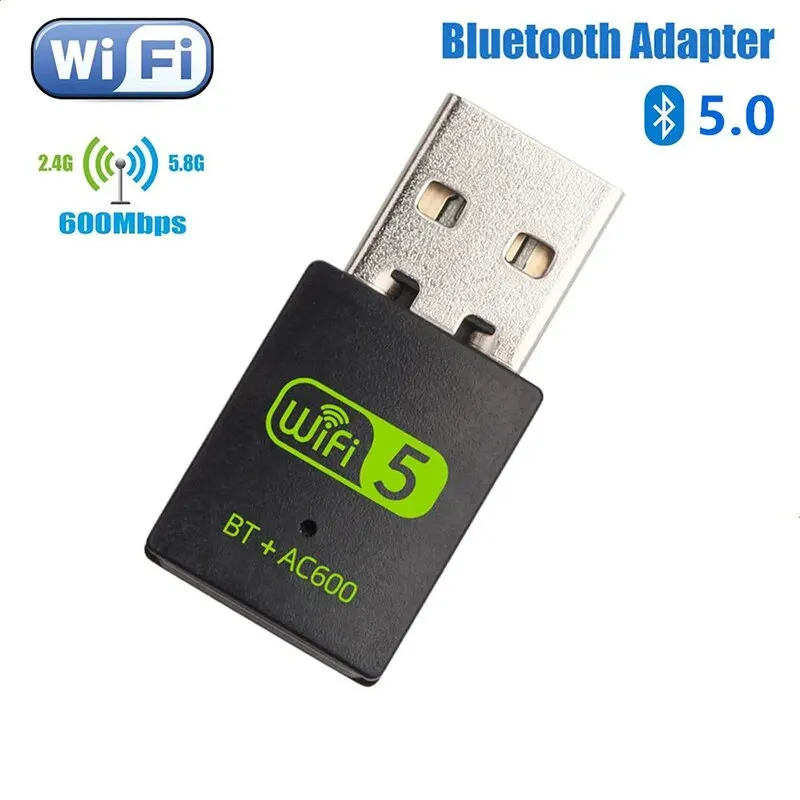
The adapter's ultra-compact form factor is immediately apparent from the visual evidence. Its diminutive size ensures it protrudes minimally from the USB port, akin to a small thumb drive. This design choice is particularly beneficial for laptops, where larger adapters can be easily damaged if bumped or obstruct adjacent ports, limiting the use of other peripherals like external hard drives or mice. It's very small.
This compact design also enhances portability, allowing the adapter to remain connected to a laptop even when placed in a bag, reducing the risk of loss or damage during transit. The robust, matte black casing suggests a degree of durability suitable for everyday use, resisting minor scratches and fingerprints while maintaining a professional appearance. Its unobtrusive nature is a key selling point, making it ideal for mobile users or those who prefer a clean, minimalist setup without bulky external components.
Compared to bulkier external adapters that might require an antenna or a short cable, this dongle offers a streamlined aesthetic and practical advantage. It integrates almost seamlessly with the host device, maintaining a clean workspace or travel setup without adding unnecessary bulk. This minimizes clutter. The absence of an external antenna, while contributing to its compact size, might slightly limit its maximum range and signal strength compared to adapters with larger, adjustable antennas, especially in environments with significant signal attenuation or at greater distances from the access point.
From a network engineering standpoint, this device is fundamentally a client-side adapter. It is designed to connect a host system to an existing wireless network, not to function as an access point, router, or network switch. Its capabilities are focused on endpoint connectivity, providing a wireless bridge for a single device. This is a consumer device. The underlying chipset, likely a common vendor like Realtek or MediaTek, is configured for basic client operations, not for complex network infrastructure roles.
The absence of explicit VLAN support or advanced packet inspection features means this adapter is unsuitable for complex network segmentation or enterprise-grade security implementations. Network administrators requiring granular control over traffic flow, secure multi-tenant environments, or the ability to tag network packets for Quality of Service (QoS) will need dedicated hardware solutions such as managed switches or enterprise-grade wireless access points. It lacks such capabilities. Its operational scope is limited to basic data transmission.
Furthermore, the "drive-free" nature, while convenient, typically implies a reliance on generic drivers that do not expose low-level hardware controls. This precludes the possibility of installing custom firmware like OpenWRT, which is a common practice for advanced users seeking to extend router functionality, implement custom routing rules, or run specialized network services. Customization is not an option. The chipset is locked to its basic functionality, lacking the necessary hardware abstraction layer for third-party firmware. Moreover, the compact form factor typically means a single internal antenna, limiting its ability to leverage advanced MIMO (Multiple-Input, Multiple-Output) techniques for spatial multiplexing, which are crucial for maximizing throughput and reliability in more demanding scenarios.
For a home user, these limitations are largely irrelevant. The adapter excels at its intended purpose: providing reliable, dual-band WiFi and Bluetooth connectivity for a single client device. However, for a power user, a network professional, or someone seeking to build a robust, enterprise-grade network at home with advanced traffic management or security protocols, this device will not meet those requirements. It serves a specific niche. Its simplicity is its strength for the target audience, but also its inherent limitation for advanced networking tasks, making it unsuitable for roles beyond basic client connectivity.
The market positioning of this adapter is clearly aimed at users seeking a cost-effective upgrade for their existing hardware. Instead of investing in a new laptop or motherboard with integrated WiFi 5 and Bluetooth 5.0, this dongle provides the necessary capabilities at a fraction of the cost. It's an economical choice. This approach allows users to extend the useful life of their current computing equipment, avoiding the higher capital expenditure associated with full system replacements. This represents a significant long-term value, transforming an older machine into a modern connectivity hub.
The combination of dual-band WiFi 5 and Bluetooth 5.0 in a single, compact unit offers significant return on investment for users with older systems. It extends the functional lifespan of hardware that might otherwise be considered obsolete in terms of wireless connectivity, enabling access to modern network speeds and peripheral ecosystems. This saves money. The value proposition is particularly strong for users with desktops that lack any wireless capabilities or laptops with outdated 802.11n WiFi and no Bluetooth, providing a substantial upgrade in capability for a minimal outlay.
Unlike purchasing separate WiFi and Bluetooth adapters, which would consume two USB ports and potentially introduce driver conflicts or management complexities, this 2-in-1 solution offers streamlined operation. This integrated approach simplifies installation and ongoing management, providing a superior user experience for its target demographic. It's a smart consolidation. The convenience of a single device handling both crucial wireless functions cannot be overstated for users prioritizing simplicity and efficiency, making it a compelling upgrade over fragmented solutions.
Imagine a scenario where your older desktop, previously tethered by an Ethernet cable or struggling with a slow, single-band WiFi connection, suddenly gains the freedom of high-speed 5GHz wireless. Picture seamless streaming of 4K content, faster file transfers across your local network, and the effortless pairing of your favorite Bluetooth headphones for an immersive audio experience. This adapter transforms a limited system into a versatile hub, ready to connect to the modern digital landscape. The frustration of dropped connections and slow downloads becomes a distant memory, replaced by the smooth, responsive performance that today's applications demand. This is the tangible benefit. The ability to effortlessly connect to a wider range of devices and networks, all from a single, unobtrusive USB dongle, fundamentally enhances the computing experience. It empowers users to fully participate in a wirelessly connected world, ensuring their systems remain relevant and capable, providing a significant upgrade in daily usability and future-proofing connectivity for years to come.
Wireless Performance and Protocol Adherence
This adapter operates on the IEEE 802.11ac standard, commonly known as WiFi 5. This designation signifies its capability to utilize both the 2.4GHz and 5GHz frequency bands. The 2.4GHz band, while offering broader range and better penetration through obstacles, is often congested by a multitude of devices, including other WiFi networks, Bluetooth devices, and even microwaves. This pervasive congestion reduces throughput.
The 5GHz band, conversely, provides significantly higher throughput and reduced interference due to a larger number of available channels and less widespread adoption by older devices. This makes it crucial for bandwidth-intensive tasks such as 4K video streaming, online gaming, and large file transfers within a local network. It leverages less crowded spectrum. However, the 5GHz band typically has a shorter effective range and is more susceptible to attenuation by walls and other physical barriers, necessitating closer proximity to the wireless access point for optimal performance.
The stated 600Mbps maximum theoretical throughput is an aggregate figure. This combines the theoretical maximums of 150Mbps on the 2.4GHz (802.11n) band and 433Mbps on the 5GHz (802.11ac) band. It is imperative for users to understand that these are theoretical maximums under ideal laboratory conditions. Actual performance will invariably be lower due to environmental factors, network congestion, the quality of the wireless access point, and the host system's USB interface. A faster connection is possible. For instance, a system connected via a USB 2.0 port, which has a theoretical maximum throughput of 480Mbps, could bottleneck the 5GHz band's potential, preventing it from reaching its full 433Mbps.
Compared to older 802.11n-only adapters, this unit represents a substantial upgrade in potential bandwidth and network efficiency. Users upgrading from single-band 2.4GHz solutions will immediately notice improved stability and speed, especially when connected to a modern 5GHz-capable router. This is a critical distinction. The ability to switch to the 5GHz band effectively mitigates the performance degradation often experienced on crowded 2.4GHz networks, providing a more consistent and responsive internet experience. This capability is essential for modern usage, where multiple devices simultaneously demand high bandwidth.
Bluetooth Integration and Peripheral Management
The inclusion of Bluetooth 5.0 is a significant feature, providing enhanced capabilities over previous Bluetooth iterations like 4.0 or 4.2. Bluetooth 5.0 offers increased range, typically up to four times that of Bluetooth 4.2 in open spaces, faster speeds (up to twice as fast), and improved broadcast message capacity, which is beneficial for IoT applications. Device pairing is quicker.
For users with older systems lacking integrated Bluetooth or featuring an outdated version, this adapter provides a seamless upgrade path. Connecting wireless headphones, keyboards, mice, game controllers, or even transferring files to a smartphone becomes a straightforward process. The improved efficiency of Bluetooth 5.0 also contributes to better battery life for connected devices, as data transmission is faster and more power-efficient, reducing the drain on peripheral batteries. This enhances user convenience.
Unlike generic, single-function Bluetooth dongles, this integrated solution simplifies hardware management by consolidating two essential wireless technologies into a single USB port. This reduces port consumption and streamlines driver management, particularly on Windows 10/11 where it often operates without explicit driver installation. Dual functionality is key. The coexistence of WiFi and Bluetooth on a single chip can sometimes lead to minor interference, especially when both are heavily utilized on the 2.4GHz band. However, modern chipsets are designed with coexistence mechanisms to manage this, and the availability of the 5GHz WiFi band helps significantly mitigate potential conflicts by offloading WiFi traffic.
System Integration and Driver Architecture
The "drive-free" claim for Windows 10/11 is a critical aspect of its user-friendliness. This indicates the adapter utilizes a standardized chipset with native driver support within the Windows operating system. This eliminates the often-frustrating process of locating, downloading, and installing proprietary drivers from a CD or a manufacturer's website, which can be a significant hurdle for less tech-savvy users. Setup is simplified. The operating system automatically recognizes the device upon insertion and applies the necessary drivers, making it immediately functional without user intervention.
For systems running Windows 10 or 11, the adapter should function as a true plug-and-play device, automatically detected and configured upon insertion. This significantly reduces the barrier to entry for users less familiar with driver management or those seeking a quick, hassle-free upgrade. Operational readiness is a benefit. This ensures a smooth user experience from the outset.
However, for older operating systems such as Windows 7 or 8, or alternative platforms like macOS or various Linux distributions, manual driver installation is highly probable. While community drivers might exist for some common chipsets (e.g., Realtek, MediaTek), official support is not guaranteed, potentially leading to compatibility challenges, reduced functionality, or instability. This requires user diligence. Users on non-Windows 10/11 platforms should verify driver availability and installation procedures before purchase to ensure full functionality and avoid potential system conflicts.
Physical Design and Portability
The adapter's ultra-compact form factor is immediately apparent from the visual evidence. Its diminutive size ensures it protrudes minimally from the USB port, akin to a small thumb drive. This design choice is particularly beneficial for laptops, where larger adapters can be easily damaged if bumped or obstruct adjacent ports, limiting the use of other peripherals like external hard drives or mice. It's very small.
This compact design also enhances portability, allowing the adapter to remain connected to a laptop even when placed in a bag, reducing the risk of loss or damage during transit. The robust, matte black casing suggests a degree of durability suitable for everyday use, resisting minor scratches and fingerprints while maintaining a professional appearance. Its unobtrusive nature is a key selling point, making it ideal for mobile users or those who prefer a clean, minimalist setup without bulky external components.
Compared to bulkier external adapters that might require an antenna or a short cable, this dongle offers a streamlined aesthetic and practical advantage. It integrates almost seamlessly with the host device, maintaining a clean workspace or travel setup without adding unnecessary bulk. This minimizes clutter. The absence of an external antenna, while contributing to its compact size, might slightly limit its maximum range and signal strength compared to adapters with larger, adjustable antennas, especially in environments with significant signal attenuation or at greater distances from the access point.
Network Engineering Perspective: Limitations and Advanced Considerations
From a network engineering standpoint, this device is fundamentally a client-side adapter. It is designed to connect a host system to an existing wireless network, not to function as an access point, router, or network switch. Its capabilities are focused on endpoint connectivity, providing a wireless bridge for a single device. This is a consumer device. The underlying chipset, likely a common vendor like Realtek or MediaTek, is configured for basic client operations, not for complex network infrastructure roles.
The absence of explicit VLAN support or advanced packet inspection features means this adapter is unsuitable for complex network segmentation or enterprise-grade security implementations. Network administrators requiring granular control over traffic flow, secure multi-tenant environments, or the ability to tag network packets for Quality of Service (QoS) will need dedicated hardware solutions such as managed switches or enterprise-grade wireless access points. It lacks such capabilities. Its operational scope is limited to basic data transmission.
Furthermore, the "drive-free" nature, while convenient, typically implies a reliance on generic drivers that do not expose low-level hardware controls. This precludes the possibility of installing custom firmware like OpenWRT, which is a common practice for advanced users seeking to extend router functionality, implement custom routing rules, or run specialized network services. Customization is not an option. The chipset is locked to its basic functionality, lacking the necessary hardware abstraction layer for third-party firmware. Moreover, the compact form factor typically means a single internal antenna, limiting its ability to leverage advanced MIMO (Multiple-Input, Multiple-Output) techniques for spatial multiplexing, which are crucial for maximizing throughput and reliability in more demanding scenarios.
For a home user, these limitations are largely irrelevant. The adapter excels at its intended purpose: providing reliable, dual-band WiFi and Bluetooth connectivity for a single client device. However, for a power user, a network professional, or someone seeking to build a robust, enterprise-grade network at home with advanced traffic management or security protocols, this device will not meet those requirements. It serves a specific niche. Its simplicity is its strength for the target audience, but also its inherent limitation for advanced networking tasks, making it unsuitable for roles beyond basic client connectivity.
Value Proposition and Market Positioning
The market positioning of this adapter is clearly aimed at users seeking a cost-effective upgrade for their existing hardware. Instead of investing in a new laptop or motherboard with integrated WiFi 5 and Bluetooth 5.0, this dongle provides the necessary capabilities at a fraction of the cost. It's an economical choice. This approach allows users to extend the useful life of their current computing equipment, avoiding the higher capital expenditure associated with full system replacements. This represents a significant long-term value, transforming an older machine into a modern connectivity hub.
The combination of dual-band WiFi 5 and Bluetooth 5.0 in a single, compact unit offers significant return on investment for users with older systems. It extends the functional lifespan of hardware that might otherwise be considered obsolete in terms of wireless connectivity, enabling access to modern network speeds and peripheral ecosystems. This saves money. The value proposition is particularly strong for users with desktops that lack any wireless capabilities or laptops with outdated 802.11n WiFi and no Bluetooth, providing a substantial upgrade in capability for a minimal outlay.
Unlike purchasing separate WiFi and Bluetooth adapters, which would consume two USB ports and potentially introduce driver conflicts or management complexities, this 2-in-1 solution offers streamlined operation. This integrated approach simplifies installation and ongoing management, providing a superior user experience for its target demographic. It's a smart consolidation. The convenience of a single device handling both crucial wireless functions cannot be overstated for users prioritizing simplicity and efficiency, making it a compelling upgrade over fragmented solutions.
Concluding Thoughts on Enhanced Connectivity
Imagine a scenario where your older desktop, previously tethered by an Ethernet cable or struggling with a slow, single-band WiFi connection, suddenly gains the freedom of high-speed 5GHz wireless. Picture seamless streaming of 4K content, faster file transfers across your local network, and the effortless pairing of your favorite Bluetooth headphones for an immersive audio experience. This adapter transforms a limited system into a versatile hub, ready to connect to the modern digital landscape. The frustration of dropped connections and slow downloads becomes a distant memory, replaced by the smooth, responsive performance that today's applications demand. This is the tangible benefit. The ability to effortlessly connect to a wider range of devices and networks, all from a single, unobtrusive USB dongle, fundamentally enhances the computing experience. It empowers users to fully participate in a wirelessly connected world, ensuring their systems remain relevant and capable, providing a significant upgrade in daily usability and future-proofing connectivity for years to come.