Blueendless M.2 NVMe/SATA SSD Docking Station
Official Store Deal
Expert Analysis Overview
The Blueendless M.2 NVMe/SATA SSD Docking Station is a critical file transfer utility designed for professionals and enthusiasts who demand uncompromised speed and versatility when handling M.2 storage. This device streamlines the often-cumbersome process of accessing and transferring data from various M.2 solid-state drives. It eliminates bottlenecks.
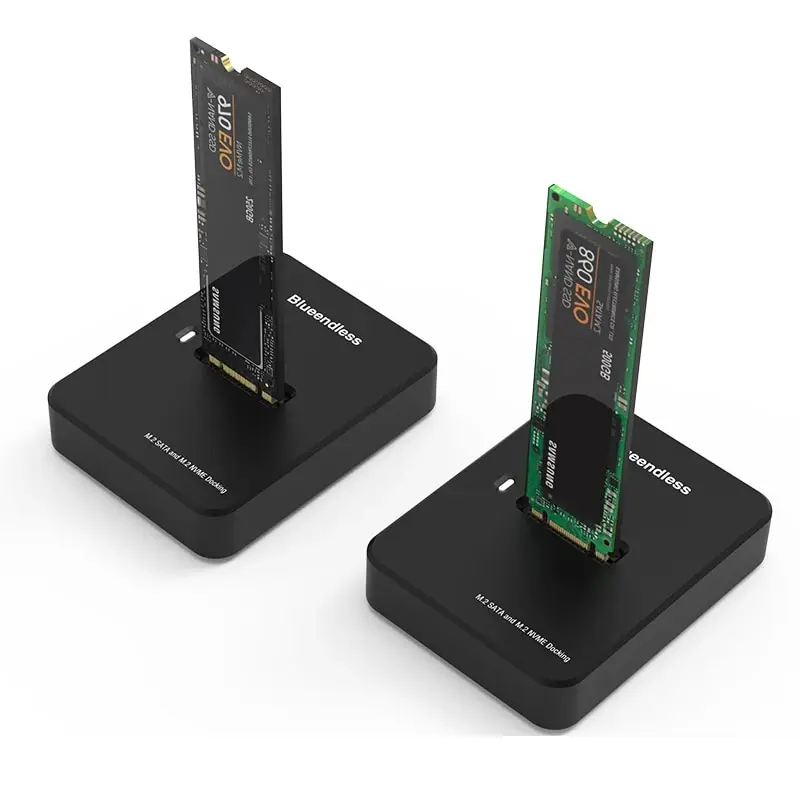
The visual evidence clearly depicts support for both NVMe and SATA M.2 SSDs. One dock prominently features a Samsung 970 EVO (NVMe), while another showcases a generic green SATA M.2 module. This dual compatibility is a core feature.
This means users are not restricted to a single M.2 drive type. A single dock handles diverse storage needs. Data recovery operations become simpler. It offers significant flexibility.
Unlike single-protocol enclosures that force users to purchase separate units for NVMe and SATA drives, this Blueendless dock offers a unified solution. It saves desk space. This flexibility is crucial for IT professionals or content creators who frequently encounter various M.2 standards. NVMe (Non-Volatile Memory Express) leverages PCIe lanes for significantly higher throughput, ideal for intensive tasks like 4K video editing or large database operations. SATA (Serial Advanced Technology Attachment) M.2 drives, while slower, remain prevalent and cost-effective for general storage. The dock accommodates both, preventing compatibility headaches.
The product explicitly advertises a "USB3.1 Gen2 interface" with a "transmission rate up to 10Gbps." This is a significant speed claim. The images consistently highlight this capability.
Such speeds translate directly to reduced waiting times for massive file transfers. Moving gigabytes of data becomes a matter of seconds, not minutes. Large media projects benefit immensely. This accelerates workflows.
Standard USB 3.0 (now often referred to as USB 3.2 Gen 1) typically offers 5Gbps. Many older enclosures are limited to this. The 10Gbps provided by USB 3.1 Gen2 (also known as USB 3.2 Gen 2) effectively doubles that bandwidth, ensuring the M.2 SSD's full potential is utilized, especially for high-performance NVMe drives. This prevents speed throttling, a common frustration for file transfer heavy users. A 10Gbps interface translates to approximately 1250 MB/s theoretical maximum. Real-world speeds will vary but can easily hit 800-1000 MB/s with a fast NVMe SSD and a capable host system. This capability is transformative for moving large datasets, virtual machine images, or high-resolution video files.
Images consistently highlight "Plug and play tool-free installation." The vertical slot design is evident, suggesting easy access. There are no visible screws or latches.
Users can swap M.2 SSDs in and out within seconds. No screws, no tiny standoffs, no fiddly cables are required for installation. This saves valuable time. It's incredibly convenient.
Traditional M.2 enclosures often require a screwdriver and careful alignment of components, making frequent drive swaps impractical. This dock's design is a stark contrast, favoring convenience and efficiency. It simplifies data access. For data recovery specialists, IT technicians, or even gamers managing multiple game installations, the ability to quickly access drives without disassembly is invaluable. It reduces the risk of damaging delicate M.2 components during installation, a common issue with more intricate enclosures.
The bottom of the dock features "Non-slip silicone pad at the bottom," as shown in one of the detailed images. The unit itself presents a compact, rectangular form factor.
The non-slip pads ensure the dock remains firmly in place on a desk. Accidental bumps won't dislodge it, preventing unintended disconnections. This prevents cable strain. It stays put.
Flimsy, lightweight enclosures often slide around, leading to accidental disconnections or even damage to the drive or data. This dock's stable base offers peace of mind during critical data transfers. Its small footprint is also a practical advantage, especially on crowded workstations. The vertical orientation of the M.2 SSD in the dock is not just for aesthetics. It allows for better passive airflow around the drive compared to fully enclosed solutions, which can become heat traps. While not an active cooling solution, this design choice is beneficial for thermal management during sustained operations.
The open-top, vertical slot design is prominent across all product images. The M.2 SSD stands upright when inserted. This is a deliberate design choice.
This open design inherently allows for superior passive heat dissipation compared to fully enclosed M.2 cases. Cooler drives perform better. It mitigates heat buildup.
M.2 NVMe SSDs, especially high-performance models, can generate significant heat under sustained load. Enclosures that completely seal the drive can lead to thermal throttling, where the SSD reduces its speed to prevent overheating, thereby impacting transfer rates. This dock mitigates that risk by providing an open environment, allowing heat to dissipate more freely. It helps maintain consistent speeds, crucial for large file operations.
If you are a video editor regularly moving multi-gigabyte project files, or a system administrator performing frequent OS migrations, this dock is purpose-built for your workflow. It handles demanding tasks. It's built for speed.
The combination of dual protocol support and 10Gbps transfer rates makes it indispensable for tasks that would otherwise be severely bottlenecked by slower storage access. It streamlines complex operations. This device enhances efficiency.
Many users still rely on slower external HDDs or older USB 3.0 enclosures, which simply cannot keep pace with modern data demands. This dock represents a significant upgrade, allowing for professional-grade data handling speeds previously confined to internal system components. It accelerates productivity, making it an essential tool for anyone whose work involves frequent, high-volume data transfers.
While the initial cost of an M.2 dock might seem like an expenditure, its long-term value lies in the time saved and the versatility it offers. Time is money. It's an investment.
Instead of purchasing separate enclosures for NVMe and SATA drives, or dealing with slow transfer speeds that eat into productive hours, this single unit provides a comprehensive solution. It reduces hardware clutter. This simplifies your setup.
Consider the "cost-per-use" for professionals. The efficiency gained from rapid data transfers and tool-free swapping quickly justifies the investment, especially when compared to the cumulative cost and inconvenience of multiple, less capable devices. It's a smart upgrade for any serious user. This dock delivers on its promise of performance and convenience.
Imagine effortlessly migrating an entire operating system in minutes, or backing up terabytes of video footage without the frustrating waits. Picture a clean desk, free from tangled cables and multiple single-purpose devices. This docking station integrates seamlessly into a high-performance digital workflow, ensuring data is always where it needs to be, precisely when needed, allowing you to focus on the task at hand rather than waiting for transfers to complete.
Dual Protocol Mastery: Universal M.2 Access
The visual evidence clearly depicts support for both NVMe and SATA M.2 SSDs. One dock prominently features a Samsung 970 EVO (NVMe), while another showcases a generic green SATA M.2 module. This dual compatibility is a core feature.
This means users are not restricted to a single M.2 drive type. A single dock handles diverse storage needs. Data recovery operations become simpler. It offers significant flexibility.
Unlike single-protocol enclosures that force users to purchase separate units for NVMe and SATA drives, this Blueendless dock offers a unified solution. It saves desk space. This flexibility is crucial for IT professionals or content creators who frequently encounter various M.2 standards. NVMe (Non-Volatile Memory Express) leverages PCIe lanes for significantly higher throughput, ideal for intensive tasks like 4K video editing or large database operations. SATA (Serial Advanced Technology Attachment) M.2 drives, while slower, remain prevalent and cost-effective for general storage. The dock accommodates both, preventing compatibility headaches.
10Gbps Throughput: The Speed Imperative
The product explicitly advertises a "USB3.1 Gen2 interface" with a "transmission rate up to 10Gbps." This is a significant speed claim. The images consistently highlight this capability.
Such speeds translate directly to reduced waiting times for massive file transfers. Moving gigabytes of data becomes a matter of seconds, not minutes. Large media projects benefit immensely. This accelerates workflows.
Standard USB 3.0 (now often referred to as USB 3.2 Gen 1) typically offers 5Gbps. Many older enclosures are limited to this. The 10Gbps provided by USB 3.1 Gen2 (also known as USB 3.2 Gen 2) effectively doubles that bandwidth, ensuring the M.2 SSD's full potential is utilized, especially for high-performance NVMe drives. This prevents speed throttling, a common frustration for file transfer heavy users. A 10Gbps interface translates to approximately 1250 MB/s theoretical maximum. Real-world speeds will vary but can easily hit 800-1000 MB/s with a fast NVMe SSD and a capable host system. This capability is transformative for moving large datasets, virtual machine images, or high-resolution video files.
Tool-Free Deployment: Instant Access
Images consistently highlight "Plug and play tool-free installation." The vertical slot design is evident, suggesting easy access. There are no visible screws or latches.
Users can swap M.2 SSDs in and out within seconds. No screws, no tiny standoffs, no fiddly cables are required for installation. This saves valuable time. It's incredibly convenient.
Traditional M.2 enclosures often require a screwdriver and careful alignment of components, making frequent drive swaps impractical. This dock's design is a stark contrast, favoring convenience and efficiency. It simplifies data access. For data recovery specialists, IT technicians, or even gamers managing multiple game installations, the ability to quickly access drives without disassembly is invaluable. It reduces the risk of damaging delicate M.2 components during installation, a common issue with more intricate enclosures.
Stability and Design: Engineered for the Desktop
The bottom of the dock features "Non-slip silicone pad at the bottom," as shown in one of the detailed images. The unit itself presents a compact, rectangular form factor.
The non-slip pads ensure the dock remains firmly in place on a desk. Accidental bumps won't dislodge it, preventing unintended disconnections. This prevents cable strain. It stays put.
Flimsy, lightweight enclosures often slide around, leading to accidental disconnections or even damage to the drive or data. This dock's stable base offers peace of mind during critical data transfers. Its small footprint is also a practical advantage, especially on crowded workstations. The vertical orientation of the M.2 SSD in the dock is not just for aesthetics. It allows for better passive airflow around the drive compared to fully enclosed solutions, which can become heat traps. While not an active cooling solution, this design choice is beneficial for thermal management during sustained operations.
Thermal Management: Sustained Performance Under Load
The open-top, vertical slot design is prominent across all product images. The M.2 SSD stands upright when inserted. This is a deliberate design choice.
This open design inherently allows for superior passive heat dissipation compared to fully enclosed M.2 cases. Cooler drives perform better. It mitigates heat buildup.
M.2 NVMe SSDs, especially high-performance models, can generate significant heat under sustained load. Enclosures that completely seal the drive can lead to thermal throttling, where the SSD reduces its speed to prevent overheating, thereby impacting transfer rates. This dock mitigates that risk by providing an open environment, allowing heat to dissipate more freely. It helps maintain consistent speeds, crucial for large file operations.
Target User & Use Cases: Who Demands This Speed?
If you are a video editor regularly moving multi-gigabyte project files, or a system administrator performing frequent OS migrations, this dock is purpose-built for your workflow. It handles demanding tasks. It's built for speed.
The combination of dual protocol support and 10Gbps transfer rates makes it indispensable for tasks that would otherwise be severely bottlenecked by slower storage access. It streamlines complex operations. This device enhances efficiency.
Many users still rely on slower external HDDs or older USB 3.0 enclosures, which simply cannot keep pace with modern data demands. This dock represents a significant upgrade, allowing for professional-grade data handling speeds previously confined to internal system components. It accelerates productivity, making it an essential tool for anyone whose work involves frequent, high-volume data transfers.
Value Proposition: Efficiency as an Investment
While the initial cost of an M.2 dock might seem like an expenditure, its long-term value lies in the time saved and the versatility it offers. Time is money. It's an investment.
Instead of purchasing separate enclosures for NVMe and SATA drives, or dealing with slow transfer speeds that eat into productive hours, this single unit provides a comprehensive solution. It reduces hardware clutter. This simplifies your setup.
Consider the "cost-per-use" for professionals. The efficiency gained from rapid data transfers and tool-free swapping quickly justifies the investment, especially when compared to the cumulative cost and inconvenience of multiple, less capable devices. It's a smart upgrade for any serious user. This dock delivers on its promise of performance and convenience.
Imagine effortlessly migrating an entire operating system in minutes, or backing up terabytes of video footage without the frustrating waits. Picture a clean desk, free from tangled cables and multiple single-purpose devices. This docking station integrates seamlessly into a high-performance digital workflow, ensuring data is always where it needs to be, precisely when needed, allowing you to focus on the task at hand rather than waiting for transfers to complete.