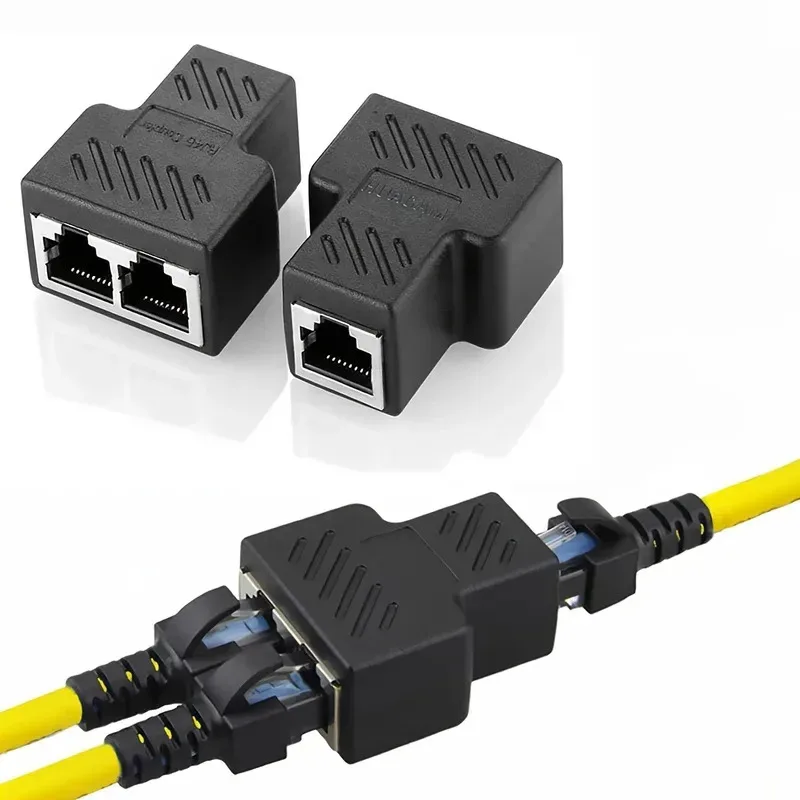
The 1Yes2 RJ45 Cable Splitter is a utilitarian
networking component designed for specific cable management scenarios, not for concurrent high-bandwidth internet sharing among multiple active devices. This distinction is critical for any competitive gamer or professional user who demands unwavering connection stability and speed.\n\n
Unpacking the Physical Design\n\nThe splitter units are compact, featuring a durable black plastic housing. Each adapter presents one male RJ45 connector and two female RJ45 ports, configuring it for a clear input-output division. The visual cues suggest a robust external shell, designed to withstand typical wear in a stationary setup.\n\nThis construction prioritizes physical resilience. Users integrating these into existing cable runs will find the form factor unobtrusive. It is a simple, direct connection point.\n\nUnlike flimsy, generic plastic adapters that often crack under minimal stress, the visible material implies a higher-grade polymer. This build quality extends its operational lifespan significantly, reducing the need for frequent replacements.\n\nDimensional Footprint\n\nDimensions for the splitter units are precisely 35mm (1.4in) by 21mm (0.82in) by 43mm (1.7in). These measurements confirm a compact form factor. Small. This small size facilitates discreet placement in crowded server racks or behind desks, where space is often at a premium.\n\nThe minimal footprint means these splitters integrate seamlessly into existing network infrastructure. Cable management becomes less of a headache. They occupy negligible space, a significant advantage in dense installations.\n\nMany standard networking accessories are bulky, creating cable clutter and hindering airflow. This compact design stands apart, offering a clean aesthetic and practical space-saving benefits over larger alternatives.\n\n## Functional Limitations for High-Performance Networks\n\nCrucially, the 1Yes2 RJ45 Cable Splitter explicitly states it does not support two computers accessing one internet connection simultaneously. This is not a network switch. It passively divides the 8 wires within a single Ethernet cable into two groups of 4 wires each. This fundamental design means it effectively creates two separate 10/100 Mbps connections over a single physical cable, or allows for non-simultaneous use of a single high-speed line.\n\nFor competitive gamers, this limitation is a deal-breaker for shared internet access. Attempting to run two active gaming PCs through a single internet connection with these splitters will result in severe bandwidth bottlenecks, increased latency, and frequent packet loss. It simply won't work for concurrent high-speed data transfer.\n\nUnlike a true network switch which actively manages and routes data packets, ensuring each connected device receives its dedicated bandwidth, this splitter offers no such intelligent management. It is a physical wire diverter. A switch guarantees minimal input lag for each connected gaming rig; this device provides no such assurance for simultaneous users.\n\n### Bandwidth and Latency Impact\n\nThe splitting of the 8-pin Ethernet cable into two 4-pin groups inherently restricts each resulting connection to a maximum of 100 Mbps (Fast Ethernet). Modern gaming and high-bandwidth applications demand Gigabit Ethernet (1000 Mbps) or higher, which requires all 8 pins for full speed. This product cannot deliver that for two simultaneous connections.\n\nSuch a bandwidth reduction directly translates to a significant competitive disadvantage. Download speeds plummet. Uploads become sluggish. High-resolution textures, voice chat, and critical game updates will suffer from prolonged loading times and potential disconnections, directly impacting player performance.\n\nCompared to a dedicated Gigabit Ethernet switch, which maintains full link speeds for multiple devices, this splitter introduces an unavoidable performance ceiling. Competitive setups demand uncompromised data flow. This device simply cannot meet those demands when active, high-bandwidth sharing is the goal.\n\n## Practical Application Scenarios\n\nDespite its limitations for shared, high-speed internet, the splitter finds utility in specific infrastructure scenarios. It excels when needing to run two *separate, non-simultaneous* 10/100 connections or a 10/100 connection alongside a Power over Ethernet (PoE) device over a single, existing cable run. Think of security cameras or IP phones where dedicated high bandwidth is not a concern.\n\nImagine a scenario where a single Ethernet cable is already routed to a location, and you need to connect two low-bandwidth devices like a smart home hub and a legacy VoIP phone, but not at the same exact moment for critical data. This splitter provides a neat solution to avoid running a second cable. It saves material and installation time.\n\nTraditional network deployments often necessitate running multiple, lengthy Ethernet cables for every device. This splitter offers a cost-effective alternative for consolidating cabling for certain use cases, specifically where two 10/100 Mbps links are sufficient and can be multiplexed over an 8-wire cable. It is purely a physical layer solution.\n\n### PoE Integration Potential\n\nThe connection example images clearly illustrate integration with PoE camera setups. This suggests the splitter can pass power over Ethernet, provided the correct wire pairs are utilized. This capability extends its utility beyond pure data splitting. Power delivery is crucial for many IP devices.\n\nFor deploying surveillance systems or remote access points, the ability to split a line while maintaining PoE functionality simplifies installation significantly. No extra power outlets are needed. This streamlines infrastructure deployment, especially in locations with limited power access.\n\nMany specialized PoE injectors and splitters exist, often at a higher cost. This adapter offers a straightforward, passive alternative for basic PoE applications, particularly with 10/100 Mbps devices that often only require two pairs for power and data.\n\n## Internal Engineering and Reliability\n\nThe internal view reveals a built-in thick PCB motherboard. This is a critical component for signal integrity. A robust PCB ensures reliable electrical pathways. It prevents signal degradation across the split connection, a common failure point in poorly constructed adapters.\n\nThis design choice directly impacts the longevity and performance of the unit. Thick PCBs resist flexing and vibration better, maintaining stable connections over time. Signal transmission security is a direct benefit.\n\nIn contrast to cheap adapters that often use flimsy, unshielded internal wiring or thin, easily fractured circuit boards, this emphasis on a thick PCB points to a commitment to sustained functionality. It minimizes input lag by preventing internal connection issues.\n\n### Material Durability\n\nThe external housing appears to be a durable, injection-molded plastic. This material choice offers good impact resistance and protection for the internal circuitry. Its matte black finish suggests a professional appearance. It blends into most environments.\n\nSuch material provides adequate shielding against minor physical knocks and environmental factors like dust. It ensures the internal components remain protected. This extends the product's operational life in various settings.\n\nCompared to brittle, glossy plastics that show scratches easily and offer minimal protection, the visible robust material represents an upgrade in build quality. This ensures the adapter can endure everyday handling without compromising its structural integrity.\n\n## Installation and Configuration\n\nInstallation is straightforward due to the plug-and-play nature of the device. Connect the main Ethernet cable to the single input, and then connect two shorter cables from the dual outputs to the respective devices. The process is intuitive. No software is required.\n\nThis simplicity means users can quickly deploy these splitters without extensive networking knowledge. It reduces setup time significantly. The clear visual examples aid in proper connection sequencing.\n\nUnlike complex managed switches that require specific IP configurations and firmware updates, these passive splitters offer immediate functionality. They just work, within their stated limitations. This streamlines network adjustments.\n\n### Optimal Cable Management\n\nThe design of the splitter, particularly its 'T' shape, lends itself well to organized cable routing. The ability to route two lines from a single point minimizes cable sprawl. This enhances the overall tidiness of a network setup.\n\nProper cable management is not just aesthetic; it improves airflow and simplifies troubleshooting. Reduced cable tangles mean easier identification of connections. This is crucial for maintaining network uptime.\n\nCompared to haphazard cable runs that can become a tangled mess, these splitters help consolidate connections efficiently. They promote a cleaner, more professional installation environment, reducing potential snagging hazards.\n\nFor competitive gamers building a multi-PC setup or managing a streaming rig, understanding the precise function of tools like the 1Yes2 RJ45 Cable Splitter is paramount. This is not a magic bullet for sharing a single high-speed internet connection across multiple active gaming devices. Instead, it is a robust, purpose-built component for efficient physical cable management in specific scenarios, particularly when multiplexing two 10/100 Mbps connections or combining data with PoE over a single existing cable run. When deployed correctly, it reduces cable clutter and simplifies infrastructure, allowing competitive players to focus on their game, not network woes. Imagine a perfectly organized gaming space, with every connection serving its precise, dedicated function, ensuring zero unexpected network hitches. This splitter supports that organized, purposeful environment, freeing you to dominate your opponents without a thought for backend network issues. This is about precision in your setup, just like precision in your aim.